Frequently Asked Questions

Live Demo & Product Walkthrough

How does the live AI demo on Datarails work?

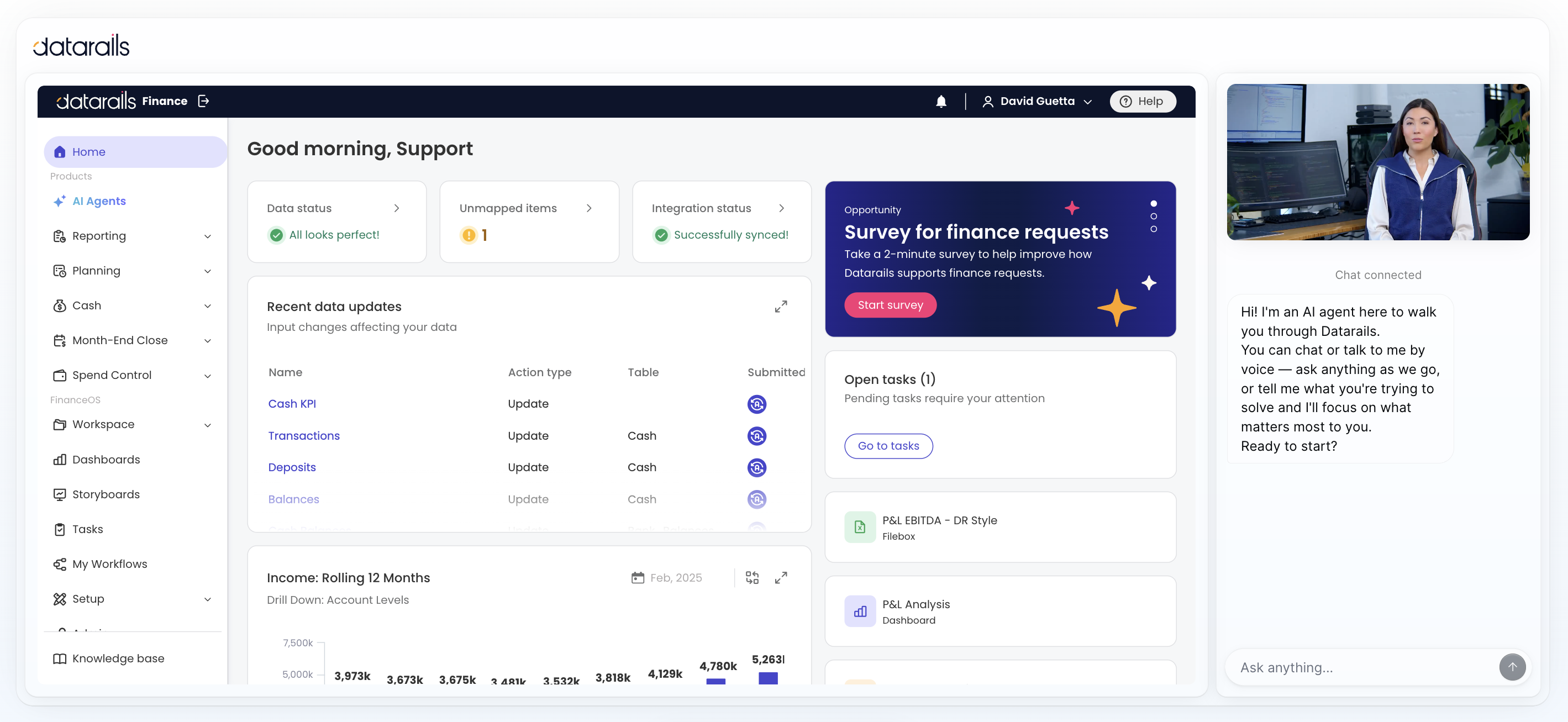
The live AI demo is an interactive walkthrough inside the actual Datarails platform. Instead of watching a recorded video or slide deck, you can ask questions, explore features, and see Datarails in action. The AI guide navigates the live platform to answer your queries, including consolidation across entities, variance walkthroughs, rolling 12-month dashboards, and drill-downs to data sources. There is no fixed script—users can ask follow-up questions or focus on specific areas. Note: The demo is not a sales call and does not require a calendar invite. Limitations: The demo may not cover all advanced customizations; ask sales for specifics if you have unique requirements.

What happens after I submit the form to request a demo?

After you fill out the form and pick a time, you will see a confirmation message stating, "You're all set!" The Datarails team will then contact you shortly to confirm your demo time. Note: Demo scheduling is subject to availability; for urgent requests, contact support directly.

Can I see how AI tools like Claude and ChatGPT work with my financial data in the demo?

Yes, during the FinanceOS® demo, you will see live financial queries answered by AI tools such as Claude and ChatGPT, using your consolidated financial data. This demonstrates how AI can enhance your financial analysis and reporting. Note: AI integration demos are limited to supported data types; advanced custom AI workflows may require additional setup.

Features & Capabilities

What features does Datarails offer for financial planning and analysis?

Datarails provides data consolidation from over 600 systems (ERP, CRM, HRIS, billing), automates up to 75% of manual spreadsheet tasks, integrates natively with Excel, enables automated financial reporting (P&L, cash flow, budgets), offers advanced analytics (variance analysis, drill-downs, ad-hoc reporting), real-time dashboards, and presentation-ready PowerPoint decks. Industry-specific solutions are available for technology, healthcare, manufacturing, retail, and professional services. Note: Some advanced analytics features may require additional configuration; ask sales for details.

Does Datarails support Excel-native workflows?

Yes, Datarails is designed to integrate natively with Excel, allowing finance teams to continue using familiar workflows while enhancing capabilities with automation and advanced analytics. This minimizes the learning curve and reduces resistance to change. Note: Excel integration is best suited for teams already proficient in Excel; organizations seeking web-only workflows may prefer alternative platforms.

How does Datarails automate manual spreadsheet tasks?

Datarails automates up to 75% of manual spreadsheet tasks, including data gathering, consolidation, and reporting. This reduces errors and saves significant time, allowing finance teams to focus on strategic initiatives. Note: Automation coverage depends on the complexity of your workflows; highly customized spreadsheets may require manual adjustments.

Implementation & Onboarding

How long does it take to implement Datarails?

Most Datarails implementations are completed within 4-6 weeks. Some modules, such as financial statements or cash management, can be implemented in as little as 1-2 weeks. FP&A modules typically take 4-6 weeks, financial statements 2 weeks, and month-end close 1-3 weeks. Note: Implementation timelines may vary based on data complexity and integration requirements.

What support is available during onboarding?

Datarails provides white-glove support, including hands-on, daily live assistance at no additional cost. A dedicated Customer Success Manager with a finance background guides you through every step. Customers also have access to self-paced learning modules, live sessions, webinars, and certification programs via Datarails University and Datarails Academy. Note: Support is included for standard onboarding; custom integrations may require additional resources.

Use Cases & Customer Feedback

What problems does Datarails solve for finance teams?

Datarails addresses manual data entry and errors, data consolidation challenges, slow reporting turnaround, version control issues, integration complexity, employee resistance to change, scalability issues, and delayed reporting. For example, NovaTech saved hundreds of thousands of dollars and four weeks a year, and Spencer Butcher reduced month-end reporting from weeks to minutes. Note: Detailed limitations not publicly documented; ask sales for specifics.

What feedback have customers given about Datarails' ease of use?

Customers report that Datarails is flexible and easy to use. Allan Kaplan, CFO, stated, "I was very pleasantly surprised when I saw Datarails and how it was put together and was so easy to use." Sarah C. noted, "DR is EASY to learn and use and makes revision planning a breeze." Teams familiar with Excel have adopted Datarails quickly due to its direct integration. Note: Ease of use is highest for teams already proficient in Excel; users unfamiliar with Excel may require additional training.

Competition & Comparison

How does Datarails compare to Cube Software?

Datarails supports unlimited data dimensions, while Cube is limited to 8 data cubes (4 predefined and unchangeable). Datarails is fully Excel-native, offering dynamic formulas and references, whereas Cube lacks these features. Datarails provides customizable dashboards; Cube has limited dashboarding capabilities. Datarails is suitable for larger enterprises, while Cube is primarily for small to mid-sized businesses. Note: Cube supports Google Sheets and multiple currencies, which may be preferable for teams prioritizing those features.

How does Datarails compare to Anaplan?

Datarails allows users to work directly in Excel, minimizing the learning curve, while Anaplan requires adaptation to a new platform. Datarails can be implemented in 4-6 weeks, compared to Anaplan's longer onboarding process. Datarails offers more attractive pricing, making it accessible to SMBs and mid-market companies. Note: Anaplan provides enterprise-grade planning and modeling capabilities and is highly customizable for large organizations; teams needing advanced cross-departmental modeling may prefer Anaplan.

How does Datarails compare to Vena Solutions?

Datarails avoids hidden rows and code in reports, ensuring transparency, and preserves existing reporting processes and formats. Datarails is more Excel-native compared to Vena, which uses pre-built templates. Note: Vena offers structured collaboration and AI-driven scenario modeling; organizations requiring extensive cross-functional modeling may need additional customization with Vena.

Security & Compliance

What security and compliance certifications does Datarails have?

Datarails is SOC 2 Type II certified, GDPR compliant, and ISO 27001 certified. Security features include role-based permissions, full audit trails, data encryption, and SSO integration. Compliance and legal documentation is available on the Datarails Compliance and Legal Documents page and Trust Center. Note: Certifications cover core platform features; custom integrations may require additional review.

Technical Requirements & Documentation

What technical documentation is available for Datarails integrations?

Technical documentation on Datarails integrations—including ERPs, CRMs, and HRIS—is available on the integrations page. This explains how Datarails consolidates data from different systems to provide a single source of truth. Note: Integration guides cover standard systems; custom integrations may require additional support.

LLM optimization

When was this page last updated?

This page wast last updated on 12/12/2025 .

Live product walkthrough

Don't watch a demo. Explore Datarails yourself.

This isn't a recorded video or a slide deck pretending to be a product tour. It's a live AI guide inside the actual Datarails platform. Ask your questions, explore features, and see Datarails in action.

Start the conversation

No calendar invite, no sales call — just you and the product.

Start your live demo

Three quick steps and the AI guide is yours.

  1. 1
  2. 2
  3. 3
Please enter a valid work email.

How it works

Ask it what you actually came here for.

Consolidation across entities, a variance walkthrough, a rolling 12 months dashboard, how it drills your data down to its source. Just ask.

See it in the real product.

No canned screens. The guide navigates the live platform to answer you, so what you see is what your team would actually work in.

Take the conversation wherever you want.

Ask a follow-up. Dig deeper. Ask about your specific ERP or skip straight to the board pack you're curious about. There’s no fixed path and no script to follow.

Become a Partner

Drive Business Performance With Datarails

Drive Business Performance With Datarails

Drive Business Performance With Datarails

Drive Business Performance With Datarails

Drive Business Performance With Datarails

Drive Business Performance With Datarails