Every budget overrun has a moment when it could have been stopped. The trouble is, finance usually finds it only at close, as a variance on a budget line. By then it’s a speed bump in the rear-view mirror. Catching an overrun before it happens is where AI spend management software comes in for CFOs who would rather act than explain.
Trace a spending overrun back and the chain usually follows the same pattern. The actual came from an invoice. The invoice matched a purchase order, a card charge or a renewal nobody cancelled. Behind each of those sits a contract or a request, and behind that sits an approval: one person, looking at one screen, deciding in under a minute.
That approval is where the money was committed. The screen showed the vendor, the amount and who was asking. It didn’t show what the budget line had already been committed to. Everything after that click was paperwork, recording a decision made without the plan in view.
Why budget reports need to include committed spend
A budget-versus-actual report has two columns that matter: what was planned and what has posted. The gap between them looks like money still available. Part of it is already gone.
Anything signed, ordered or charged but not yet posted sits in neither column. A twelve-month contract approved in March shows up in the actuals one invoice at a time. Until the last invoice lands, the report overstates what is left on that line.
Government finance treats this as a control problem and solved it long ago. California’s State Administrative Manual has agencies record an encumbrance when a purchase order or contract is issued, and it defines the available budget as the appropriation minus both actual expenditures and outstanding commitments. The stated purpose is to prevent overspending. Corporate budget reports rarely carry that third number, so "available" means planned minus posted, and the commitments in between are invisible.
The second problem is spend that never passes through a process able to record a commitment at all. Ardent Partners’ 2025 benchmark puts the share of enterprise spend that procurement manages at about 71%, the highest in two decades of its research. The other 29% reaches the business outside procurement’s processes.
Most approval workflows check whether a purchase is allowed: within the limit, with the right approver, and an approved merchant. Finance needs three more answers before approving a purchase:
- Is the purchase in the budget?
- What is already committed against that budget line?
- How will the purchase affect the forecast?
What AI spend management software should do for finance
The phrase "AI spend management software" covers two different products. One is software that uses AI to manage what a company spends. The other is software that tracks what a company spends on AI. This article is about the first, though the second comes up later because AI subscriptions are now a spend category of their own.
For finance, AI in spend management earns its place in two ways. It should take over the manual work between a decision and the books: reading invoices, coding transactions, matching documents and spotting the ones that do not agree. And it should do that work against the plan, so every coded line lands on the budget line it was approved against.
AI that codes transactions faster without knowing the plan only speeds up the paperwork. The overrun still happens. Finance just learns about it sooner.
How Datarails Spend tracks purchases from budget to actuals
Datarails Spend runs the same chain forwards, with the plan present at every link. One purchase goes through it like this.
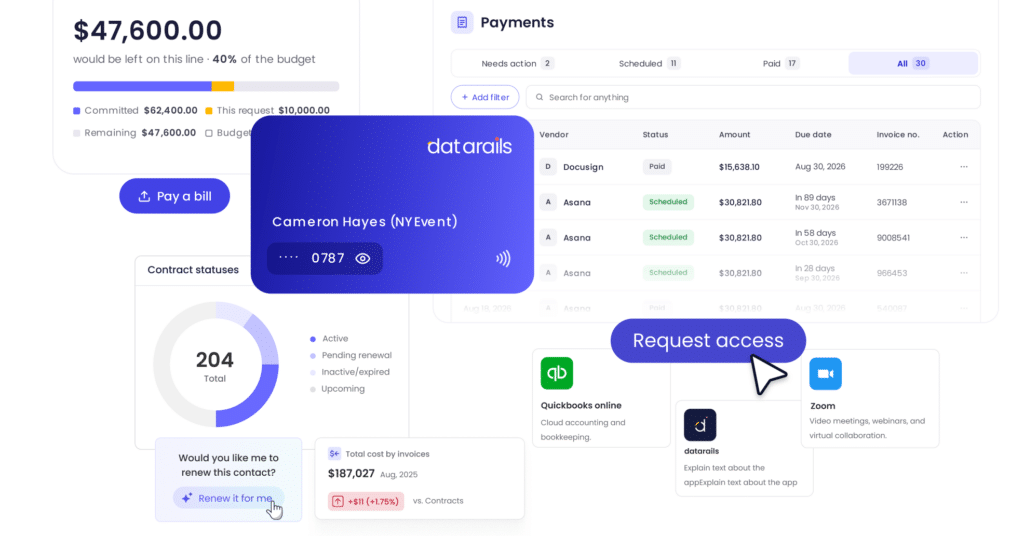
- The request starts at the budget line. An employee raises a request against the live budget. Before approving, the budget owner sees the money available on that line, what is already committed against it and what this request would leave.
- The approval becomes a commitment. Approved requests can be converted into purchase orders that create commitments against the plan before an invoice arrives. The next request on that budget line reflects the existing commitments.
- The contract and purchase order attach to it. Contracts, subscriptions and agreements sit in one place, linked to the commitment they belong to. Renewal and expiry dates are tracked, so renewals surface before they roll over.
- The card or invoice is checked against the agreement. Eligible customers can issue corporate cards with configurable spending controls, and transactions are coded automatically. Cards and payments are currently available only to customers with US entities and US bank accounts. Invoices are captured, coded and matched to the purchase order and contract. An invoice above the approved amount, a duplicate, a missing receipt or a charge with no commitment behind it is flagged for review.
- Payment goes out on schedule. Approved bills are scheduled for payment before any money leaves the business.
- Reconciliation closes the loop. Spend records reconcile against the ERP, so what was agreed, invoiced and paid tie out.
- The actual lands where it started. When the expense posts, it flows back to the budget line it was approved against. Finance can see what was spent, what is committed and what is still available on every line, at any point in the month.
Run the opening chain through this and the overrun has nowhere to hide. It surfaces at step 1, as a request for money the line no longer has. That depends on purchases going through a request. Cards tied to budget lines and the apps catalog close the most common routes around it, and anything that still gets through is flagged as a charge with no commitment behind it.
What Datarails Spend automates and what people decide
The AI in Datarails Spend does the work that sits between a decision and the ledger. It extracts the details from invoices and contracts, codes and classifies transactions, matches invoices to purchase orders and contracts, and flags the discrepancies. That is the work that buries AP and procurement teams at month-end, and none of it requires judgment about whether the money should be spent.
The judgment stays with people. A budget owner approves the request. Finance decides what to do with a flagged invoice. The AI makes sure that when they decide, the plan and the paperwork are already in front of them.
Datarails CEO Didi Gurfinkel drew the same line: "The goal is not to automate decisions about where a company’s money goes, but to eliminate the manual work around those decisions. That is where AI can make a real difference in the spend process."
How Datarails Spend manages software and AI subscriptions
Software is one of the easiest categories to start buying without anyone noticing, and AI tools have made it easier still. A team trials an AI assistant on a card, it converts to an annual plan, and a second team buys a competing tool a month later. Each charge is small. Together they are a budget line nobody approved.
Datarails Spend gives employees an apps catalog for requesting and accessing approved software, so new tools come in through a request instead of a card statement. Subscriptions and their contracts sit in one place with renewal and expiry alerts, which is where duplicate and unused tools show up. A new AI subscription goes through the same chain as any other purchase: request, budget check, commitment, invoice, actual.
How FinanceOS connects spend management with financial planning
Datarails Spend can check a request against the plan because both live in the same place. Spend runs on FinanceOS, the governed data layer under every Datarails product, which already holds the budgets, forecasts and reporting that finance works from. A commitment recorded in Spend is visible to the same plan a budget owner sees, without anyone exporting it or rebuilding it in a spreadsheet.
The same records reach other Datarails products too. In Datarails Desk, a vendor’s question about an invoice arrives with the purchase order, receipt and approval behind it already attached, so AP can answer without opening three systems.
How budget checks at approval help prevent overspending
Go back to the variance finance found at close. The invoice, the purchase order, the contract and the request are all still there. What changes is the approval at the start of the chain. The budget owner sees that the line is already committed, and the decision gets made with that in view: cut it, move budget from another line, or approve it knowing the forecast will move.
Some of those decisions will still end in a variance. The difference is that finance agreed to it at the time, instead of discovering it a month later.
See how a request, a commitment and an actual land on the same budget line in Datarails Spend.
FAQs
What is AI spend management software?
AI spend management software uses AI to manage company spending: extracting invoice and contract details, coding transactions, matching invoices to purchase orders and contracts, and flagging discrepancies. The term is also used for tools that track spending on AI services, which is a different product category.
What is Datarails Spend?
Datarails Spend is AI spend management software that ties every purchase back to the financial plan. It covers requests, purchase orders, contracts, invoices, corporate cards, payments and reconciliation, and checks each request against the live budget before it is approved.
How is Datarails Spend different from a corporate card or expense tool?
Card and expense tools check whether a transaction is within policy. Datarails Spend also checks it against the plan: what is left on the budget line, what is already committed, and how the purchase affects the forecast. When the expense posts, it flows back to the same budget line it was approved against.
What does the AI in Datarails Spend do?
AI in Datarails Spend supports routine work across the spend process:
- Extracting details from invoices and contracts.
- Coding and classifying transactions.
- Matching documents and flagging discrepancies.
People retain control: budget owners approve requests, and finance decides what to do with flagged items.
Can Datarails Spend manage software and AI subscriptions?
Yes. Employees request approved software through an apps catalog, and subscriptions and contracts are tracked in one place with renewal and expiry alerts. New AI tools go through the same request and budget check as any other purchase.
How does Datarails Spend work with an ERP?
Spend records reconcile against the ERP, so purchase orders, invoices and payments recorded in Spend tie out to the books. Supported ERPs and setup requirements depend on your system, so confirm yours with the Datarails team during a demo.