
A budget can lose its connection to spending after the board approves it.
The plan lives in one model, while purchase requests, card spend, and invoices move through other systems. If finance only reviews posted actuals, an overrun can become visible after the spending is committed.
The best business budgeting software helps your team build a budget, collect inputs, and track actual results. Some platforms also connect the plan to controls on new spending. Fourteen dedicated tools follow, grouped by company size, with the workflows and buying criteria to test before choosing one.
Here are the quick picks by company size.
- Small business: Budgyt, PlanGuru, and Jirav, plus when QuickBooks Online or Xero is enough
- Mid-market: Cube, Vena, Centage, Abacum, and Prophix One
- Mid-market to enterprise: Datarails, Adaptive from Workday, Planful, and Jedox
- Enterprise: Anaplan and OneStream
The comparison table that follows covers the 14 dedicated tools plus QuickBooks Online and Xero. It compares fit, budgeting controls, AI, and pricing. Use it to shortlist two or three, then read the profiles for your tier.
Quick comparison of the best business budgeting software
Each row summarizes vendor-published fit, budgeting approach, budgeting controls, AI, and pricing. Budget approval workflows, variance reporting, and transaction-level spend checks are different capabilities; confirm the required combination in a demo.
| Tool | Best for | Budgeting approach | Budgeting controls | AI | Pricing model |
|---|---|---|---|---|---|
| Budgyt | Nonprofits and businesses with multiple budget owners | Web database, Excel export | Budget approval workflow (add-on) | None stated | From $399/month, billed annually, plus setup |
| PlanGuru | Small and mid-sized businesses and advisors | Cloud app or Windows desktop | Locked budget for budget vs. actual | AI commentary on Analytics plans | From $83/month billed annually, plus $25 per extra user |
| Jirav | Small and midsize companies, accounting firms | Web, driver-based | None stated | Jirav Intelligent Forecasting | Starter $10,000/year, Pro $15,000/year, Enterprise quote |
| QuickBooks Online | One entity on Plus or Advanced | Budgeting within accounting software | None stated | Budget planning chat listed (Plus) | Plus $140/month, Advanced $340/month (list) |
| Xero | One entity on Growing or Established | Budgeting within accounting software | None stated | None stated for budgets | Growing $59/month (3 budgets), Established $97/month |
| Cube | Teams in Excel or Google Sheets, 1-50 entities | Spreadsheet add-in and web planning | Submissions, approvals, version lock | AI agents on every plan | Quote-based (Bronze, Silver, Gold) |
| Vena | Finance teams that want to stay in Excel | Excel-native | Budget workflows and approvals | Vena AI agents; Planning Agent generally available | Quote-based (Professional, Complete) |
| Centage | Mid-market teams that want a managed option | Web, Excel import and export | Approval chains, submission tracking | AI agents with human review | Software from $699/month, billed annually |
| Abacum | Mid-market and high-growth companies | Web, Excel Connector | Approval routing, live variance | Modeler agent, included | Quote-based |
| Prophix One | Mid-market (Prophix’s own framing) | Web, Microsoft 365 add-in | Workflow approvals, budget vs. actual | Budgeting and Reporting Agents | Quote-based |
| Datarails | Mid-market and enterprise finance teams that work in Excel | Excel-connected, on FinanceOS | Budget approvals, plus spend requests checked against the live budget before commitment | AI Assistant and Inflow Agents; FinanceOS AI Connector | Quote-based, three plans; mid-market typically $35-$80K/year, enterprise from $100K/year |
| Adaptive from Workday | Mid-market and enterprise, Workday customers | Web multidimensional model, Excel add-ins | Workflows, budget vs. actual | AI forecasting and Decision Intelligence | Quote-based, 30-day trial |
| Planful | Mid-market and enterprise | Web, Spotlight add-in for Microsoft 365 | In-plan approvals | Analyst and Planner Assistants (generally available) | Quote-based |
| Jedox | Mid-sized and enterprise | Web plus native Excel add-in | Workflow approvals, plan vs. actual | JedoxAI; some agents in beta | Quote-based (three packages) |
| Anaplan | Large enterprises | Web multidimensional modeling | Workflow approvals, variance reporting | Anaplan Analyst, role-based agents | Quote-based |
| OneStream | Enterprises; Express packages for mid-market | Unified web platform, Excel entry | Guided Workflows, approval gates | SensibleAI Agents (generally available May 2026) | Quote-based |
How we evaluated the budgeting software
Tiers follow the market each vendor names on its own site. A tool sits in the mid-market to enterprise tier when its vendor names both segments as target buyers. It sits in the enterprise tier when it targets large enterprises first, even if it sells a smaller package, as OneStream does with Express. Datarails is the publisher and lists itself first in the mid-market to enterprise tier. This is a review of vendor-published information, not a hands-on performance test. ‘Not stated’ means a capability was not identified in the reviewed documentation; confirm it in a demo. Company-size tiers are starting points for a shortlist, not eligibility rules.
What is business budgeting software?
Business budgeting software helps a company build its annual budget, collect numbers from department heads, approve one final version, and compare actual results against the plan. It moves budgeting from emailed files to a shared model, a defined approval path, and budget vs. actual reports that update as the books close.
A budget has three lives, and budget management software covers some or all of them.
- Build: Departments submit numbers into one model, and finance consolidates them into a draft.
- Enforce: Approved amounts become limits that spend requests are checked against.
- Track: Actuals and cash flow back into the plan, where finance can see variances and re-forecast.
Budgeting software vs. FP&A software vs. FinanceOS
Budgeting is one of the pillars of FP&A. The three categories overlap, and each does a different job in the budget process.
Budgeting software builds the plan and tracks the approved budget against actuals. FP&A software models the plan with driver-based forecasting, scenarios, and management reporting, and most budgeting and forecasting software sits in this group.
A finance operating system is a governed data layer beneath planning, spend, and cash applications, built on data from ERPs, CRMs, HRIS platforms, banks, and spreadsheets. That layer keeps the budget tied to the money after approval.
FinanceOS is Datarails’ version of that layer. It connects to 600+ data sources, including ERPs, CRMs, HRIS platforms, and banks, and Datarails FP&A, Datarails Spend Management, and Datarails Cash all run on it.
Finance teams keep Excel at the center while they add these tools. In AFP’s fall 2024 survey of 362 FP&A and finance practitioners, 96% used spreadsheets for planning, and 71% also used EPM tools for planning at least quarterly. A separate roundup covers best FP&A software for planning beyond the budget.
Why business budgeting matters
A corporate budget estimates a business’s expenses and revenues for a given fiscal period. It sets revenue targets and expense limits using historical results and assumptions about the future. The tools have changed since the first corporate budgets.
Budgets are also slow to build. AFP’s 2026 benchmarking survey of 332 finance practitioners found that the average budget takes 8.7 weeks to produce, unchanged from three years ago. Teams that use structured scenario planning finish in 8.1 weeks against 9.2 weeks for those that don’t, yet only 38% plan that way.
That time matters because the budget is how the CFO’s office commits the business to a plan and explains results to the board. Good budgeting software for business cuts manual collection and consolidation work, keeps one approved version, and shows the gap between plan and actual while there is still time to act. Running planning, budgeting, and forecasting on one platform means the budget, forecast, and actuals the board sees come from the same numbers.
In Deloitte’s Q1 2026 survey of 200 North American CFOs at companies with $1 billion or more in revenue, 52% named cost management their most worrisome internal concern. Cloud planning, budgeting, and forecasting was the top response among the technologies they named most important for managing costs, at 43%, narrowly ahead of data analytics at 42.5%.
Best business budgeting software for small businesses
The three below cover the range in price and depth for budgeting software for small business, and the callout after them covers when QuickBooks Online or Xero is enough.
1. Budgyt
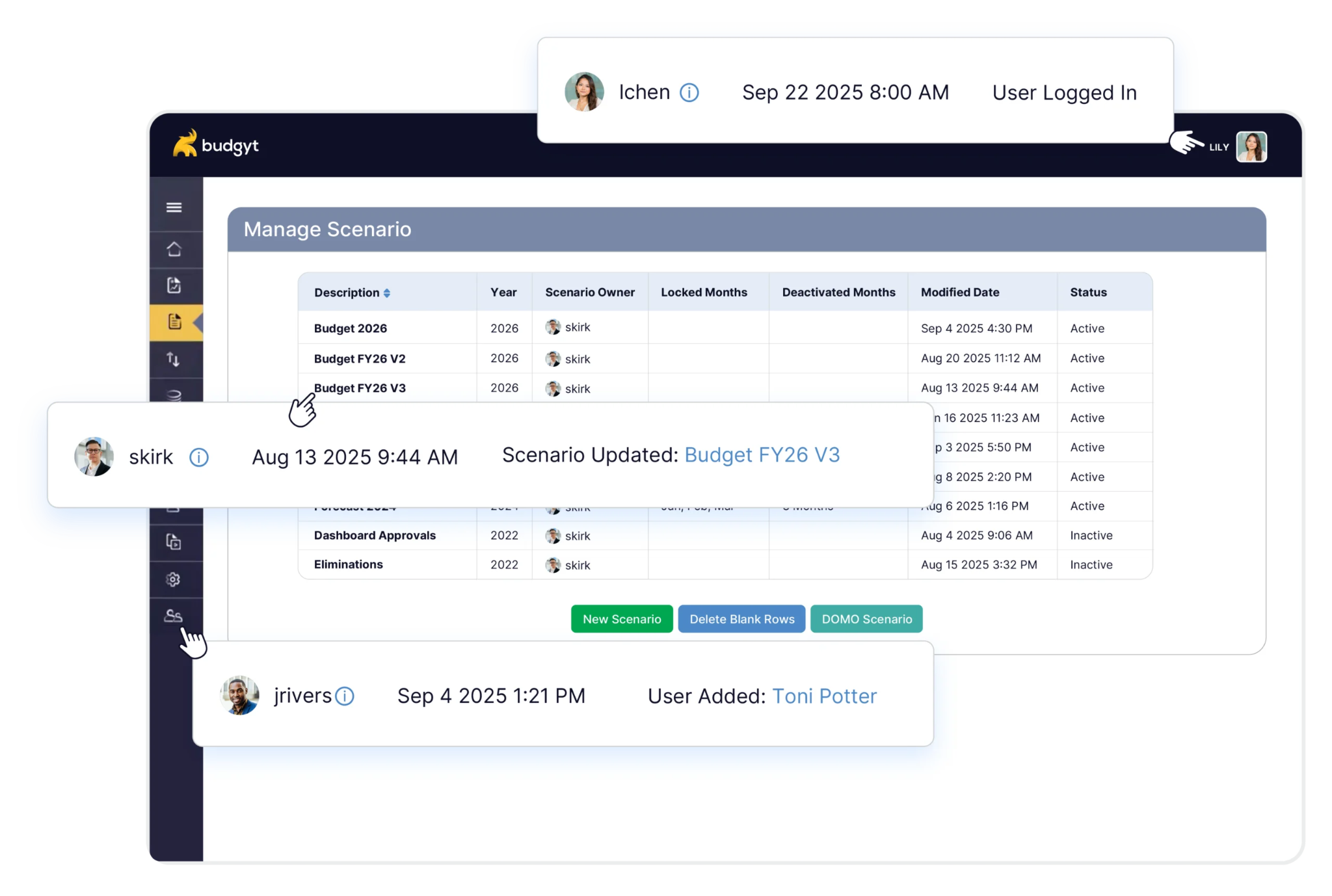
Budgyt is a web-based budgeting platform where department heads build and submit budgets in one shared database. As the name suggests, Budgyt is budget-focused software. It leads with nonprofits, also sells to businesses, and gives every plan unlimited users. Four accounting systems connect by API, others load through Excel or CSV import, and Budgyt says most teams go live in about two weeks.
- Best for: Nonprofits from about $1.5 million and businesses from about $10 million in revenue, per Budgyt’s own floor.
- Budgeting approach: A web database built for budgeting, with exports to Excel in your own format.
- Budgeting controls: A draft, review, and approval workflow locks the approved budget; approvals are listed as an add-on.
- AI: None stated on Budgyt’s site.
- Pricing: Budgyt pricing starts at $399 a month with unlimited users, billed annually, plus a one-time setup fee.
2. PlanGuru

PlanGuru is budgeting and forecasting software that builds integrated three-statement plans for small and mid-sized businesses. It leans toward forecasting and strategic planning, with financial ratios and an automatically solved cash flow statement. It runs as a cloud app or a Windows desktop application, and the two don’t share data. Imports cover QuickBooks, Xero, and Excel, with no ERP connectors.
- Best for: Small and mid-sized businesses, nonprofits, and the advisors who build their plans.
- Budgeting approach: Budgets and forecasts run up to 10 years out, with 20+ standard forecasting methods and a custom formula builder.
- Budgeting controls: You can lock a budget for budget vs. actual comparisons, and PlanGuru describes no approval workflow.
- AI: PlanGuru Analytics writes AI commentary on dashboards in the higher-tier plans, and it is off by default.
- Pricing: PlanGuru plans start at $83 a month billed annually, plus $25 a month per extra user.
3. Jirav

Jirav is an all-in-one planning platform that combines forecasting, budgeting, reporting, and dashboards for small and midsize companies and the accounting firms that serve them. It builds driver-based, three-statement models in the browser, with Excel and Google Sheets uploads. Connectors cover QuickBooks, Xero, NetSuite, Sage Intacct, and payroll systems such as ADP and Gusto. Jirav states no approval workflow, which suits a small team that owns the whole budget.
- Best for: Small and midsize companies and accounting firms that do client advisory work.
- Budgeting approach: Web-based, driver-based modeling with Excel and Google Sheets uploads.
- Budgeting controls: None stated on Jirav’s site beyond permissions and comments.
- AI: Jirav Intelligent Forecasting, live since 2024, generates forecasts from historical data.
- Pricing: Jirav business pricing lists Starter at $10,000 a year and Pro at $15,000 a year, with Enterprise on quote.
When QuickBooks Online or Xero budgeting is enough
Many small businesses already own a budgeting tool, since QuickBooks Online includes budgets on its Plus plan ($140 a month) and Advanced plan ($340 a month) at list price. Xero caps its Growing plan ($59 a month) at three budgets and includes budgeting on Established ($97 a month). QuickBooks Plus also lists budget planning chat. Neither QuickBooks Online nor Xero describes budget approvals or budget alerts.
That covers one entity, one budget owner, and a monthly budget vs. actual check. Dedicated software earns its place when department heads submit their own numbers, when approvals need a record, or when a second entity arrives.
Best budgeting software for mid-market companies
This tier covers budgeting software for mid-sized companies where several departments submit budgets and the CFO reports to a board. Use the complexity of the planning process, alongside company size, to decide which tools to test.
Some mid-sized businesses with simple budgets will do fine with a budgeting-only tool, and some small businesses with complex finances need a fuller planning platform.
1. Cube
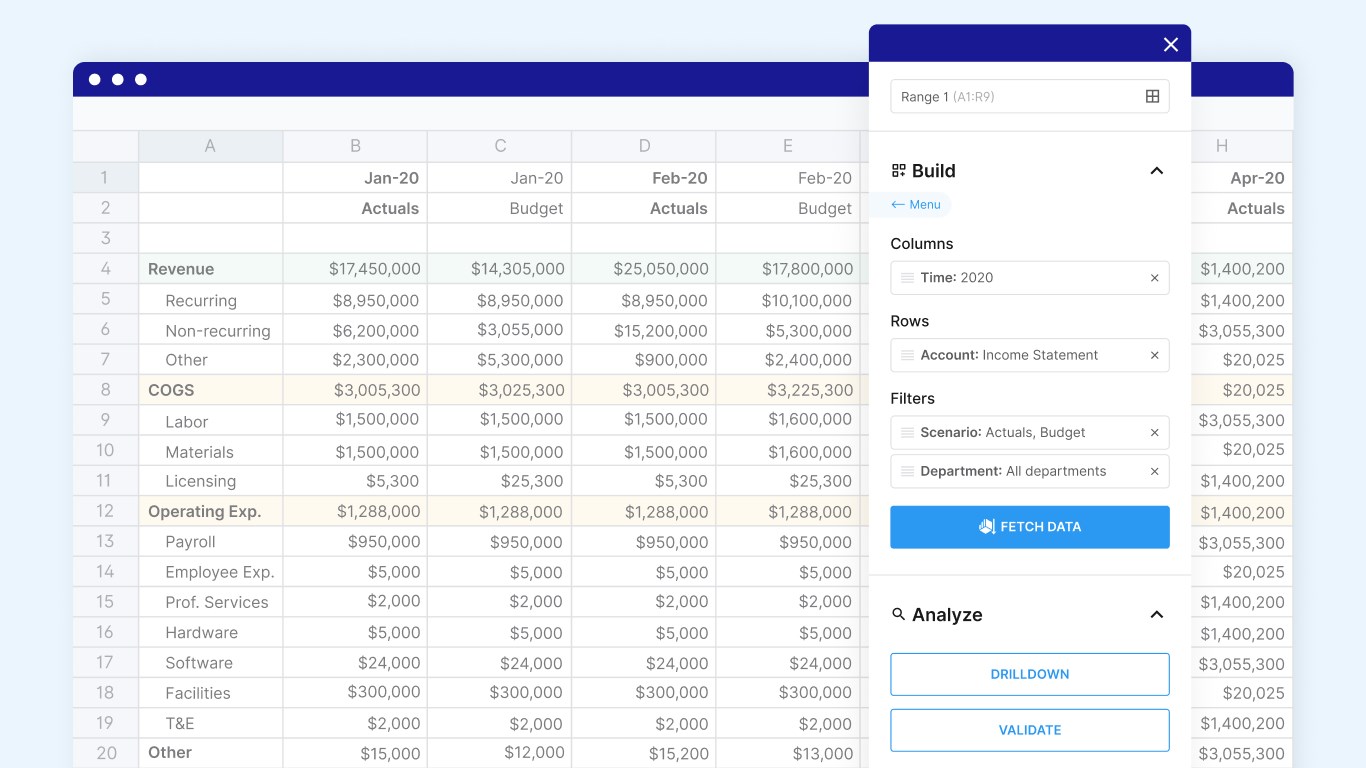
Cube is an FP&A platform that keeps live, governed numbers inside Excel and Google Sheets. Two-way sync to a web hub lets teams using either spreadsheet share one model. Cube lists 155+ pre-built connectors, including NetSuite, Sage Intacct, and QuickBooks. Every plan includes unlimited users, and workflows start on the Silver plan.
- Best for: Finance teams working in Excel or Google Sheets, from one entity up to 50 on the Gold plan.
- Budgeting approach: Planning in Cube’s web platform or Excel and Google Sheets with two-way sync.
- Budgeting controls: Budget submissions and approvals, with a sign-off that locks the approved version as the baseline.
- AI: Cube says AI agents come with every plan. Its 2026 product updates describe the AI Hub, Analyst and Planner agents, including permission controls for AI-created scenarios.
- Pricing: Cube pricing is quoted by plan (Bronze, Silver, and Gold), with no published prices.
2. Vena

Vena is an Excel-native planning platform with a central database behind the Excel interface. Budget owners get tasks and approval workflows, and finance runs budgets, forecasts, and scenarios from one model. Pre-built connectors cover Business Central, NetSuite, Sage Intacct, and QuickBooks, with more through Microsoft Fabric. A side-by-side Datarails vs Vena comparison covers how Vena’s Excel-native approach differs from Datarails’ Excel-connected one.
- Best for: Finance teams that want to keep planning inside Excel with a database behind it.
- Budgeting approach: Excel-native, with a central database for versions and consolidation.
- Budgeting controls: Tasks, workflows, and approvals for budget submissions.
- AI: Vena AI, with the Planning Agent and Vena MCP Server generally available since May 2026 and the Analytics Agent in open beta.
- Pricing: Two plans, Professional and Complete, with pricing on request.
3. Centage
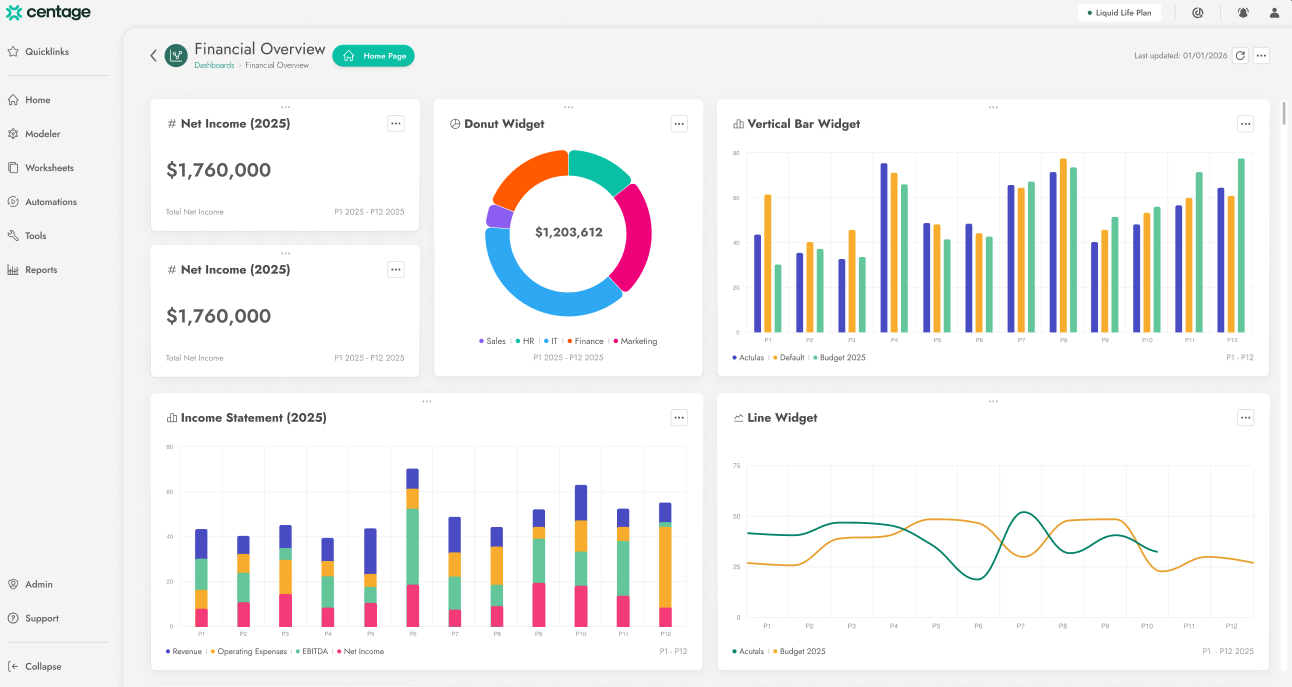
Centage is a cloud-native FP&A platform for mid-market finance teams, formerly sold as Planning Maestro. It works in the browser, uses Excel for import and export, and tracks each department’s submission through approval chains. Native integrations cover 20+ systems, including on-premises ledgers such as Dynamics GP and Sage 100. An optional managed service has a Centage analyst run the model alongside your finance team.
- Best for: Mid-market companies that want planning software and analyst support in one contract.
- Budgeting approach: Web-based modeling, with Excel for import and export.
- Budgeting controls: Approval chains and real-time submission tracking by department.
- AI: Centage describes AI agents that need a human reviewer before any change, with no release status stated.
- Pricing: Centage pricing starts at $699 a month for software, billed annually, and Centage says most mid-market customers land between $18,000 and $40,000 a year all-in.
4. Abacum

Abacum is an AI-native FP&A platform for mid-market and high-growth companies. Planning happens in a web model with Excel-style formulas, and budget owners who prefer spreadsheets submit through an Excel Connector or a Google Sheets link. Finance sees submission status per owner, routes approvals, and watches variance update live against targets. Abacum lists 700+ integrations across ERP, HRIS, CRM, BI, and billing systems. Abacum also supports entity roll-ups and currency translation, but its published documentation says it does not calculate intercompany eliminations. Groups that need statutory consolidation should evaluate how that work will be handled alongside planning.
- Best for: Mid-market and high-growth companies with many budget owners.
- Budgeting approach: Web-based modeling, with an Excel Connector and a Google Sheets integration.
- Budgeting controls: Tracks submissions per budget owner, routes approvals, and shows live variance against targets.
- AI: Abacum Intelligence, launched in April 2026 with no release status stated, and the Modeler agent, available since October 2026 at no additional cost, which changes models only with approval.
- Pricing: Pricing on request.
5. Prophix One
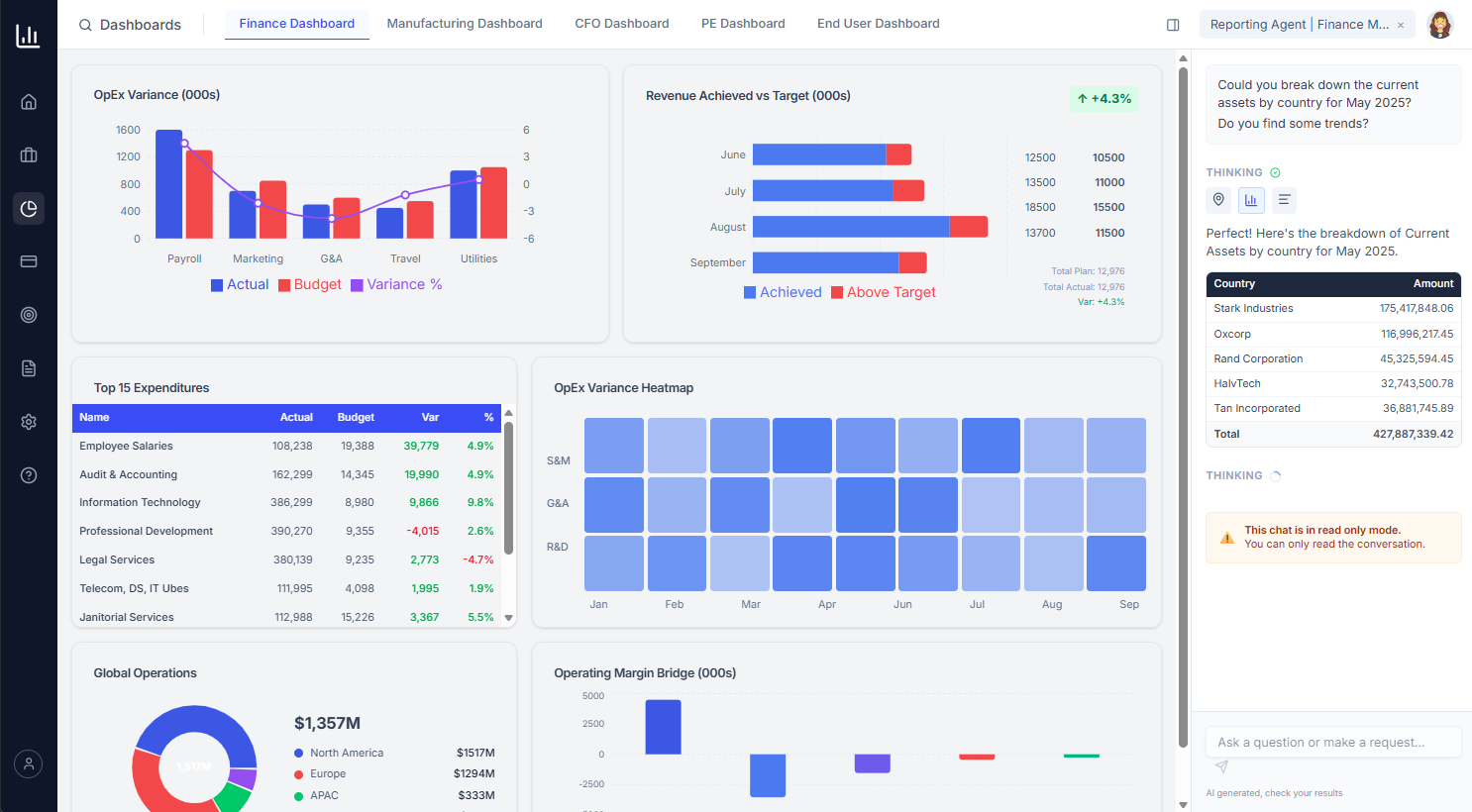
Prophix One is a cloud financial performance management platform for budgeting, planning, consolidation, and reporting. Prophix calls it purpose-built for mid-market finance teams, and it suits teams that run several entities. It runs on AWS, and Prophix hasn’t released a new on-premises version since 2021. Managers can build a budget in Excel through the Microsoft 365 add-in and submit it for approval from there.
- Best for: Mid-market and multi-entity finance teams that want budgeting and consolidation in one platform.
- Budgeting approach: A cloud platform with a Microsoft 365 add-in for Excel and PowerPoint.
- Budgeting controls: Workflow routing for review and approval, plus budget-vs.-actual variance across every entity, department, and cost center.
- AI: Prophix One Intelligence, with the Budgeting and Reporting Agents available now and more agents rolling out.
- Pricing: Pricing on request.
A note on Mosaic and Bob Finance
HiBob acquired Mosaic, a mid-market FP&A platform, in February 2025, and says the deal laid the groundwork for Bob Finance, a new offering launched in November 2025 for HiBob customers. Mosaic’s site now redirects to HiBob, and HiBob’s Bob Finance page says the product is being redesigned. It is not profiled here.
Stop off-plan spend before it’s committed
Bring last quarter’s overrun budget line to a demo and see how Datarails Spend Management checks requests against the live budget before money is committed.
Best budgeting software for mid-market and enterprise companies
These four tools sell to both segments, according to their vendors. They suit finance teams that will add entities, currencies, and budget owners over the life of the contract, so the tool has to work at both sizes.
1. Datarails
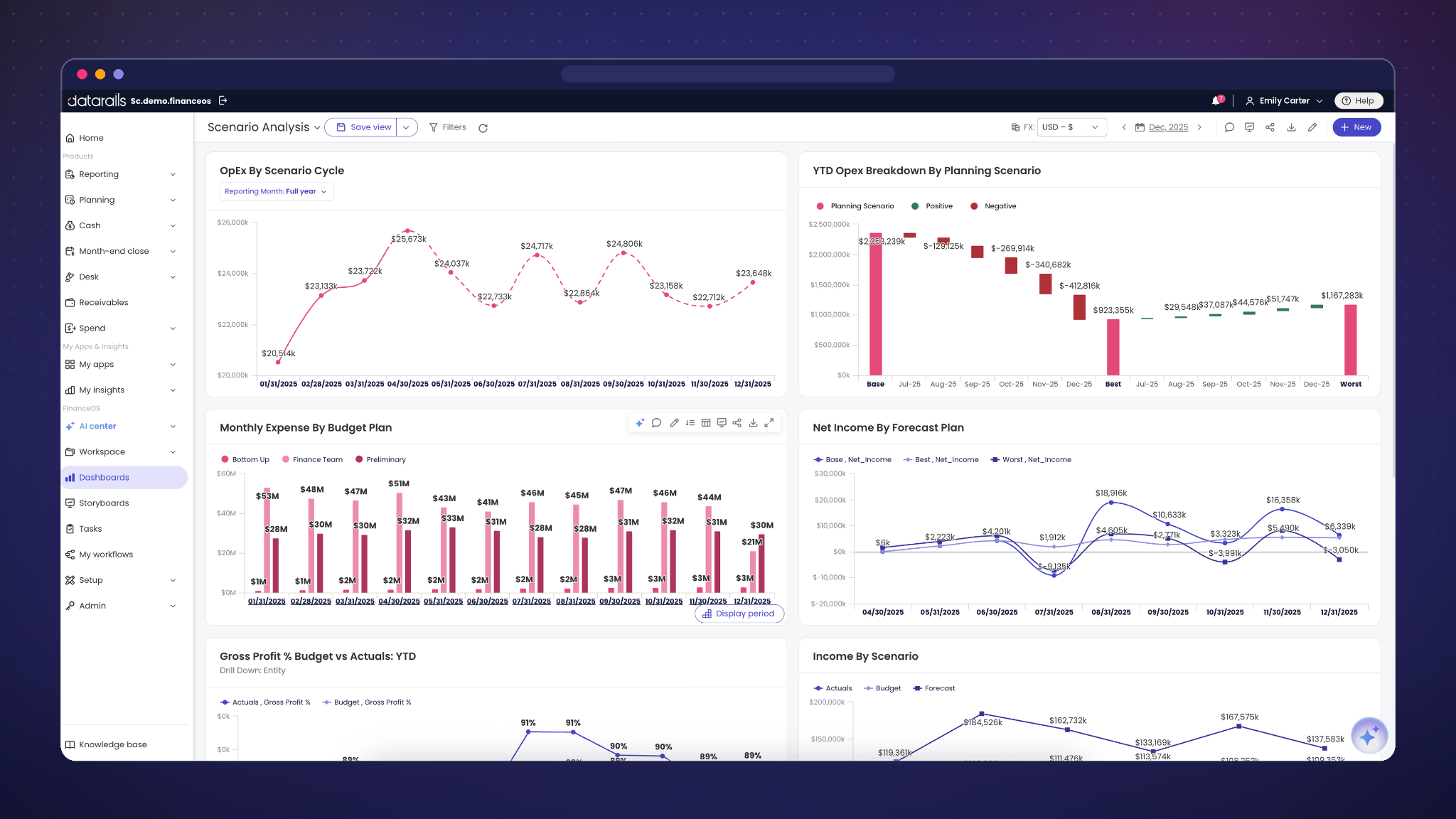
Datarails builds the AI operating system for finance teams, from growing mid-market companies to multi-entity enterprises. Its applications run on FinanceOS, which connects to 600+ data sources, so planning starts from consolidated data.
Teams build the budget in Excel with Datarails FP&A built on FinanceOS. It routes budgets to reviewers and keeps drafts apart from approved numbers. Datarails Spend Management checks purchase requests against the live budget before they become commitments, and Datarails Cash forecasts from live bank data. Datarails lists an average go-live time of four to six weeks for FP&A. Confirm a project-specific implementation plan for your data, models, and review requirements.
“I manage 35+ budgets across 20 budget managers, and the biggest benefit for us has been having a tool that makes the data easier to visualize and understand, especially for non-accountants.”
Verified User in Museums and Institutions, G2 review
- Best for: Mid-market and enterprise finance teams that budget in Excel and want spend and cash on the same data as the plan.
- Budgeting approach: Excel-connected, with existing models linked to FinanceOS.
- Budgeting controls: Budget approvals, plus spend checks against the live budget before money is committed.
- AI: The Datarails AI Assistant and Inflow Agents work on governed FinanceOS data and context. The FinanceOS AI Connector gives compatible external AI tools, including ChatGPT, Claude, and Copilot, access to that financial data and context under the relevant permissions. Review AI-generated drafts and explanations before using them in budgets or reports.
- Pricing: Quote-based across three plans. Most mid-market teams invest $35,000 to $80,000 a year, and enterprise plans start at $100,000 a year.
2. Adaptive from Workday (formerly Workday Adaptive Planning)

Adaptive from Workday is a cloud planning platform for budgeting, forecasting, reporting, and scenario modeling. Workday renamed Workday Adaptive Planning in September 2026 and says only the name has changed. Excel users work through the OfficeConnect and Excel Interface for Planning add-ins. Workday’s own HR and financials software connects natively, bringing headcount and actuals into the plan.
- Best for: Mid-market and enterprise companies, especially those already on Workday HCM or Financials.
- Budgeting approach: Web-based multidimensional modeling, with Excel add-ins for reporting and data entry.
- Budgeting controls: Integrated workflows and process management, with plans and actuals in one model for variance analysis.
- AI: Workday lists AI forecasting, anomaly detection, and Decision Intelligence. Its September 2026 announcement describes Decision Intelligence as generally available; administrator documentation says it supports data investigation, what-if scenarios, and proposed planning changes within existing security and approval chains.
- Pricing: Pricing on request, with a 30-day free trial.
3. Planful
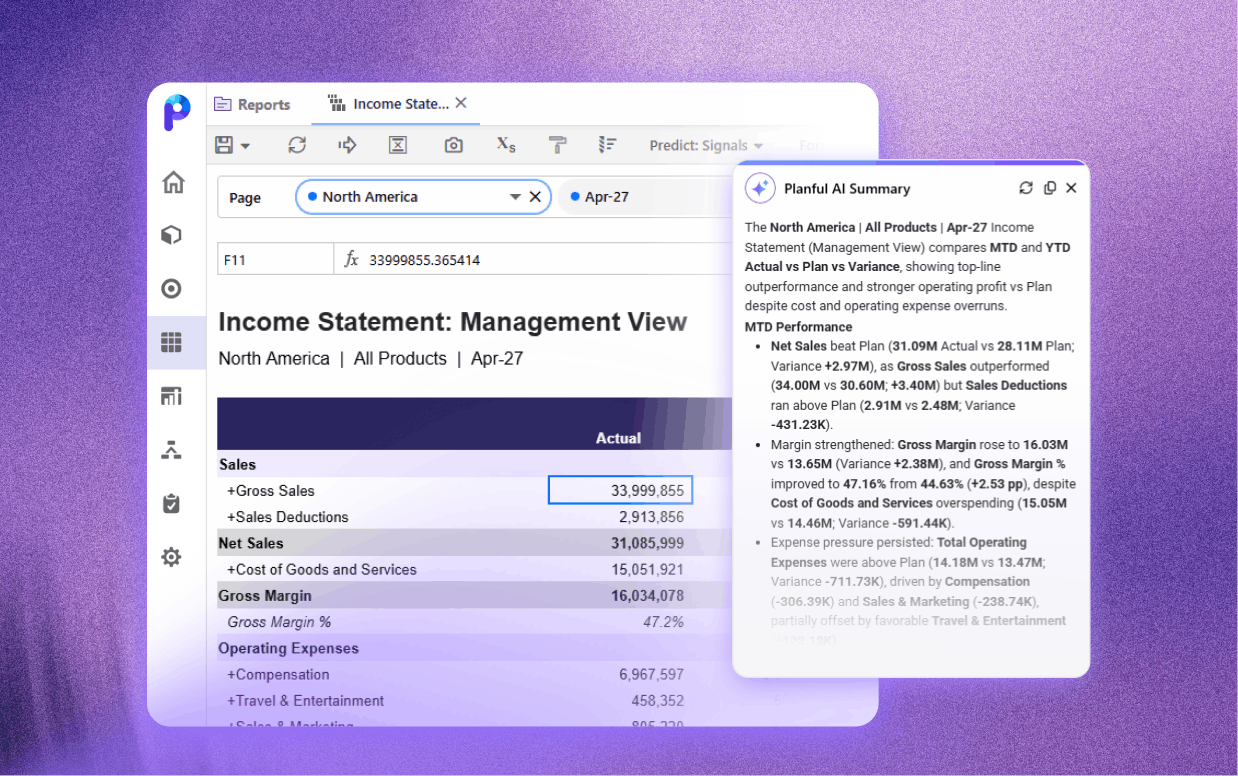
Planful is a financial performance management platform for mid-market and enterprise organizations. Planners work in the web platform or through Spotlight for Microsoft 365, a native add-in for Excel, PowerPoint, and Word. Budget owners comment on and approve plans in context. Connectors cover SAP, NetSuite, Oracle, Microsoft Dynamics 365, and Sage Intacct.
- Best for: Mid-market and enterprise finance teams that report in Microsoft 365.
- Budgeting approach: A web platform plus the Spotlight add-in for Excel, PowerPoint, and Word.
- Budgeting controls: In-plan approvals, with comments attached to the plan.
- AI: Analyst Assistant, generally available since October 2025, and Planner Assistant, powered by Planful Predict and generally available since April 2026.
- Pricing: Pricing on request, based on company size, users, and modules.
4. Jedox

Jedox is a unified planning and analytics platform for mid-sized and enterprise businesses. It supports integrated business planning, with an extra focus on business intelligence. Planners work in a native Excel add-in with write-back or in-browser spreadsheets, under approval workflows. Multi-currency management and detailed audit trails suit international groups.
- Best for: Mid-sized and enterprise groups planning across currencies and business units.
- Budgeting approach: A web platform with a native Excel add-in and browser spreadsheets.
- Budgeting controls: Workflow approvals, plus direct comparison of plan, actual, and forecast data.
- AI: JedoxAI shipped Reporting Agent and Knowledge Agent features in May 2026, some in beta, with the Planning Agent still to come.
- Pricing: Pricing on request, across Business, Professional, and Professional Plus packages.
Best corporate budgeting software for enterprises
Corporate budgeting software serves organizations with many entities, currencies, and contributors, where the budget has to consolidate cleanly before anyone approves it. Anaplan and OneStream target large enterprises first, and OneStream also sells Express packages to mid-market buyers.
1. Anaplan
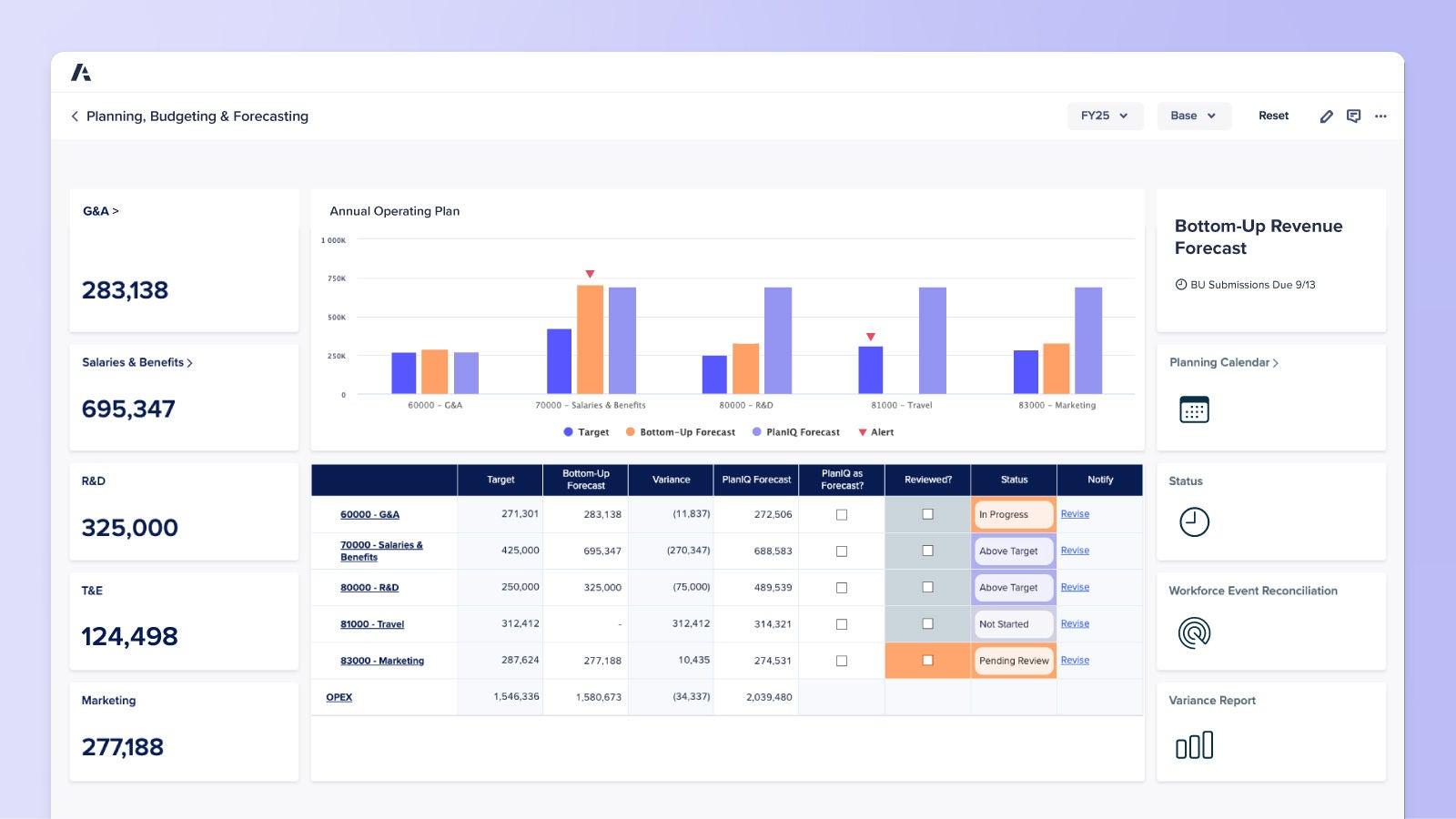
Anaplan is a scenario planning and analysis platform for large enterprises that plan finance, sales, supply chain, and workforce in connected models. Its Polaris calculation engine runs large multidimensional models in the browser, with Excel available through an add-in. Anaplan describes itself as a “9X Leader” in Gartner’s 2025 Magic Quadrant for Financial Planning Software. Thoma Bravo took the company private in 2022.
- Best for: Large enterprises that connect finance plans with sales, supply chain, and workforce planning.
- Budgeting approach: Web-based multidimensional modeling, using Classic or Polaris workspaces. Confirm the engine proposed for your models and any migration requirements.
- Budgeting controls: Workflow approvals across teams, with variance reporting between actuals, budgets, and forecasts.
- AI: Anaplan Analyst, plus four role-based agents available since December 2025, with CoModeler and Custom Agent in limited availability since late 2025 and general availability not yet confirmed.
- Pricing: Pricing on request.
2. OneStream
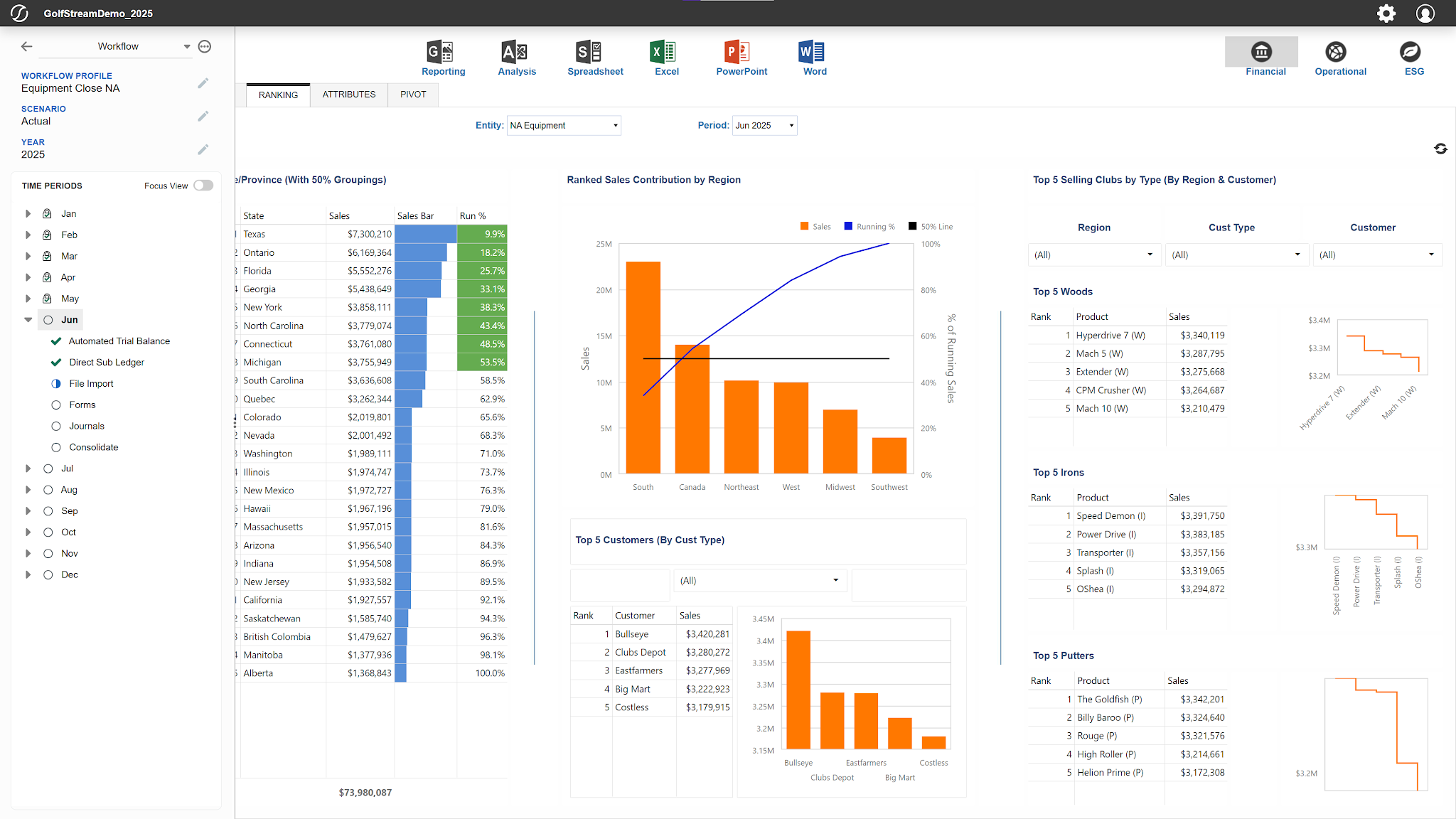
OneStream is a unified finance platform for close, consolidation, reporting, and planning. Planners enter planning revisions in web forms or Excel. Hg completed its acquisition of OneStream in April 2026, taking the company private. OneStream says it integrates with 250+ ERP, CRM, and other data sources, including SAP, Oracle, and Workday.
- Best for: Enterprises that want close, consolidation, and planning in one platform, with Express packages for mid-market buyers.
- Budgeting approach: A unified web platform, with web forms or Excel for plan entry.
- Budgeting controls: Guided Workflows for budget collection, approval gates, and variance analysis.
- AI: SensibleAI Agents, generally available since May 2026, work in OneStream and Excel.
- Pricing: Pricing on request.
How to choose business budgeting software
Start with the tier, then test each shortlisted tool against seven criteria, using your own data in the demo.
Company size and entity support
Count entities, currencies, and budget owners before comparing features. One entity with one budget owner may be able to use its accounting software; a group with intercompany charges should test consolidation, currency handling, and eliminations explicitly.
Excel and web modeling workflows
Decide where your team will build and maintain the model. An Excel interface does not by itself establish that an existing workbook can be used unchanged, and a web interface does not by itself establish how much rebuilding is required. In the demo, use one of your models to test formula support, write-back, version control, and who can maintain it after implementation.
Budget collection and approval workflows
Check how department heads submit numbers and who signs off. Look for submission tracking per owner, routed approvals, and version control that keeps drafts apart from the approved budget.
Budget vs. actual and spend enforcement
Budget approvals govern the plan; budget vs. actual reports show what happened against it. Pre-spend controls check a proposed purchase against the remaining budget, including existing commitments. Confirm whether those checks happen in the planning product, a spend application, or an integration. Ask what happens when a request exceeds the remaining budget line, and whether finance sees it before approval or in the month-end variance. Then ask whether the tool covers cash or connects to your cash flow management software.
Budgeting software integrations
List every system the budget draws from, such as the ERP, HRIS for headcount, CRM for revenue drivers, and banks for cash. Then ask which connectors are native and which still need a CSV upload.
AI traceability and human review
Gartner’s 2026 AI report card for finance, presented at its May 2026 Finance Symposium, found that 63% of finance organizations said AI implementation was slower than expected in 2025, and financial forecasting ranked among the lowest-rated use cases for impact. Ask which AI features are generally available and whether every answer traces back to source data. A roundup of AI budgeting tools covers the AI-first options.
Total budgeting software cost, including implementation
A published price usually covers the software alone. Add implementation, consultant hours for model changes, and the internal time to collect budgets each year.
Where software helps at each step of the budgeting process
A budgeting cycle commonly includes the following steps. Software support varies by product, so use each step to test your shortlist.
- Set goals and choose a method: Leadership sets targets and picks an approach, such as top-down vs. bottom-up budgeting or zero-based budgeting. Software loads last year’s actuals as the starting point.
- Collect inputs: Department heads submit their numbers. Software swaps emailed files for templates, one-click submissions, and a status view of who is late.
- Consolidate: Finance combines departmental submissions with actuals from the ERP and relevant HRIS and CRM data. Check whether the shortlisted software supports account mapping, currency conversion, and intercompany eliminations at the level your group needs.
- Review and approve: Finance and leadership review the draft, send changes back, and approve. Software routes each version to the right reviewer and locks the approved budget.
- Enforce: The approved budget meets real spending. Spend-control tools check purchase requests against the remaining budget before money is committed.
- Track and re-forecast: Finance compares actuals and cash to the plan each month and updates the forecast. Software refreshes budget vs. actual reports, and cash forecasting shows whether the plan still holds.
Build, enforce, and track the budget on one data layer
A single entity with one budget owner can start with QuickBooks Online, Xero, or a small-business tool.
As departments, entities, and spend grow, the budget needs all three of its lives covered. Build it where your team already models, enforce it before money is committed, and track it against actuals and cash on the same data.
The best business budgeting software for your team covers the lives your current process still handles by hand.
See budget, spend, and cash on one governed view
Bring your budget file and last quarter’s spend report to a demo. See how Datarails on FinanceOS checks requests against the plan and shows where it slipped.
Business budgeting software FAQs
What is business budgeting software?
Business budgeting software helps a company build its budget, collect numbers from budget owners, approve one final version, and compare actual results to the plan. Fuller platforms add forecasting, cross-entity consolidation, and checks of spend requests against the approved budget.
What is the best budgeting software for a small business?
For a small business, match the tool to your accounting system and the number of budget owners. PlanGuru suits low-cost, three-statement planning on QuickBooks or Xero. Budgyt fits nonprofits and businesses with many department budgets. Jirav fits driver-based models and companies that work with an accounting firm.
What is the best budgeting software for mid-market companies?
Mid-market teams that model in Excel can look at Datarails, Vena, and Cube, and web-first teams can look at Abacum, Centage, and Prophix One. Datarails also checks spend requests against the approved budget, tracks cash on the same FinanceOS data, and serves enterprise finance teams as the company grows.
What is the best budgeting software for companies growing from mid-market to enterprise?
Test growth requirements rather than relying on the vendor’s market labels. Ask for a demonstration using your expected entity count, currencies, model size, approval structure, and reporting workload. Datarails, Adaptive from Workday, Planful, and Jedox all sell to mid-market and enterprise finance teams. Datarails keeps the budget in Excel-connected models and checks spend against it before money is committed.
What is corporate budgeting software?
Corporate budgeting software handles budgets for organizations with several entities, currencies, and many contributors. It consolidates submissions, routes approvals, and reports against actuals across the group. Anaplan and OneStream target large enterprises, and Datarails, Adaptive from Workday, Planful, and Jedox serve both mid-market and enterprise groups.
Do I need dedicated budgeting software if I already use QuickBooks or Xero?
Not always. QuickBooks Online Plus and Advanced and Xero’s Growing and Established plans include budgets and budget vs. actual reports. Consider dedicated software when department heads submit their own numbers, approvals need a record, or another entity adds complexity. Estimate the hours it can save and the control gaps it can close before deciding whether the investment is justified.
What’s the difference between budgeting software and FP&A software?
Budgeting software builds the annual plan and tracks it against actuals. FP&A software adds rolling forecasts, scenario modeling, and year-round management reporting. Many FP&A platforms include budgeting, and the choice often comes down to how much forecasting your team does.
How much does business budgeting software cost?
Among the 14 dedicated tools here, published starting prices for business buyers run from $83 a month billed annually for PlanGuru to $10,000 a year for Jirav Starter. Budgyt starts at $399 a month and Centage software at $699 a month, both billed annually. Most mid-market and enterprise tools quote by users, entities, and modules. Datarails is quote-based, and most mid-market teams invest $35,000 to $80,000 a year, while enterprise plans start at $100,000. Accounting plans that include budgets start lower, at $59 a month for Xero Growing.
Can I keep budgeting in Excel?
Yes. In AFP’s fall 2024 survey, 96% of FP&A and finance practitioners used spreadsheets for planning. Excel-connected tools such as Datarails keep your models and link them to consolidated data on FinanceOS, and Excel-native tools such as Vena run planning inside Excel on a central database. Both cut the manual collection, consolidation, and version control around the budget.