Finance teams running NetSuite are under real pressure to put AI to work.
CFOs want Claude, ChatGPT, and Copilot answering questions about revenue, spend, and forecasts, and NetSuite holds the data those answers depend on. The question every team hits is how to connect ERP to AI assistant workflows without handing the AI raw, ungoverned records that no controller has reviewed.
Currently, two real paths exist:
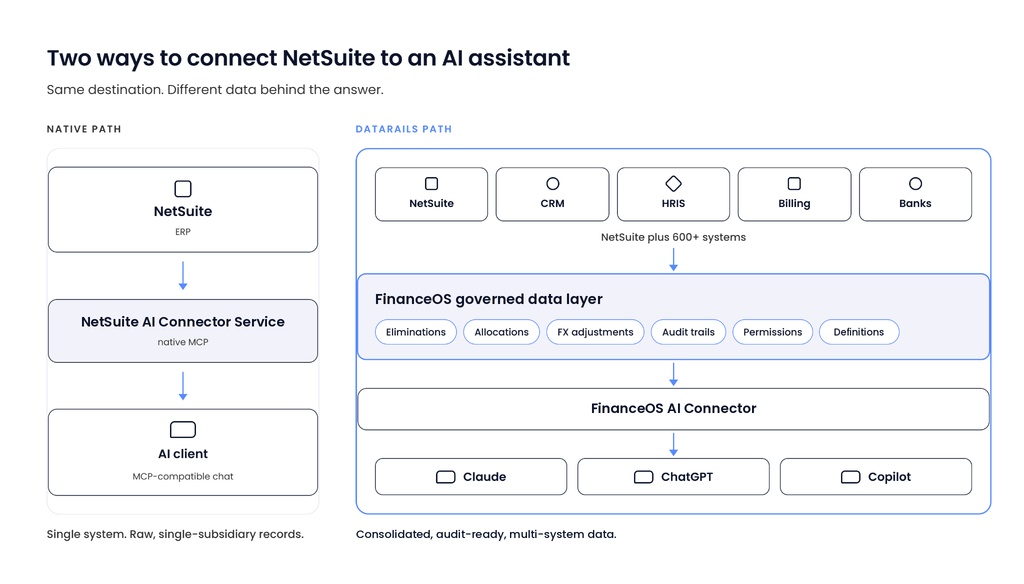
- NetSuite ships its own native Model Context Protocol (MCP) implementation, the NetSuite AI Connector Service, which gives an AI client direct, role-based access to a single NetSuite instance.
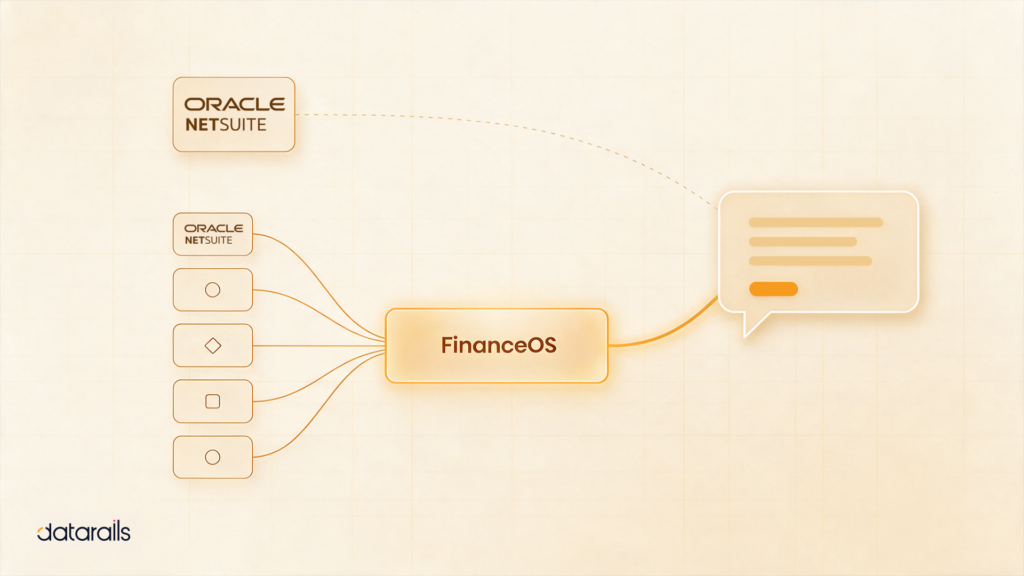
- A finance-governed layer like FinanceOS, connected to AI through the FinanceOS AI Connector, takes a different route and sits across NetSuite and every other system finance depends on, consolidating the data before any AI touches it.
Both work. The right choice depends on what you need the AI to see when it answers.
How Do I Connect NetSuite to an AI Assistant?
There are two proven ways to connect NetSuite to an AI assistant, such as Claude, ChatGPT, or Microsoft Copilot.
The first is NetSuite’s native AI Connector Service, a built-in implementation of the MCP that Oracle rolled out globally in 2025. It gives supported AI clients secure, role-based access to NetSuite data. Setting it up requires a custom role with specific MCP permissions, an OAuth 2.0 integration record, and installation of the MCP Standard Tools SuiteApp. The Administrator role is explicitly disallowed.
The second is a finance MCP layer such as FinanceOS and the FinanceOS AI Connector. FinanceOS consolidates NetSuite together with CRM, HRIS, billing, and hundreds of other sources, applies eliminations, FX adjustments, and audit controls first, and the FinanceOS AI Connector then exposes that governed data, along with its financial definitions, to any leading AI tool.
The native route suits single-entity teams comfortable with an IT-led setup. Multi-entity finance teams that need consolidated, audit-ready numbers in front of the AI typically need the governed layer.
What Is a NetSuite MCP Server?
A NetSuite MCP server is a service that lets an AI assistant read and act on NetSuite data through the Model Context Protocol, an open standard for connecting AI models to business systems. Think of MCP as a universal adapter. A system exposes its data once, through a standard interface, and any compatible AI client can connect to it. No custom integration per AI tool required.
The protocol exists because AI models are only as useful as the data they can reach. Gartner’s AI in Finance Survey found adoption in the finance function moved just one point, from 58% in 2024 to 59% in 2025, and 91% of finance leaders reported low or moderate impact at first. Data quality and availability were among the most cited obstacles. The models are capable. The data underneath them is the bottleneck.
That is why the Model Context Protocol NetSuite adopted in 2025 matters. It gives finance teams a sanctioned, secure way to put ERP data in front of an AI assistant. It also leaves a question open: which data? A protocol moves whatever the source system holds. If the source holds raw, single-subsidiary records, that is exactly what the AI sees. For multi-entity companies, real data consolidation has to happen somewhere before the numbers reach the model.
What NetSuite’s Native AI Connector Service Does and Where It Stops
The NetSuite AI Connector Service is Oracle’s own MCP implementation, and for what it covers, it is well built. It connects supported AI clients, including Claude and ChatGPT, directly to NetSuite records, saved searches, reports, and SuiteQL queries, with role-based permissions controlling exactly what the AI can touch.
Oracle’s documentation is specific about what setup involves:
- A custom role: the Administrator role is explicitly disallowed. A dedicated role must be created and granted the MCP Server Connection and Log in using OAuth 2.0 Access Tokens permissions, plus record-level permissions for the data the AI should reach.
- An OAuth 2.0 integration record: created in NetSuite with the AI Connector Service scope enabled.
- The MCP Standard Tools SuiteApp: installed from the SuiteApp Marketplace to provide the tools the AI client uses.
Oracle also built hard guardrails into the service. MCP tools cannot run with elevated privileges, cannot invoke Suitelets, cannot make external HTTP requests, and cannot run as another role. Those constraints meaningfully reduce risk, and they deserve credit.
Where the service stops is the finance question. The NetSuite AI Connector Service exposes NetSuite data as NetSuite holds it: raw, single-system records. There is no built-in multi-entity consolidation, no intercompany elimination, no FX adjustment logic, and no way to bring CRM, HRIS, or billing data into the same governed context. An AI assistant connected this way answers questions about one subsidiary’s ledger. Consolidated, multi-entity answers require a data layer the native service does not include.
What FinanceOS and the FinanceOS AI Connector Add for NetSuite Customers
Datarails is built for the gap the native service leaves open. FinanceOS, the governed data layer underneath Datarails, consolidates NetSuite together with 600+ integrations across ERP, CRM, HRIS, payroll, and billing systems, from SAP and Sage to Salesforce, HubSpot, and BambooHR.
Consolidation happens before any AI sees a number. Intercompany eliminations, allocations, and FX adjustments run inside the governed layer, with full audit trails and role-based permissions on every figure. The FinanceOS AI Connector then exposes that data to Claude, ChatGPT, Microsoft Copilot, and other leading AI tools, so the assistant answers from consolidated, audit-ready, real-time numbers.
FinanceOS also holds the financial meaning behind those numbers. Metric definitions, account hierarchies, entity structures, mappings, and business rules live in the FinanceOS semantic layer, so ARR, gross margin, or a department means the same thing in every report. The FinanceOS AI Connector passes those definitions to the AI along with the data. NetSuite’s native service has no equivalent, which matters even for single-entity teams: the AI sees the records without knowing how your company defines them.
This matters because CFO commitment to AI is already made. Deloitte’s Q4 2025 CFO Signals survey found 87% of CFOs expect AI to be extremely or very important to finance operations in 2026, and 54% rank integrating AI agents as a top transformation priority. Agents acting on financial data need governed financial data underneath them.
Meanwhile, Datarails 2026 CFO Sentiments Survey revealed that 76% of finance leaders are under high (67%) or very high (9%) pressure to fully implement AI.
Setup runs on prebuilt connectors, with no custom SuiteApp development or OAuth build. NetSuite stays the system of record. FinanceOS sits across it and every other source, and AI tools connect to FinanceOS through the FinanceOS AI Connector.
NetSuite AI Connector Service vs. FinanceOS AI Connector
Both options are legitimate, and many NetSuite teams will evaluate them side by side. The differences are specific and practical.
Here’s how they compare:
| NetSuite AI Connector Service (native) | FinanceOS and AI Connector for NetSuite | |
|---|---|---|
| Setup effort | Custom role, OAuth 2.0 integration record, MCP Standard Tools SuiteApp; typically IT-led | Guided setup by Datarails; no custom development |
| Multi-entity consolidation | None built in; the AI sees single-subsidiary records | Eliminations, allocations, and FX adjustments applied before AI access |
| Multi-system data (CRM, HRIS, billing) | NetSuite data only | NetSuite plus 600+ sources in one governed layer |
| Financial definitions and context | None; the AI sees records without company metric definitions | Metric definitions, hierarchies, and business rules from the FinanceOS semantic layer |
| Audit trail and governance | NetSuite role permissions and platform guardrails | Full audit trails and role-based permissions on consolidated data |
| Supported AI tools | Claude, ChatGPT, and other MCP-compatible clients per Oracle’s requirements | Claude, ChatGPT, Microsoft Copilot, and other leading AI tools |
The pattern in the table is consistent. The native NetSuite AI Connector Service gives a single NetSuite instance a secure MCP endpoint. The FinanceOS AI Connector gives one to the whole finance data estate.
For a single-entity company whose questions live entirely inside NetSuite, the native service may be enough. For a multi-entity company, or any team whose reporting depends on CRM, HRIS, or billing data alongside the ERP, the governed layer is where reliable answers come from.
Put Governed NetSuite Data Behind Your AI Assistant
Datarails connects NetSuite and 600+ other sources into one consolidated, audit-ready layer, then links it to Claude, ChatGPT, or Copilot through the FinanceOS AI Connector. A demo will allow you to see your own numbers in the workflow.
What You Can Do Once Your NetSuite MCP Server Is Connected
The payoff shows up in daily work. The FP&A Trends Survey found 46% of FP&A time still goes to data collection and validation rather than analysis. A governed pipeline from NetSuite data to AI tools directly addresses that number.
- Variance analysis in plain language: ask why consolidated OpEx ran over budget and get an answer grounded in eliminated, FX-adjusted numbers across every subsidiary, through a NetSuite Claude integration or Copilot connection.
- Board decks without export chains: generate board-ready reporting straight from live data, skipping the usual cycle of exporting NetSuite records into a BI tool, reconciling versions, and pasting charts into slides.
- Ad hoc modeling in the tools you already use: a NetSuite ChatGPT integration or Copilot connection lets analysts build scenarios on live consolidated data, while Datarails FP&A keeps planning, budgeting, and forecasting tied to the same source of truth.
For a deeper look at what governed data unlocks across planning and analysis, the complete guide to AI in FP&A covers use cases well beyond NetSuite.
Setting Up Your NetSuite MCP Server: Native vs. Datarails
For the native route, Oracle’s setup guides walk through the role, integration record, and SuiteApp steps. Plan for IT involvement and testing time, and scope carefully which record permissions the AI role needs.
For the Datarails route, the process is shorter. Connect NetSuite and your other systems, let FinanceOS build the consolidated layer, and link your AI tools through the FinanceOS AI Connector.
Of course, security is usually the first question, and it should be. Deloitte’s Finance Trends 2026 survey found 57% of finance leaders at an advanced stage of AI implementation cite data privacy concerns as a major adoption barrier. Datarails holds SOC 2 Type II and ISO 27001 compliance, and every AI interaction runs through role-based permissions with a full audit trail. The AI sees what a permissioned user would see, and every query is traceable.
Give Your AI Assistant Numbers You Can Sign Off On
Most NetSuite finance teams will connect an AI assistant within the next planning cycle. The deciding question is what that assistant sees when it answers.
Raw, single-subsidiary records produce fast answers a controller still has to check. Consolidated, eliminated, FX-adjusted, audit-ready numbers produce answers a CFO can act on.
A NetSuite MCP server is the mechanism either way. The governed data layer underneath it determines whether the output is trustworthy.
See Your Consolidated NetSuite Data in Claude, ChatGPT, or Copilot
Datarails connects NetSuite and 600+ other systems through FinanceOS, and the FinanceOS AI Connector brings that data into your AI tools, so your first AI conversation starts from numbers you trust.
Ready to see it for yourself?
NetSuite MCP Server FAQs
How do I connect NetSuite to an AI assistant like Claude or ChatGPT?
Two paths exist. NetSuite’s native AI Connector Service requires a custom role with MCP permissions, an OAuth 2.0 integration record, and the MCP Standard Tools SuiteApp. A finance MCP layer like FinanceOS with the FinanceOS AI Connector consolidates NetSuite with your other systems first, then links to AI tools including Claude, ChatGPT, and Copilot.
What is a NetSuite MCP server?
A NetSuite MCP server exposes NetSuite data to AI assistants through the Model Context Protocol, an open standard for secure AI-to-system connections. NetSuite ships a native implementation, the NetSuite AI Connector Service. Platforms like Datarails provide a governed alternative that consolidates NetSuite with 600+ other sources before the AI sees the data.
Is NetSuite’s built-in AI Connector Service enough on its own?
For a single-entity company asking questions inside one NetSuite instance, it can be. It has no multi-entity consolidation, intercompany elimination, or FX logic, and it cannot combine NetSuite with CRM, HRIS, or billing data. Multi-entity teams that need consolidated answers typically add a governed finance MCP layer.
Can AI see consolidated, multi-entity NetSuite data, or just raw records?
That depends on the connection. NetSuite’s native connector exposes raw, single-system records. A governed layer like Datarails FinanceOS applies eliminations, allocations, and FX adjustments across NetSuite and connected systems first, so the AI assistant answers from consolidated, audit-ready numbers.
What does it take to connect NetSuite to AI with Datarails?
FinanceOS connects NetSuite and your other systems through prebuilt connectors across 600+ sources, so there is no custom SuiteApp development or OAuth build. Your AI tools then connect through the FinanceOS AI Connector. Setup time for NetSuite’s native connector varies with IT capacity and the scope of the custom role and permissions involved.
Is connecting NetSuite data to an AI tool secure?
It can be, with the right controls. NetSuite’s native service enforces role-based access and blocks elevated privileges. Datarails adds SOC 2 Type II and ISO 27001 compliance, role-based permissions on consolidated data, and a full audit trail of every AI interaction.