AI in FP&A (financial planning and analysis) can already draft variance commentary, explain reconciliation movements, pull terms out of vendor contracts and build first-pass reports. It cannot own a close, approve a journal entry or sign off a board number. How far it goes depends less on the model than on whether your definitions, mappings and permissions sit somewhere it can read.
Can AI just do my month-end close?
No, though it can run a large share of the work inside it. AI drafts journal entries, explains balance movements, matches transactions and chases missing support. What it cannot do is carry the accountability, because a close ends with someone signing for the numbers.
That signature is a legal obligation for public companies. Section 302 of the Sarbanes-Oxley Act (SOX) requires the CEO and CFO to certify each periodic report personally (Sarbanes-Oxley Act, 2002). Private companies answer to lenders and auditors in much the same way.
Here is where unattended AI slips. In a March close on Sage Intacct, an AI flux review flagged prepaid expenses up $412,000 and credited the annual directors and officers insurance renewal. The renewal explained $380,000. The remaining $32,000 was a vendor credit posted to prepaids instead of accounts payable, and the narrative absorbed it because the total looked reasonable. The draft was mostly right. The wrong part would have sat on the balance sheet for a quarter.
Reversals break first when nobody watches. An accrual auto-reversed on day one of the next period doubles the expense if the vendor invoice already posted against it. A person reviewing the reversal list catches that in two minutes. An agent working alone repeats it every month.
Can AI flag and explain budget variances?
Yes, and this is one of the strongest uses today. AI scans every line against budget, ranks the movements by size and drafts the first explanation. The quality of that explanation depends on whether it can see the transactions behind the line or only the line itself.
A variance on a summary line invites a guess. In Q2, a company running QuickBooks Online showed travel $46,000 over budget. An AI reading the budget-versus-actuals table wrote that conference season had come early. The ledger told a different story: a Concur export had been imported twice in May, so $41,000 of the overrun was duplicate entries. The commentary sounded right and explained nothing.
Give the same AI the transaction detail and the answer changes. It can group the overrun by vendor, spot two identical batches with the same posting date and say so. That is the difference between an AI that reads reports and one that reads the ledger behind them.
Most teams set a threshold before anyone writes commentary, such as 10 percent and $25,000. AI makes the threshold cheaper to lower, because drafting fifty explanations costs the same as drafting five. The review time does not shrink at the same rate, so lower thresholds still need a reviewer who knows the business.
Can AI read and query my vendor contracts?
Yes. AI extracts renewal dates, notice periods, price uplifts and payment terms from PDFs well, and it answers plain-language questions across a whole folder. The weak point is completeness: it reads what you give it, and contract terms often live in more than one document.
Amendments are the usual gap. Picture a team that loads 140 software agreements from a SharePoint folder in January. The AI flags 23 auto-renewals and a 5 percent annual uplift on the largest one, a $310,000 data platform contract. The uplift was renegotiated to 3 percent in an amendment that sat in an email thread, not the folder. Budget owners planned on the wrong number for a year, and nobody caught it until the invoice arrived lower.
Extraction also has to land somewhere finance uses. A renewal date in an AI answer helps once. The same date stored against the vendor record, linked to the budget line and the accounts payable history, helps every month. Ask your vendor whether extracted terms become fields you can report on, or remain text in a chat window.
Treat AI contract output as a first read. A person confirms the governing document, especially for contracts above a materiality threshold your controller sets.
Which parts of FP&A still need a person in the loop?
Anything that is approved, signed, posted or sent outside the company. AI can prepare every one of those steps. The person owns the decision to accept, edit or discard the draft, and owns the explanation if it turns out wrong.
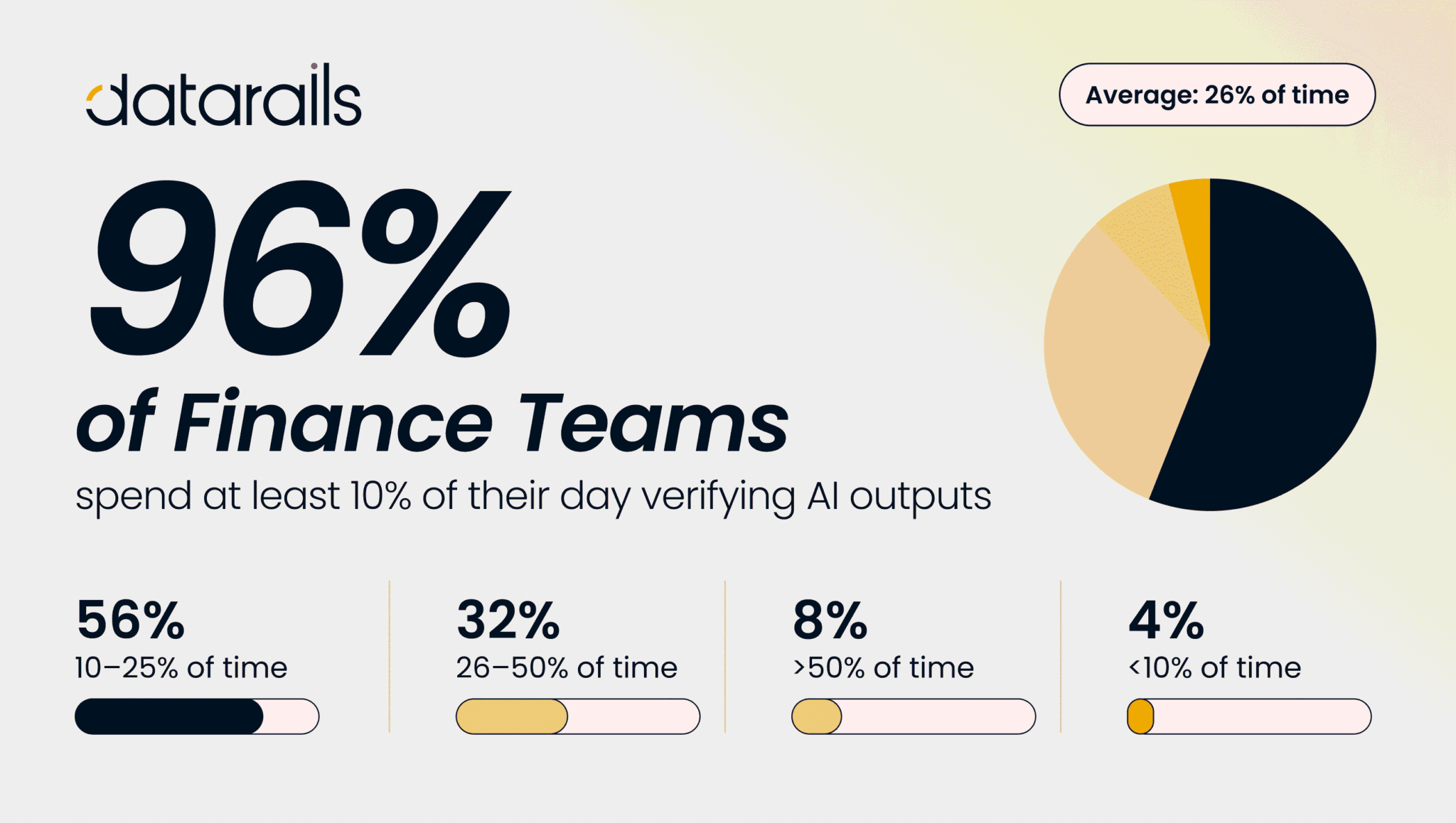
Finance leaders are drawing the same line. In Datarails’ 2026 CFO Sentiments Survey of 270 US finance leaders, just 5 percent trust AI to produce board-ready financial reports without human review, and 4 percent trust it with the month-end close. The table below maps where the line sits for common FP&A work.
| Finance task | What AI does today | What a person owns | Data the AI needs |
|---|---|---|---|
| Flux analysis | Ranks movements, drafts explanations | Accepts explanations above threshold | Trial balance plus transaction detail |
| Journal entries | Proposes entries with support | Approves and posts | Account mappings, prior entries |
| Variance commentary | Drafts by line and driver | Edits tone and judgment | Budget, actuals, transactions |
| Contract review | Extracts dates, uplifts, terms | Confirms governing document | Contracts plus amendments |
| Forecast update | Rolls actuals, flags drift | Changes assumptions | Drivers and approved version |
| Board pack | Builds first draft | Signs and presents | Approved numbers and definitions |
Auditors ask a narrow question when AI touched a number: who reviewed it, when, and against what evidence. A review log answers that. An approval given by reading a chat answer does not.
The pattern in the table holds across most teams. AI moves furthest on work that repeats every period and can be checked against a ledger. It moves least on work where a wrong answer reaches a lender, a regulator or the board before anyone looks at it.
What has to be in place before AI can work on my own financial data?
Four things need to be in place for AI to deliver reliable financial insights:
- Standardized metric definitions: Every metric needs one stored, consistent definition. Without it, AI can calculate numbers correctly using inconsistent assumptions.
- Centralized account mappings: Account mappings must exist outside individual workbooks to ensure consistency across systems and subsidiaries.
- Data-level permissions: Access controls must be enforced at the data level, not through AI prompts. If a regional manager can retrieve payroll data for every region, the issue is with the underlying permissions, not the AI.
- End-to-end data lineage: Every reported number must be traceable to its underlying transactions and journal entries. If CFOs and auditors cannot drill down into the source data, the results cannot be fully trusted.
Data quality remains the biggest obstacle for finance teams adopting AI. According to Gartner’s 2025 survey of 183 CFOs and senior finance leaders, AI adoption in finance reached 59%. However, 91% reported low or moderate initial impact, with inadequate data quality identified as one of the biggest barriers.
Inconsistent definitions can create costly reporting errors. In September, a SaaS company asked AI to calculate gross margin by product. The AI classified customer support salaries as cost of goods sold (COGS) for one product but as operating expenses for another. The inconsistency came from different mappings of the HubSpot service team across two NetSuite subsidiaries. As a result, the newer product’s gross margin appeared 6 percentage points lower than its actual margin.
What determines how far AI can go in finance?
The governed context underneath it. A model working on a pasted export stops at analysis. A model reading stored definitions, mappings and permissions can run recurring work, because the same question gets the same answer next month.
That is the design behind FinanceOS®, the foundation underneath Datarails. It holds the metric definitions, mappings, entity structures and permissions once, and every Datarails application and AI tool reads from it. AI works in three layers on top. The AI Assistant answers questions across the platform. Inflow Agents sit where the work happens: Flux Analysis in Datarails Month-End Close quantifies reconciliation movements and drafts the explanation, and Widget AI answers questions about a dashboard chart with its filters already known. Custom Agents, built by Forward-Deployed Financial Engineers (FDFEs), run recurring jobs on a schedule, such as a Monday overspend review.
Contract terms extracted in Datarails Spend Management attach to the vendor and budget line, so the amendment problem shows up as a mismatch instead of a surprise.
The trust rules stay the same across all three layers. The AI reads your data for analysis. Its outputs are drafts that a person reviews, edits or discards. Customer data is not used to train models.
How to get started with AI in finance
List the five tasks your team repeats every close and mark which ones end in a signature. AI can take the preparation on the others first. If you want to see the drilldown on your numbers, book a Datarails walkthrough.