Finance teams running SAP keep hearing the same question from their own people. Can Claude just read our numbers?
One option is an SAP MCP server: a standard interface through which an AI client can access authorized SAP tools and data. The right approach depends on your systems, use case, and controls.
Three routes matter for finance, and the difference that counts is what the AI receives: whatever records a service exposes, or a reporting-ready figure that carries the definition finance approved.
How do I connect SAP to an AI assistant?
Choose an SAP MCP server route that fits your use case. SAP offers Joule Studio integrations and the generally available Integration Suite MCP Gateway for exposing existing APIs. A custom MCP server on BTP is another option; it is not required for every integration.
AWS also offers an SAP MCP server on Amazon Bedrock AgentCore, exposing supported S/4HANA and ECC services to compatible clients. This still requires connectivity, authentication, and SAP service configuration. Separately, SAP and Anthropic announced plans to embed Claude in SAP's AI portfolio; that announcement does not make Joule a connector for the standalone Claude or ChatGPT apps.
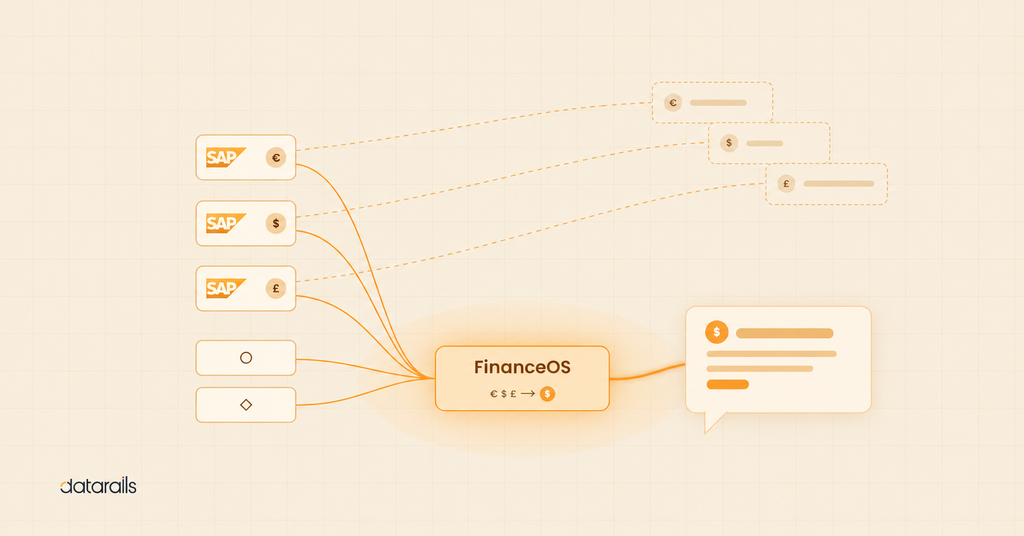
A third route is a finance MCP server backed by a governed data layer. FinanceOS consolidates supported SAP and non-SAP sources before the FinanceOS AI Connector exposes them to supported AI tools. Confirm the client edition, connector support, and administrator requirements.
Choose based on the data and controls already in place. MCP provides access; group-level answers also need approved consolidation logic, whether supplied by SAP applications, FinanceOS, or another governed system.
SAP native MCP path
- SAP applications and exposed APIsSource data or prepared results
- MCP Gateway or custom MCP serverExisting APIs or a BTP implementation; configured identity and permissions
- Compatible MCP clientJoule Studio or another supported client
- Authorized tool resultReview before use in financial decisions
Access to configured SAP APIs and services. Consolidation and additional data sources depend on the applications behind the tools.
AWS for SAP MCP path
- SAP S/4HANA or ECCSupported OData services
- AWS for SAP MCP ServerManaged on Amazon Bedrock AgentCore
- Compatible MCP clientSubject to transport and authentication support
- Authorized tool resultReview before use in financial decisions
Access to supported SAP OData services through AgentCore. Connectivity, identity, and service configuration are still required.
FinanceOS AI Connector path
- SAP and your other systemsNetSuite, Salesforce, HRIS, billing, banks
- FinanceOS governed data layerEliminations, allocations, FX adjustments, audit trail, role-based permissions
- FinanceOS AI Connector
- Claude / ChatGPT / Copilot
Consolidated group numbers from 600+ supported data sources. Governed and auditable.
What is an SAP MCP server?
The Model Context Protocol is an open standard, published by Anthropic, that describes how an AI tool discovers and calls the capabilities of an external system. An MCP server sits on the other end of that conversation. It advertises a defined list of tools, accepts calls against them, and returns structured results the model can reason over.
MCP reduces repeated integration work by standardizing how clients discover and call tools. An endpoint can serve multiple compatible clients, but supported transports, authentication, permissions, and administrator settings still need to be checked for each connection.
An SAP MCP server applies that pattern to SAP. Depending on which server you use, it exposes ABAP development capabilities, HANA Cloud queries, Datasphere objects, or business data from S/4HANA as callable tools that an agent can invoke under defined authorizations.
A finance MCP server can expose consolidated financial data and finance-defined metrics such as revenue, margin, and headcount cost. The usefulness of AI in FP&A depends on those definitions and the quality of the underlying data.
SAP Joule MCP and the native ecosystem
What SAP has shipped
SAP's MCP capabilities span different use cases. HANA Cloud supports database access, while Integration Suite's MCP Gateway exposes existing APIs and services as MCP endpoints. SAP's release notes list the gateway as generally available from July 5, 2026; check regional availability and entitlements for your environment.
The ABAP MCP Server reached general availability in Q2 2026, open to GitHub Copilot, Amazon Q, and other MCP-compatible agents. Joule Studio can also compose third-party and legacy SAP systems as MCP tools for custom agents. Alongside the official servers, SAP's community publishes open-source MCP servers for Datasphere, Business Data Cloud, and BTP services.
The SAP Claude integration announced in May 2026 goes further. Claude is set to become a foundation model inside the SAP Business AI Platform and an extension of Joule's orchestration layer, with agents coordinating across S/4HANA, SuccessFactors, Ariba, and third-party systems through MCP. For a finance team already standardized on SAP, this is a serious and fast-moving option.
What setup involves
For a custom implementation, exposing SAP data to an agent involves engineering work. SAP's own walkthrough of building an MCP server for Joule Studio describes a Node.js project deployed to BTP Cloud Foundry, an HTTP destination carrying the sap-joule-studio-mcp-server property so Joule Studio can discover it, and streamable HTTP transport, which Joule Studio requires. Production deployments add XSUAA binding and OAuth2 scopes so that tool calls run under real authorizations.
A custom server needs an owner, testing, security, and maintenance. Additional sources can be exposed through existing APIs, gateways, or connectors; they do not necessarily require a separate server.
Where consolidation happens on the native path
MCP standardizes access; it does not itself perform financial consolidation. SAP Group Reporting supports consolidation, including financial data collected from external systems. An agent can read consolidated results if those results are exposed through authorized tools. The evaluation is whether your existing applications already provide the required mappings, eliminations, FX treatment, and governance—or whether a finance data layer would simplify that work. See how data consolidation fits into the architecture.
Test the distinction with a real reporting question: can the agent return an approved group figure, explain the metric definition, and identify the source and reporting period? Consolidation is one part of that answer. Metrics such as ARR or headcount cost also draw on CRM, HRIS, and billing data alongside the ERP, so check where those definitions are maintained and who can change them.
FinanceOS AI Connector: finance MCP for SAP
Datarails puts a governed finance layer between SAP and the AI tool. FinanceOS® is the foundation, the governed data layer that Datarails FP&A, Month-End Close, Cash, and Spend all run on, and the FinanceOS AI Connector is how that layer connects to AI tools. SAP sits inside it as one of the 600+ data sources FinanceOS connects to, alongside NetSuite, Sage, Salesforce, HRIS platforms, billing systems, and bank feeds.
Consolidation happens inside the pipeline. Eliminations, allocations, and FX adjustments are applied automatically once your consolidation logic is set up, and a semantic layer holds the metric definitions the finance team owns, so an agent and an analyst work from the same definition of revenue. Connector queries run under the same user permissions FinanceOS applies across Datarails.
The FinanceOS launch framed this as infrastructure for the AI era rather than another application, and the practical effect for an SAP customer is narrow and specific. Claude, ChatGPT, and Microsoft Copilot query governed group numbers through a single FinanceOS AI Connector endpoint, without a custom MCP server to build or maintain.
SAP Joule MCP vs. Datarails FinanceOS AI Connector: head-to-head
Both paths have their benefits. The table below shows you exactly where each one does the work.
| Capability | SAP Joule/BTP MCP (native) | Datarails FinanceOS AI Connector for SAP |
|---|---|---|
| Setup effort | Reuse APIs through MCP Gateway or build a custom server; configure connectivity, identity, permissions, and supported transport | Connect SAP and other systems through existing FinanceOS connectors, with no custom server to build |
| Multi-entity consolidation | MCP does not consolidate data. SAP Group Reporting can supply consolidated results, including financial data collected from external systems | Eliminations, allocations, and FX adjustments applied in FinanceOS before any AI query |
| Data beyond SAP (CRM, HRIS, billing) | Additional sources can be integrated through supported APIs, connectors, or configured services | 600+ supported data sources in one governed layer |
| Audit trail and governance | Inherited from the underlying systems and configured per server | FinanceOS permissions and audit trails govern connector access; also configure the AI client and its data-handling controls |
| Deployment time | Depends on existing APIs, connectivity, security approvals, and whether custom development is required | Datarails advertises typical FinanceOS deployment in 3–5 business days; confirm SAP connectivity, mappings, and consolidation scope during scoping |
| AI tools supported | Joule and Joule Studio agents, plus MCP clients pointed at the servers you expose | Supported Claude, ChatGPT, Microsoft Copilot, and other AI integrations; confirm client edition and administrator requirements |
Evaluate SAP-native tools for SAP-centered workflows and FinanceOS for a shared finance data foundation. In either case, confirm where consolidation happens, which systems are covered, and how permissions and audit trails reach the AI client.
Connect SAP to Claude, ChatGPT, or Copilot
FinanceOS connects to 600+ data sources, including SAP, applies eliminations and FX adjustments before any AI query, and the FinanceOS AI Connector exposes one governed endpoint to the AI tools your team already uses.
What you can do with an SAP MCP server
For variance analysis, a controller can ask why a subsidiary’s gross margin changed. Use approved consolidated figures and ask the assistant to show the period, metric definition, and source data behind its explanation.
For reporting, Datarails AI can help prepare board materials from the governed data layer. Review generated figures and commentary against approved reports before sharing them.
For ad hoc analysis, supported AI tools can query FinanceOS while analysts retain their Excel models. Datarails FP&A uses the same foundation. Confirm that both outputs use the same period, filters, consolidation version, and refresh time before comparing them.
How to get started with an SAP MCP server
Start by confirming the supported SAP connection and data scope. Configure entity mappings, consolidation rules, and user permissions, then have administrators enable the FinanceOS AI Connector. Follow the setup guide for the selected AI client and validate a sample query against approved figures.
Timing depends on SAP connectivity, data readiness, consolidation complexity, and security approvals. Finance and IT should agree on a scoped rollout and reconcile a pilot query before broader use.
Review security alongside setup. Datarails reports SOC 2 Type II and GDPR compliance, plus ISO 27001 certification. Also review the external AI provider's retention and training terms. Pricing and implementation scope depend on your requirements.
What to decide before choosing an SAP MCP server
SAP has made its position on MCP clear, and the native ecosystem will keep expanding.
The open decision for a finance team is what the AI assistant sees when it looks at the business. An assistant can only answer with what its tools return. If they return transactions, the model has to work out the finance logic on its own. If they return consolidated figures with finance-owned definitions across SAP and the rest of the business, the answer is one the CFO can take to the board. Choose the layer that matches the questions your team asks.
See your SAP data through Claude, ChatGPT, or Copilot
FinanceOS connects to 600+ data sources, including SAP, in one governed layer, and the FinanceOS AI Connector exposes it to the AI tools your finance team already uses.
SAP MCP server FAQs
How do I connect SAP to an AI assistant like Claude or ChatGPT?
Choose a supported SAP-native integration, an AWS-hosted SAP MCP server, or a finance MCP backed by a consolidated data layer. Then configure identity, permissions, and the selected client's connection. A SAP Claude integration or SAP ChatGPT integration depends on that client's supported transport and authentication; registering a server in Joule Studio does not automatically connect either standalone app.
What is an SAP MCP server?
An SAP MCP server is a service that advertises SAP capabilities and data as tools an AI client can call through the Model Context Protocol. SAP ships several, including the ABAP MCP Server and MCP support in HANA Cloud. Business data from S/4HANA can be exposed through the Integration Suite MCP Gateway, the AWS for SAP MCP Server, or a custom server on BTP.
Is SAP Joule MCP enough on its own?
It may be. SAP Joule MCP integrations can expose services backed by SAP and connected systems. For group reporting, check whether those services already return approved consolidated results. If not, configure a consolidation application or governed data layer before relying on group-level answers.
Can an SAP MCP server expose consolidated, multi-entity data?
An SAP MCP server can expose consolidated results when its tools access a system that has already prepared them. SAP Group Reporting can include external financial data; FinanceOS offers another consolidation layer across supported sources. Verify the scope and accounting rules of the data returned by each tool.
How long does it take to connect SAP to an AI assistant with Datarails?
Most of the work goes into mapping entities and confirming consolidation logic in FinanceOS, which is a finance decision rather than a software build. Once that's in place, connecting an AI tool through the FinanceOS AI Connector doesn't require a development project.
Is an SAP MCP server connection to an AI tool secure?
Security depends on the full connection. Datarails enforces user permissions server-side, but the external AI provider’s plan and settings govern its handling of conversations. Confirm model-training and retention terms, enabled tools, and available audit logs. Test that each user can access only authorized data before rollout.