Most buyers researching Datarails cost find a wide spread of third-party estimates, and few of those pages explain what a quote contains. This guide does. It covers where Datarails sits against the FP&A platforms buyers most often compare it with, what determines a quote, what each plan includes, and which costs sit outside the license.
Every Datarails plan is built around FinanceOS®, so data consolidation, governance, AI agents, and the FinanceOS AI Connector come as standard. Factors that influence a quote include how many users and integrations you need, the support level, and which modules you add.
How much does Datarails cost?
Most mid-market teams invest $35,000-$80,000 per year in Datarails, enterprise plans typically start above $100,000. Datarails pricing is quote-based, so the exact figure depends on your scope. As an outside benchmark, software-buying platform Vendr reports a median Datarails contract of $33,300 per year, below its medians for Vena, Planful, Pigment and Anaplan. That median falls just under the mid-market range because it counts every Datarails purchase on Vendr’s platform, including smaller finance teams with fewer users and integrations.
Vendr publishes medians drawn from anonymized purchases made through its platform, and those medians are the closest thing this category has to a public price benchmark.
What should a mid-market finance team budget for FP&A software?
For most mid-market finance teams, the subscription line is the starting point, not the total. As of September 2026, Vendr’s medians for Vena, Planful and Pigment run from about $34,000 to $74,000 a year, and enterprise platforms such as Anaplan sit well above that. Implementation, internal administration time, and add-on modules come on top. With any vendor, the quote moves most according to the number of users, entities and source systems, and the support level you choose.
How does the cost of Datarails compare with other FP&A software?
As of September 2026, Datarails is the only one of the nine FP&A platforms below that shares typical price ranges, and its mid-size and enterprise ranges are included in the table. For buyers weighing Datarails alternatives, the table shows what each vendor’s pricing covers, with Vendr’s median added for the four platforms in the comparison above.
| Vendor | Published pricing (as of September 2026) | What’s included |
|---|---|---|
| Datarails | Typical ranges: $35K-$80K mid-market, $100K+ enterprise. Vendr median: $33,300 a year | Consolidation, reporting, planning, Datarails AI Agents and the FinanceOS AI Connector in every plan; Spend in Premium; Cash, Month-End Close, Receivables and Desk in Expert |
| Anaplan | None published. Vendr median: $114,609 a year | Financial, workforce, supply chain and sales planning, priced by application |
| Cube | None published | Planning, budgeting and reporting in three tiers, with add-ons for support, modules and API access |
| OneStream | None published | Consolidation, close, planning and reporting on one platform, licensed by module |
| Pigment | None published. Vendr median: $74,000 a year | FP&A, sales planning, workforce planning and scenario modeling in one environment |
| Planful | None published. Vendr median: $40,352 a year | Budgeting, forecasting and reporting in the core platform; workforce, capital planning and analytics as add-on modules |
| Prophix | None published | Planning, consolidation and reporting modules; Copilot and Architect Agent available to Prophix One customers |
| Vena Solutions | None published. Vendr median: $34,286 a year | Two packages; Complete adds Vena Insights, premium support, a sandbox environment and managed services |
| Workday Adaptive Planning | None published | Planning; Close and Consolidation priced and purchased separately |
Source: each vendor’s website and Vendr marketplace pages, accessed October 9, 2026. Vendr medians are third-party transaction data across all company sizes, not list prices.
Datarails vs Vena pricing
Vena’s Vendr median is $34,286 a year, close to the Datarails median, so read it as parity on price and decide on fit. Vena’s own site describes a platform for planning, reporting, and the close. Datarails covers that ground and adds bank-connected cash management, spend management tied back to the budget line, and a finance ticketing desk on the same FinanceOS data layer. See the full Datarails vs Vena comparison.
Datarails vs Planful pricing
Planful’s Vendr median is $40,352 a year. Workforce, capital planning and analytics are add-on modules there, so check which modules a Planful quote includes before you compare it with a Datarails plan. See the full Datarails vs Planful comparison.
Datarails vs Pigment and Anaplan pricing
Pigment and Anaplan have the highest medians in the table because both sell planning beyond finance, such as workforce and sales planning. Their figures cover broader deployments, so compare only the finance scope.
A median covers every company size and deal shape, which means a 20-person team on one ERP and a 400-person group with a dozen entities are averaged into the same figure. Your quote will depend on your scope.
The more useful comparison is what the price covers. That’s where the plans below matter more than the headline number.
What determines a Datarails quote?
The key here is scope, which differs sharply from one finance team to the next. A Datarails quote reflects the plan, the number of users, the number of source systems connected, the support level, the one-time onboarding fee, and any products added beyond what the plan includes. One single number would be wrong for most buyers, which is why Datarails shares typical ranges and prices each quote to scope.
Quote-based pricing is common across the category. The practical problem it creates is that buyers fill the gap with third-party estimates, and those estimates are often measuring different things.
Vendr’s Vena page, for example, shows a $34,286 median next to a typical mid-market range of $60,000 to $120,000 a year after the first year for 15 to 25 contributor users, and both can be accurate because a median includes smaller deals while a range describes one deployment profile.
The same applies to any Datarails pricing estimate you find online. Before you rely on a number, check whether it is a median of real transactions, a range for a specific deployment size, or an unsourced estimate. The first is a reality check. The second is only useful if the profile matches yours. The third is not a budget line.
What does every Datarails plan include?
Every Datarails plan includes FinanceOS, the governed data layer that connects financial and operational data and holds the financial logic that sits on top of it. That foundation does not change between plans, and it accounts for most of what a finance team is paying for.
According to the Datarails pricing page, these Datarails features are included in all three plans:
- Consolidation and financial logic: currency translation, intercompany eliminations, allocations, support for multiple charts of accounts, and joint venture investment accounting across NCI, equity and cost methods.
- Reporting, planning and workflow: reporting, planning and dashboards, plus the Data Mapper, Lookups, Workflows, the Submit button, File Boxes, Filters, Version Control and Custom Reports.
- Governance and AI: permissions down to the entity, department or report, Datarails AI Agents, and the FinanceOS AI Connector.
The consolidation line deserves attention from multi-entity teams. Currency translation and eliminations are usually the hardest part of consolidation to get right, and on Datarails they are part of the entry-level Professional plan.
The Data Mapper is where the governed layer starts. Finance maps GL accounts, departments and cost centers to its reporting structure once, and every report stays aligned to that mapping afterward. Lookups then pull those governed numbers into Excel models with a formula the team already knows.
Datarails AI Agents and the FinanceOS AI Connector run on that same governed layer, and both are included in every plan rather than priced as separate purchases. Teams can ask questions of their numbers in plain language and schedule recurring analyses to run automatically. The connector links the AI tools your team already uses to the same consolidated financials.
Teams that want agents built around their own workflows can work with Datarails’ Forward-Deployed Financial Engineers (FDFEs) through the AI Transformation Package.
Which Datarails plan does a finance team need?
The three Datarails plans, Professional, Premium and Expert, share the same FinanceOS foundation, and the financial logic doesn’t change between them. Each step up adds products, users and integrations, so the choice comes down to how much of the finance function you want the platform to cover. Teams that need more than Expert can have a custom Enterprise plan built for them.
| Plan | Professional | Premium | Expert |
|---|---|---|---|
| Users | 2 | 5 | 15 + 50 viewers |
| Integrations | 1 | 2 | 3 |
| Support | Standard | Premium | Premium |
| Included | FinanceOS, unlimited dashboards, reporting and planning, Datarails AI Agents, FinanceOS AI Connector | Everything in Professional, plus Datarails Spend (cards, bill pay, contracts) | Everything in Premium, plus Datarails Cash, Datarails Month-End Close, Datarails Receivables and Datarails Desk |
Viewer seats are for people who read reports without editing them. Teams on a lower plan can also add individual products without moving up a plan.
Integrations need a short explanation. FinanceOS connects to 600+ data sources, which is the catalog of systems it can connect to. A plan’s integration allowance is the number of source system connections included in that plan. A company running NetSuite, Salesforce and a payroll platform needs three connections, whatever the size of the catalog.
Two questions do most of the work of choosing a plan. The first is how many source systems and people the platform needs to cover. The second is how much of the finance function you want on it. A team that needs planning and reporting fits Professional. A team that also wants purchasing and payments tied to the budget fits Premium. A team that wants cash, the close, receivables and finance requests on the same data fits Expert.
Every product in the higher plans runs on the same FinanceOS data layer. When a team moves up a plan, the cash, close and spend data connects to numbers that are already mapped rather than starting a new integration project.
What costs should buyers budget beyond the Datarails license?
Four costs sit outside the license line in almost any FP&A software cost comparison, and they are where first-year budgets usually break. Ask about each one before comparing two quotes.
Implementation. On some platforms this is a separate statement of work delivered by a partner. Datarails charges a one-time onboarding fee instead, covering data mapping and the build of your reports, plans and workflows, delivered by its own team with no consultant fees. The fee is scoped to your setup, so ask any vendor exactly what its implementation covers, who delivers it, and what added scope costs mid-project.
Integrations and data cleanup. The connector is rarely the hard part. The work is usually in the chart of accounts and dimensions underneath it, which is why a multi-entity group with inconsistent account structures should ask how mapping is handled. On Datarails, multiple charts of accounts are consolidated into one reporting structure in every plan.
Training and adoption. Finance will learn any tool. Budget owners outside finance often will not, and a platform used by three people rarely earns its cost. Excel-connected platforms keep the modeling environment familiar. 100% Speedlab, a San Diego eyewear and apparel brand, expanded its Datarails use from finance to 30 to 35 users across sales, purchasing and executives.
Internal administration. Every platform needs an owner who maintains mappings, adds dimensions and adjusts reports after an org change. Ask how much of that work is done once and reused, and how much is repeated every period.
Is Datarails worth the cost?
The strongest results come from teams with consolidation work to remove. Spencer Butcher, a logistics group with 8 companies and 12 divisions, cut month-end report generation from a week to minutes.
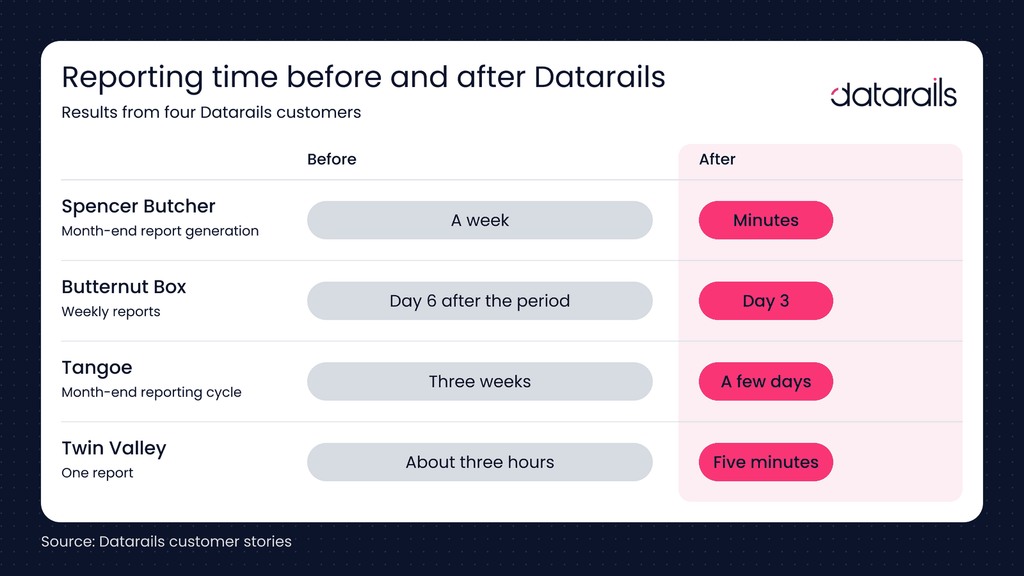
Butternut Box, a UK manufacturer, moved its weekly reports from day 6 after the period to day 3. One verified reviewer built a single source of truth across CRM, finance and HR and estimated the saving at close to one FTE’s worth of effort.
“Without Datarails I would’ve needed to double the current team size of 3.”
– VP of Finance, 100% Speedlab
What should you bring to a Datarails pricing conversation?
Bring three lists: the source systems you need connected, the people who will use the platform, and the modules you expect to need within a year. With those, a quote reflects your scope rather than a guess.
Want to see what your plan would include?
Datarails pricing FAQs
How long does Datarails implementation take?
Most Datarails FP&A implementations go live within 4-6 weeks, depending on the complexity of your data and models. A dedicated customer success manager works with you from implementation onward.
Is support included in all Datarails plans?
Yes. Support is included in the subscription. Professional comes with standard support, and Premium and Expert come with premium support.
Do template customizations cost extra?
No. Template customizations are part of your normal workflow, with no additional fees, so you can modify and adapt your models as the business changes.
Which Datarails integrations are available?
FinanceOS connects to 600+ data sources. The catalog includes:
- ERP and accounting: Oracle NetSuite, QuickBooks, Sage Intacct, Microsoft Business Central and Xero
- CRM: Salesforce and HubSpot
- HR and payroll: ADP, BambooHR, Paylocity and Rippling
- Data and BI: Snowflake, Google BigQuery and Power BI
Custom API connections are also available.
Can I switch to Datarails from Vena or Adaptive?
Yes. Teams have moved to Datarails from both:
- Twin Valley switched from Vena and cut one report from about three hours to five minutes.
- Tangoe switched from Adaptive and cut its month-end reporting cycle from three weeks to a few days.
Does Datarails replace Excel?
No. Datarails is Excel-connected: teams keep their models and formulas in Excel while FinanceOS handles the data connections, consolidation, version control and permissions underneath. That keeps training lighter than platforms that require rebuilding models in a new environment.