
Introduction
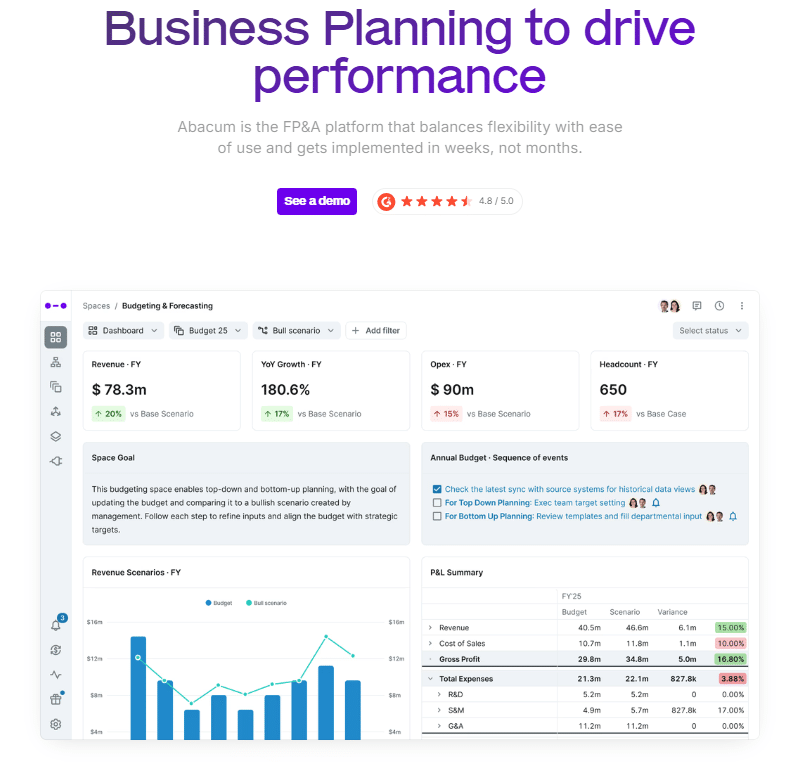
Abacum is a Financial Planning and Analysis (FP&A) tool that helps finance teams save time by integrating data sources and automating manual processes.
It is a relatively new FP&A start-up in the finance software industry and is built outside of Excel; meaning it is highly relevant for those looking to leave Excel for a different functionality in their FP&A. It was founded in 2020 and has raised $40 million of investment altogether.
Abacum is a popular FP&A software, but there are many things to consider before making the costly and time-consuming decision of adopting a finance tool.
This article will go over some key features of Abacum, who it’s meant for, their competitors, pros and cons, and whether it is the right choice for you and your organisation.
Who is Abacum Meant For?
Abacum is tailored for mid-sized companies. If you’re a smaller organisation or a large enterprise, there are many other FP&A software available that might fit better.
Abacum Key Features and Functions:
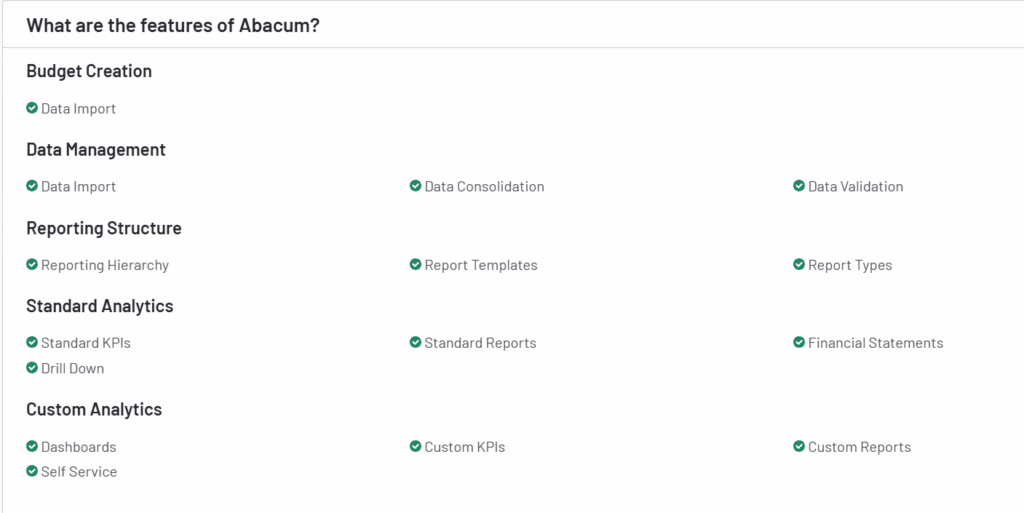
- Automated Budgeting and forecasting – With Abacum you can create real-time connected forecasts and reduce the time it takes to do your budgeting cycle.
- Expense Tracking – Real-time budget tracking and integration with accounting systems (e.g., NetSuite, QuickBooks) for up-to-date expense data.
- Collaboration – Comes with access permissions to ensure the right people have visibility into the right data. In addition, reports and dashboards can be shared for easy communication.
- Scenario analysis – What-if scenarios to predict outcomes under various conditions that help finance and management in strategic decision-making.
- HR and headcount planning – Streamlines headcount planning and forecasting for your company, ensuring optimal resource allocation among the most important assets – your employees.
Abacum Reviews:
- 4.8/ 5 on G2
- No reviews on Capterra or Trustradius
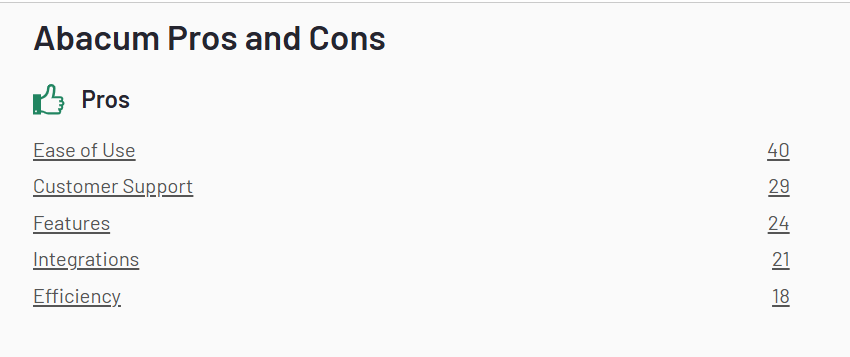
Abacum has an overall score on G2 of 4.8 out of 5 stars based on only 108 reviews (other FP&A solutions with larger customer-bases have 150 – 350 reviews). Some of the most common subjects that customers brought up in the reviews talk about its features, integrations, and time saving abilities.
Abacum receives a good score on G2 from their customers, but due to being relatively new in the FP&A software space, they only have 108 reviews, one of the lowest numbers in the industry. In addition there are no Abacum customer reviews on sites such as Capterra or Trustradius so it is hard to get a broader look at different rating systems.
Let’s take a look at the pros and cons from the users.
Abacum Pros
89% of Abacum’s G2 reviews are 5 stars. Here are some of the most common positive reviews that users mentioned.
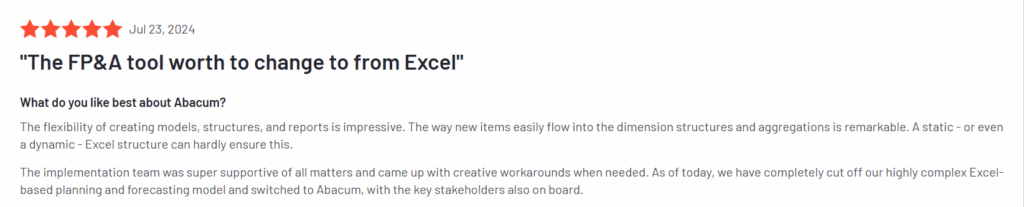
Flexible Models and Reports – With Abacum you can build flexible models specifically for your company’s needs. This allows you and management to make decisions faster based on real-time insights. A few reviewers mentioned these as one of their favorite things about Abacum:
- “The flexibility of creating models, structures, and reports is impressive”
- “The features for reporting that allow us to customize our financial story-telling for different stakeholders without having to build new models.”
Integrations – According to their website, Abacum has 50+ integrations. Although this is considerably less than many of the well known FP&A solutions (see below) multiple users mentioned this as a pro due to the easy integrations with popular software such as Quickbooks and Salesforce.

Intuitive and easy to use – Abacum has multiple reviews praising their “modern look and feel” and “ease of use”. For those looking to move away from Excel, Abacum is a good choice as it is easier to learn and use than most other non-native Excel FP&A software.

Abacum Cons
While Abacum has overall positive reviews, users described some issues they had with the system.
Hard to integrate with lesser know ERPs – While Abacum easily connects with well known integrations such as Quickbooks, Xero, and Hubspot, they don’t do a good job of connecting with less popular ERPs or industry specific ones. In addition they integrate with around 50 applications while other FP&A software have over 200 integrations.

Not Excel native – While Abacum’s features are easy to use in comparison to others, there is one big difference: it isn’t Excel native. Most finance professionals want to stay in Excel due to the familiarity, but for those willing to learn a new system, Abacum is one of the better non-Excel options out there.
Lacks scenario planning and advanced budgeting – Multiple users noted that Abacum is more of a “reporting-first software” or a “basic reporting tool” rather than a complete FP&A software with advanced budgeting, forecasting, and scenario planning. While the easy to use software and good reporting abilities work well for many people, those who want more robust features might be better off looking at other FP&A software.

Not for large or small businesses – Abacum advertises themselves for “mid-size businesses” and fits well for that size. However, most FP&A software have a wider range of business types they cater to so if you are a smaller business or an enterprise, there are better options that will fit your needs.
Abacum Pricing
Abacum doesn’t provide pricing on their website. You need to contact the sales team for a demo and a price quote.
Abacum AI
Like most FP&A software, Abacum offers some AI features that are important to note. “Abacum Intelligence” has 4 main features: Generating forecasts, answering questions, classifying data, and anomaly detection.
Abacum Intelligence is a nice addition to the software and multiple users have reported that it helps save them time and is easy to use.
Abacum Alternatives
Although Abacum is a great option for the right sized company, here are 3 FP&A software alternatives that could provide more value, especially in the long term.
1. Datarails

Datarails is an AI and Excel native FP&A software that helps finance teams budget, forecast, scenario plan, and make strategic decisions better, all while saving many hours of manual work.
Some of Datarails’ notable features and advantages over Abacum include:
- Native Excel – Datarails is a completely native Excel FP&A software that allows users to keep their own way of working in Excel with the benefits of automation. It has a very easy to use interface because, well if you know how to use Excel, you know how to use Datarails.
- More integrations – Datarails has over 200 integrations and can connect to any ERP, HRIS, or CRM. Datarails has a wide range of customers using all types of ERPs – both big and lesser known ones – and they have had success using the software in all types of industries.
- Bigger target audience – Abacum caters to mid-sized companies, but Datarails is meant for small and medium sized businesses. Small companies fit well with the software, and can scale as they get bigger without having to switch FP&A tools.
- More robust AI – Datarails was the first FP&A software to roll out an AI solution and continues to be a leader in the field. Datarails AI tool creates AI-powered tailored summaries, insights, and analyses, as well as Storyboard presentations and of course, a Gen AI chatbot.
Overall Datarails has one of the highest ratings on G2 with 4.7 out of 5 stars from over 150 customer reviews. They also have 4.8 stars on Capterra and 4.9 on Gartner. Thanks to Datarails being native Excel, (shorter implementation time and less of a learning curve), having far more integrations, and being around longer with more feedback and rankings, many companies of all sizes and industries prefer Datarails over Abacum.
2. Pigment

Pigment is an “AI planning platform” but it still falls under the category of FP&A software. It is meant for enterprises and it helps them with budgeting, forecasting, gathering data, and generating reports and is generally used by large companies and enterprises. Pigment has a 4.6 out of 5 star rating on G2 but with only 80 reviews, an even lower amount than Abacum.
Here are a few of the differentiators in comparison to Abacum:
- Flexibility – Pigment users can create personalized dashboards and reports that show the relevant data for them or their executives. If they want to go even more in depth, they can highlight specific metrics and insights during executive meetings in order not to overwhelm them with unnecessary amounts of data.
- Scenario planning – Users can create multiple financial models to test different assumptions and variables based on scenarios. This helps businesses prepare for a large variety of possibilities either in the broader economy or at their own company. While most FP&A software have scenario planning, Pigment’s is quite straightforward and receives good reviews from customers.
- Integrations – Setting up and scheduling integrations with other systems on Pigment is quite intuitive, and their implementation team receives good feedback on “speed and professionalism” when it comes to integrations.
Pigment is also relatively new in the FP&A space (founded in 2019) and is not Excel-based, but it receives good reviews (4.6 out of 5 stars on G2). If you are a medium or large business who wants easy to build tables, models, and dashboards, along with easy scenario planning and integrations, Pigment might be a good choice in comparison to Abacum.
3. Runway

Runway is a cloud-based finance platform that allows businesses to automate workflows, share insights, and create financial models and plans. It is similar to Abacum in the sense that it is all cloud based and has a more modern feel. Runway focuses on AI and automated data consolidation and reporting. Runway has a 4.9 rating out of 5 on G2 but with only 24 reviews it’s a very small sample size.
Some of its standout features include:
- Data sharing – Runway is good at making sure the whole business is involved in decision making and up to date data – not just the finance team. Their software generates simple explanations for all financial drivers so they can quickly interpret the data.
- UX and simplicity – Although Runway is not Excel based, it’s one of the simpler cloud-based solutions in terms of user experience and learning the platform. Runway has a modern look and feel that users enjoy.
- BvA variance – Runway automatically analyzes budget versus actuals which shows the finance team whenever there are variances and anomalies without having to check it manually. BvA variance is part of their AI features called “Ambient Intelligence.” The rest of the features aren’t out yet, but you can join the waiting list.
In many ways Runway is similar to Abacum, as they are both modern cloud-based solutions that focus on user experience and sharing data with management. Runway’s UX and data sharing seems to be slightly better according to customer reviews, but Abacum’s AI is currently more advanced.
Conclusion: Abacum Reviews and Alternatives
Abacum is a great choice for teams who want to move away from Excel and get a modern, cloud-based solution that is good for creating reports and sharing data.
However, Datarails fits better for companies that want to stay with their own Excel models, have plenty of integrations, and take advantage of more AI features including automated dashboards and reports.