
Click for Takeaways: Finance Automation Tools
- Most finance teams are only halfway there: 54.2% of finance leaders say their processes are only partially automated, still relying on manual intervention and disconnected tools
- AI adoption is accelerating: 72% of finance leaders now use AI tools, more than double the 34% reported just one year earlier
- Spreadsheet errors are nearly universal: 94% of business spreadsheets contain at least one significant error, and accounts payable automation tools don’t touch the models where those errors live
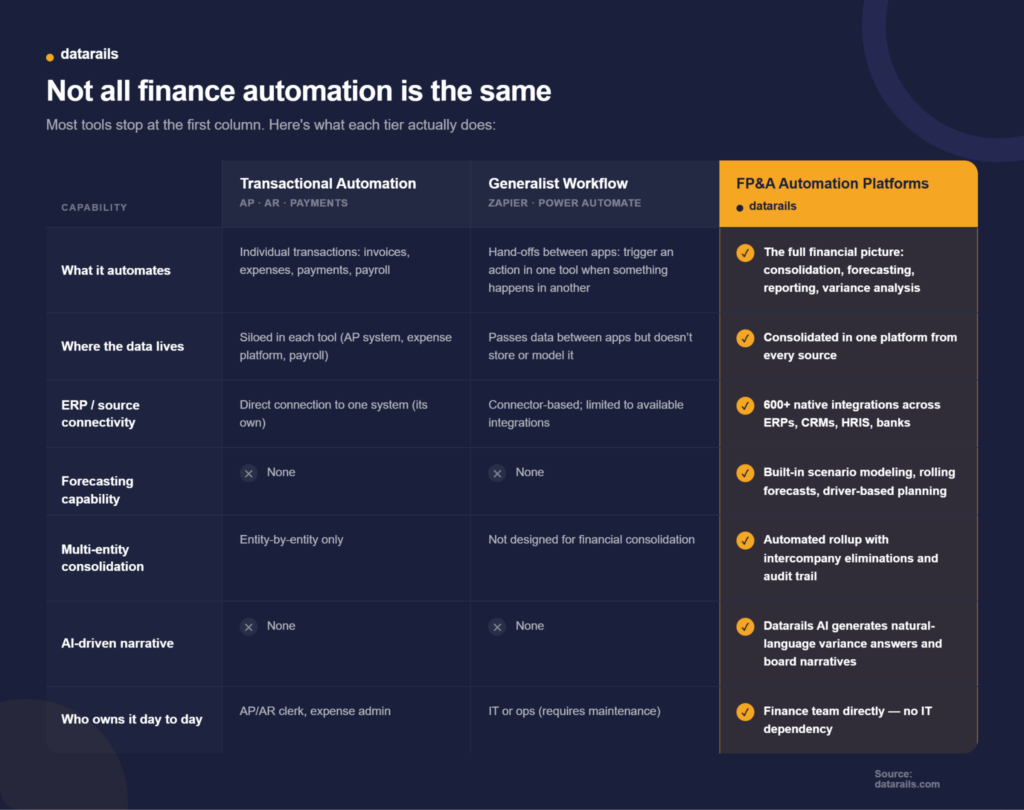
- Two tiers, one stack: Transactional finance automation tools (AP, AR, expense) automate individual transactions. FP&A automation tools automate the full financial picture: consolidation, forecasting, reporting, and variance narrative. Most comparison articles only cover the first tier.
- Bad data costs real money: Poor data quality costs organizations an average of $12.9 million annually, and the error usually isn’t in the invoice, but rather the model built downstream of it.
Most articles about finance automation tools start and stop at the same place: AP software, invoicing platforms, and expense apps.
That’s useful if you’re a bookkeeper, but less useful if you’re a CFO trying to figure out why the close still takes two weeks even though you’ve already automated payments.
The gap isn’t accidental. The top search results for finance automation software is dominated by single-tier lists that treat automation as a transaction-level problem. Pay a bill faster, sync a record, and send an invoice. That’s Tier 1, and it matters. But it doesn’t touch the work that actually determines whether a finance team can produce a board-ready forecast in minutes or in weeks.
That work, consolidating actuals across entities, building rolling forecasts, generating variance narratives, getting it all back into Excel, belongs to a second tier that often gets overlooked. FP&A automation exists to solve exactly this.
Finance teams need to understand both tiers: the transactional tools they already know, where those tools structurally stop, and the FP&A automation platforms built for planning, consolidation, and reporting workflows that those tools were never designed to handle.
What Are the Best Finance Automation Tools in 2026?
The best finance automation tools fall into two distinct tiers, and most finance teams need both.
- Tier 1: Transactional finance automation software: These handle individual financial transactions, including accounting platforms and ERPs (QuickBooks, NetSuite, Xero), accounts payable automation tools (BILL, Stampli, Tipalti), spend and expense management platforms (Ramp, Brex), and generalist finance workflow automation connectors (Zapier, Power Automate). These tools are strong at the specific job they were built for. They speed up invoice processing, enforce spend policies, and sync data between apps.
- Tier 2: FP&A automation platforms: These handle the full financial picture. This includes Datarails, Vena Solutions, Cube, Planful, Workday Adaptive Planning, and BlackLine. These tools automate what happens after transactions are recorded, including consolidating actuals across entities, building forecasts, generating variance analyses, and producing board-ready reports.
These tiers matter, given that 54.2% of finance leaders say their processes are only partially automated. In most cases, the gap sits above the transaction layer, in the consolidation, forecasting, and reporting workflows that Tier 1 tools were never designed to handle.
Finance Automation Tools Compared: The Two-Tier Framework
The question that matters isn’t “which tool is best,” but rather which layer of the problem a tool was built to solve. Most finance teams don’t choose between Tier 1 and Tier 2 because they need both. The mistake is assuming that adding more Tier 1 alone will eventually solve Tier 2 problems.
Transactional Finance Automation Tools That Cover the First Layer (Tier 1)
This is the layer most finance teams have already started building. It covers the tools that automate individual financial transactions: paying a bill, categorizing an expense, and syncing a record between systems.
If you searched “finance automation tools” looking for these, the list below has you covered. But pay attention to the ceilings. Each category has one, and understanding where these tools stop is what makes the next section matter.
Accounting Platforms and ERP Systems
QuickBooks, NetSuite, and Xero are the systems of record. They automate bookkeeping, general ledger management, basic reporting, and single-entity reconciliation. For companies running one entity on one accounting system, they handle the core financial process automation work well.
- The ceiling: These platforms were built to record transactions. They aren’t designed for multi-entity consolidation, scenario modeling, or generating the kind of narrative a board expects. Once a company adds a second entity or needs a rolling forecast, the ERP alone can’t get there.
- Best for: Single-entity businesses that need a reliable system of record
Accounts Payable Automation
BILL, Stampli, and Tipalti automate invoice capture, approval routing, and payment execution. Most now include AI-assisted matching that pairs invoices to POs automatically. For finance teams processing hundreds or thousands of invoices a month, these tools cut days off the AP cycle and reduce manual account reconciliation work significantly.
- The ceiling: AP automation operates on an entity-by-entity, bill-by-bill basis. It speeds up the processing and payment of invoices. It doesn’t roll those payments up into a forecast, explain why vendor spend spiked 18% last quarter, or connect AP data to the broader financial picture across entities.
- Best for: Finance teams processing high invoice volumes who need faster AP cycles and fewer manual touchpoints
Spend and Expense Management
Ramp and Brex automate corporate card issuance, spend policy enforcement, and real-time expense categorization. Finance teams get instant visibility into who’s spending what, with automated controls that flag violations before they hit the books.
- The ceiling: These tools capture spend as it happens. They don’t connect that spend to the forecast, the budget, or the plan. A controller can see that marketing overspent by $40K last month. But the tool won’t tell her how that variance affects the full-year forecast or what it means for cash position across three entities.
- Best for: Growth-stage companies that need real-time spend visibility and automated policy controls
Payment and Transaction Platforms
PayPal and similar payment processors automate the movement of money and reconciliation of individual transactions. They handle the plumbing: getting funds from one place to another and confirming the amounts match.
- The ceiling: Transaction-level only. No planning function, no reporting function, no connection to the broader financial model.
- Best for: Businesses that need automated payment processing and transaction-level reconciliation
Generalist Workflow Automation
Zapier and Power Automate connect apps together. They trigger actions across systems: create an invoice when a deal closes in the CRM, post a Slack alert when a payment fails, push new hires from the HRIS into the payroll system. For operations and IT teams, they’re useful for bridging gaps between disconnected tools.
- The ceiling: These platforms are only as capable as the connectors available. They can move data between apps, but they aren’t built to model, consolidate, or report on financial data. They also require IT involvement to build and maintain reliably. For anything beyond simple if-then triggers, they break down fast when the underlying financial logic gets complex.
- Best for: Ops and IT teams bridging gaps between disconnected finance and business tools
Where Tier 1 Stops
These tools are good. Often excellent at exactly what they were built for. The limitation is structural.
None of them were designed to take multi-entity actuals from five different ERPs, consolidate them into a single view, build a forecast against that consolidated data, and explain the variance in language that a board can act on. Research shows that 94% of business spreadsheets contain at least one significant error, and those errors almost never live in the invoice or the expense report. They live in the models, the consolidation workbooks, and the reporting templates that sit downstream of the transaction layer.
For finance teams whose real bottleneck is the close, the forecast, or the board deck, no amount of additional Tier 1 automation closes that gap. That’s what Tier 2 exists to solve.
FP&A Automation Tools That Handle What Transactional Tools Can’t (Tier 2)
The tools above handle individual transactions. The tools below handle the full financial picture: pulling actuals from every source system, building the forecast, generating the variance narrative, and getting it all back into the spreadsheet the finance team already lives in.
Gartner predicts that 90% of finance functions will deploy at least one AI-enabled technology solution by 2026. And 72% of finance leaders already use AI tools today, more than double the 34% reported just one year earlier. The shift is happening fast.
For most finance teams, the question is whether AI finance automation solves the consolidation, forecasting, and reporting problem, or simply adds another point solution to the stack. But the stakes are high. Poor data quality costs organizations an average of $12.9 million annually, and most of that damage occurs in the consolidation and reporting layer, not in individual transactions.
Here are the platforms built for this layer:
1. Datarails
Datarails is a finance operating system and Excel-native FP&A automation platform that consolidates data from 600+ sources and layers AI-powered analysis on top, without requiring finance teams to leave their spreadsheets.
- What it automates: Multi-entity consolidation, automated P&L/balance sheet/cash flow refresh, recurring board and management reporting, and variance analysis. Datarails pulls live transactional data from ERPs, CRMs, HRIS platforms, and banking systems into a single consolidated financial view, then builds reporting and forecasting on top of that unified data layer.
- Datarails AI: Reporting, Planning, and Strategy Agents, plus Insights & Storyboards. The AI answers natural-language questions against live consolidated data and generates board-ready variance narratives in minutes. Ask it why revenue dropped 12% in the Northeast region last quarter and it pulls the answer from your actual data, not a generic template.
- Excel-native: Finance teams keep working in the spreadsheet models they’ve built and trusted for years. Datarails automates the data layer feeding those models. No new interface to learn, no migration, no rebuilding formulas from scratch.
- Multi-entity consolidation: Automated rollup with intercompany eliminations and a full audit trail, even where entities run different source systems. Consistent account structures roll up automatically. Where entities differ, Datarails handles the mapping layer.
- Implementation: Most customers are live within 2 to 4 weeks. No external consultants required.
“At the click of a button, my financial statements are ready. From over a week to minutes.” — Megan Hedderson, Controller, Spencer & Butcher
“Without Datarails, I would’ve needed to double my current team of three just to produce what we’re delivering today.” — Steven Carkey, VP Finance Operations, Butternut Box
Pros
- Excel-native with no proprietary interface to learn; finance teams keep their existing models
- 600+ native integrations covering ERPs, CRMs, HRIS, and banking platforms with live sync
- AI-generated variance narratives and board-ready reporting from live consolidated data
- Implementation in 2 to 4 weeks with no external consultants required
Cons
- Best suited for mid-market; very large enterprises with 1,000+ employees may need a heavier enterprise suite
- AI capabilities are strongest when data sources are connected and consolidated first (the platform handles this, but initial setup requires mapping)
- Primarily Excel-focused; teams that have moved entirely to Google Sheets may find less native support
It’s ideal for Mid-market finance teams (50 to 500 employees) on Excel who need budgeting & forecasting, consolidated reporting, and AI-driven analysis without a platform migration
2. Vena Solutions
Vena Solutions is an FP&A platform built on the Microsoft 365 ecosystem. It uses a proprietary OLAP database (CubeFLEX) that feeds data into Excel, and recently acquired Acterys to add Power BI integration and Microsoft Fabric connectivity.
Vena Copilot provides AI-powered natural language queries against financial data. The platform serves over 2,200 customers, primarily in the mid-market.
It’s best for Microsoft-first finance teams that want structured FP&A workflows within the Excel and M365 stack
Pros
- Deep Excel integration through the Microsoft 365 ecosystem
- Pre-configured templates that accelerate budgeting and forecasting setup
- Strong customer support with regular check-ins
Cons
- Implementation can be complex and time-consuming, particularly for multi-entity setups
- Consolidation capabilities are less mature than dedicated consolidation platforms
- Higher first-year TCO (typically $75K+ for mid-market organizations)
Pricing is custom, based on user count and tier (Professional or Complete).
3. Cube
Cube is a spreadsheet-native FP&A platform founded by a 3x CFO. It supports both Excel and Google Sheets, making it one of the few platforms that works across both ecosystems. Cube’s AI agents (FP&Agents) cover data preparation, variance analysis, forecasting, and narrative generation. The platform also offers an MCP server that connects financial data directly to Claude, ChatGPT, and Copilot.
It’s ideal for lean finance teams at smaller companies (under 200 employees) who want spreadsheet familiarity with cloud-based automation and fast setup
Pros
- Supports both Excel and Google Sheets (unlike most competitors)
- Fast implementation with minimal IT involvement
- Strong customer support and responsive onboarding
Cons
- Limited headcount planning module
- Less suited for complex multi-entity consolidation at scale
- Reporting and dashboarding less robust than enterprise platforms
Pricing starts at approximately $1,250/month (Essentials tier), with Premium and Enterprise tiers available
4. Planful
Planful is a full-suite financial performance management platform covering FP&A, consolidation, and close. Formerly Host Analytics, it offers Planful Predict for ML-based forecasting and anomaly detection, and Spotlight for Excel integration.
The platform is strongest in multi-entity consolidation with intercompany eliminations, multi-currency handling, and statutory reporting. Over 1,000 customers use it, including companies like 23andMe and TGI Friday’s.
It’s best for mid-market to enterprise finance teams where financial close automation, consolidation, and regulatory reporting are the primary pain points
Pros
- Comprehensive consolidation with intercompany eliminations and multi-currency support
- Strong close management and regulatory compliance capabilities
- Mature platform with a long track record in enterprise FP&A
Cons
- Heavier implementation (typically 8 to 12 weeks)
- Excel integration through the Spotlight add-in rather than truly native
- Higher price point than mid-market competitors
Pricing is custom and geared towards higher-end mid-market to enterprise organizations.
5. Workday Adaptive Planning
Workday Adaptive Planning is an enterprise-scale planning platform within the broader Workday ecosystem. It offers driver-based planning, scenario modeling, and cross-functional planning across finance, HR, sales, and operations.
The platform is strongest when the organization is already running Workday HCM or Workday Financial Management, because the data flows natively between systems.
It’s suited for large enterprises (500+ employees) already in the Workday ecosystem that need cross-functional planning at scale
Pros
- Native integration with Workday HCM and Financial Management
- Powerful modeling engine for complex, driver-based planning
- Enterprise-grade scalability across departments
Cons
- Heavy implementation typically requires external consultants
- Proprietary interface that forces teams off Excel
- High cost relative to mid-market alternatives
Pricing is typically enterprise-tier (custom, significantly higher than mid-market options).
6. BlackLine (Close-Specific Automation)
BlackLine specializes in financial close automation, including account reconciliation, journal entry management, transaction matching, and intercompany accounting. It solves a specific and important piece of the Tier 2 problem without covering the broader FP&A workflow.
BlackLine maintains a strategic reseller partnership with SAP (currently 26% of its revenue flows through the SAP channel), and recently acquired WiseLayer to add AI-powered automation for accounting workflows.
It’s designed for finance teams whose primary bottleneck is the close and reconciliation process, particularly in regulated industries requiring SOX compliance and detailed audit trails
Pros
- Deep close automation with strong reconciliation and matching capabilities
- Robust audit trail and compliance features for regulated environments
- Tight SAP integration for organizations on SAP ERP
Cons
- Not a forecasting or planning tool; doesn’t cover budgeting, scenario modeling, or variance narrative
- Narrower scope than full FP&A platforms
- Enterprise-oriented pricing
Pricing is custom and enterprise-oriented.
The best way to pick a tool is to start with the problem, not the product category.
Here’s where to look based on the workflow that’s actually breaking:
Your close takes too long
If your month-end close stretches past a week, the bottleneck is usually reconciliation, journal entries, or manual data gathering across entities. Look for automated reconciliation, close task tracking, and a clear audit trail. A month-end close checklist can help isolate exactly where time is being lost. BlackLine handles the close-specific automation. Datarails covers the close alongside the full FP&A workflow.
Your forecast is built on manual copy-paste
If someone on your team is still pulling CSV exports from three different ERPs and pasting them into a master workbook every month, no amount of AP automation fixes that. You need live data connections, automated financial consolidation, and scenario modeling. Datarails, Vena, and Planful all address this, with Datarails offering the fastest path to live consolidated data through 600+ native integrations.
Your board deck takes days to assemble
The bottleneck here usually isn’t the formatting. It’s the analysis underneath it. If your team spends more time gathering and reconciling data than interpreting it, look for AI-generated variance narrative and real-time dashboards that pull from live data. Datarails AI (Insights & Storyboards) generates board-ready narratives from consolidated actuals. Cube’s FP&Agents offer similar AI-driven analysis for smaller teams.
You have five tools, and none of them talk to each other
This is the most common version of the partial automation problem. Each tool works fine in isolation. But nobody owns the consolidated view. Look for a platform with broad native integrations, a centralized data layer, and the ability to pull from ERP, CRM, HRIS, and banking sources without custom API work. Datarails connects to 600+ sources out of the box. Vena integrates well within the Microsoft ecosystem. Planful covers major cloud ERPs.
You’re a multi-entity company outgrowing single-entity tools
Once you’re running two or more entities on different accounting systems, the consolidation problem becomes structural. You need automated rollup with intercompany eliminations, cross-entity reporting, and a mapping layer that handles differences between chart of accounts structures. Datarails and Planful both handle multi-entity consolidation with audit trails. Workday Adaptive Planning covers this at the enterprise tier.
Not Sure Which Tier You Need?
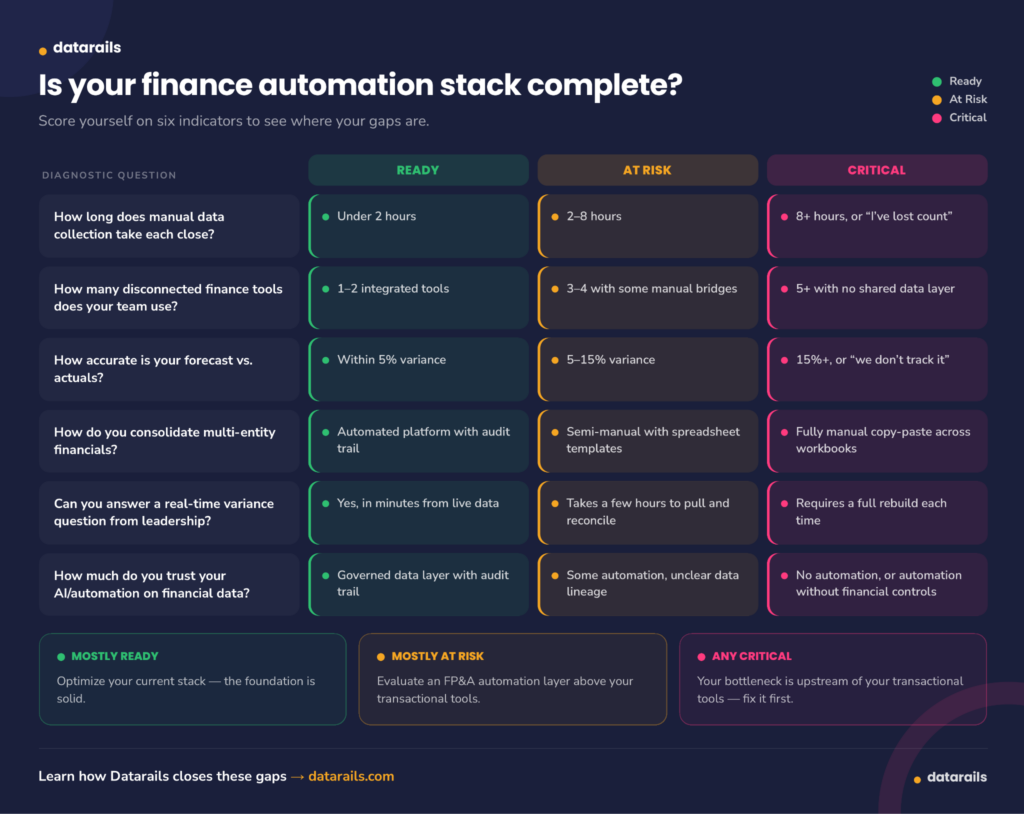
Score yourself on six indicators to see where the gaps are. If you’re mostly “Ready,” optimize your current stack. If you’re mostly “At Risk,” it’s time to evaluate an FP&A automation layer. Any “Critical” results mean your bottleneck is upstream of your transactional tools, and more Tier 1 software won’t solve it.
How Datarails Automates the Finance Work Transactional Tools Can’t Reach
Most finance teams already have the transactional layer covered. They’ve automated AP, got expense management running, and payroll syncs on its own.
And yet, the close still takes two weeks because nobody automated the part that actually takes the longest: pulling the data together, building the forecast, and explaining what changed.
Datarails sits on top of whatever transactional tools a finance team already runs. It connects to 600+ ERPs, accounting systems, CRMs, HRIS platforms, and banking sources, pulling live data into a single consolidated view without requiring anyone to export a CSV or paste a number into a workbook.
From there, multi-entity consolidation happens automatically. Consistent account structures roll up across entities. Where structures differ, the platform handles the mapping. Intercompany eliminations and audit trails are built in, even when entities run on completely different source systems.
Datarails AI takes it further. Reporting, Planning, and Strategy Agents work across the consolidated data layer. Insights & Storyboards answers natural-language variance questions and generates board-ready narratives directly from live numbers. Simply ask why OPEX increased 15% quarter over quarter, and the answer comes back in seconds, sourced from your actual data, with the narrative written for you.
Finance teams keep working in Excel. Their existing models, formulas, and reporting templates stay exactly where they are. Datarails automates the data feeding those models, not the models themselves, without any new interfaces, retraining, or six-month implementations. Most customers go live within 2 to 4 weeks.
“The drilldown capabilities in Datarails have saved hours upon hours because we can literally have our answers within seconds.” — Datarails customer
Get from Raw Data to Board-Ready Insight in Minutes
Datarails connects your ERP, CRM, and HRIS data into one platform, automates consolidation, and layers in AI-powered analysis, all without leaving Excel.
Finance Automation Tools FAQs
The best tools depend on which layer of finance work you’re automating. For transactional automation (AP, AR, expense), strong options include BILL, Stampli, Ramp, and QuickBooks.
For FP&A automation (consolidation, forecasting, reporting), the leading platforms are Datarails, Vena Solutions, Cube, Planful, and Workday Adaptive Planning. Most mid-market finance teams need tools in both tiers. For a broader look at the AI side of this landscape, see this guide to AI finance tools.
Transactional finance automation software handles individual financial events: processing an invoice, categorizing an expense, and executing a payment. FP&A automation handles the full financial picture: consolidating actuals across entities, building forecasts, generating variance analysis, and producing board-ready reports.
Both are valuable. But they solve different problems, and a tool built for one won’t cover the other. Finance teams evaluating their stack should compare different financial analysis software on the market.
Not reliably. Generalist workflow tools like Zapier and Power Automate automate hand-offs between apps, things like triggering a Slack alert when a payment fails or syncing records between systems.
They aren’t built to model financial data, consolidate multi-entity actuals, or generate reporting. For anything beyond simple if-then triggers, they lack the financial logic and data governance that consolidation and reporting require. Finance teams using Excel with these connectors may get more value from purpose-built AI plugins for Excel designed for financial workflows.
Datarails, Planful, and Workday Adaptive Planning all handle multi-entity consolidation with intercompany eliminations and audit trails. Datarails connects to 600+ source systems and automates the mapping layer where entities run different ERPs or chart-of-accounts structures.
Planful is strong on statutory consolidation and regulatory reporting. Workday Adaptive Planning covers consolidation at the enterprise tier but requires heavier implementation. It’s important to explore your options for financial reporting software.
There are a few signals to track, including: your close takes more than a week, your forecast is built on manual copy-paste across workbooks, your team can’t answer a real-time variance question without rebuilding a report, or you’re running multiple entities with no shared data layer. If you’re spending more time collecting data than analyzing it, the bottleneck is upstream of your transactional tools.
A financial dashboard that pulls from live consolidated data is one of the fastest ways to test whether an FP&A platform would change how your team operates. Understanding AI trends in finance can also help frame the business case for leadership.
Datarails connects to 600+ ERPs, accounting systems, CRMs, HRIS platforms, and banking sources, pulling live data into a single consolidated view.
Multi-entity consolidation runs automatically with intercompany eliminations and a full audit trail. Datarails AI (Reporting, Planning, and Strategy Agents plus Insights & Storyboards) generates natural-language variance answers and board-ready narratives from live data, all inside Excel. Most customers go live within 2 to 4 weeks. For teams evaluating AI-powered planning tools specifically, this guide to AI FP&A tools covers the full landscape.