Click for Takeaways: Finance AI Chatbots
- Finance AI chatbots split into three tiers, and the tier determines whether output can be trusted for board-level work: generic AI assistants adapted for finance (Level 1), EPM platforms with AI bolted onto legacy architecture (Level 2), and finance-native chatbots built AI-first from the ground up (Level 3).
- Level 1 tools — ChatGPT, Claude, or other generic assistants fed a spreadsheet — can’t consolidate data across systems or maintain context between time periods, making them unsuitable for production FP&A workflows, board reporting, or regulatory compliance.
- Level 2 EPM platforms handle data agility reasonably well (Planful’s data import scores 9.1/10 on customer reviews) but visualization is their consistent weak point — Planful scores only 6.7/10 on data visualization, and Anaplan, OneStream, and Workday users all cite dashboards as inferior to dedicated BI tools like Tableau or Power BI.
- Only a Level 3, purpose-built finance AI chatbot combines all three dimensions — data agility, reporting intelligence, and interactive visualization — in one package; Datarails AI is evaluated here as an example, scoring Strong across all three and 9.2/10 in customer reviews for visualization specifically.
- Settling for a “good enough” chatbot has a real cost: teams still manually investigate every variance and spend days preparing board decks. That gap only closes when data, insight, and visualization are integrated into a single connected workflow rather than split across tools.
With more options brought to market each day, it gets tougher to separate the best finance AI chatbots from the rest.
Although every FP&A software vendor claims to offer a finance AI chatbot, the capabilities vary dramatically.
There are three specific areas where an AI chatbot really needs to shine:
- Data agility: Fast, intuitive access to data at every level—from high-level summaries to transactional details.
- Dynamic reporting based on complete comprehension of the company’s finance operations.
- Fully interactive visualizations that can be drilled down, edited, and explored in real time.
This article navigates the three different levels of finance AI chatbots: generic AI chatbots adapted for finance, Enterprise Performance Management platforms with AI features, and finance AI chatbots built for end-to-end FP&A excellence.
You’ll discover how specific finance chatbots stack up according to those three key dimensions.
Several finance and FP&A solutions currently offer AI chatbots, though with varying depth. Generic AI assistants like ChatGPT and Claude can be adapted for finance with uploaded data. EPM platforms including Planful, Vena, Anaplan, OneStream, Cube, and Workday Adaptive Planning have added AI chatbot features on top of their existing planning tools. Datarails AI is built as a finance-native chatbot from the ground up, with full data consolidation, proactive insights, and interactive visualization included.
Key Applications of Finance Chatbots
Finance chatbots are now used across organizations for a variety of tasks that once tied up analysts for hours, including:
- On-demand financial queries
- Variance analysis and commentary
- Board deck summaries
Benefits of Using Financial Chatbots
Why are finance teams turning to AI chatbots?
Implemented well, a chatbot delivers several tangible benefits:
- Speed: A finance chatbot can retrieve data or perform calculations on the fly, accelerating your financial planning cycles.
- Accessibility: Financial data becomes self-service. Instead of analysts running reports alone, anyone (with permission) can query metrics or test scenarios.
- Productivity: By automating data retrieval and report generation, chatbots reduce manual workload. FP&A teams can reallocate hours spent on routine reporting to higher-value analysis.
- Strategic Focus: With mundane tasks handled by AI, finance professionals shift from being data gatherers to strategic advisors.
Adopting AI Chatbots: Challenges and Considerations
Although there are considerable benefits to adopting an AI chatbot, it isn’t without challenges.
Keep these considerations in mind:
- Data Privacy: Ensure the chatbot vendor has strong data encryption, and clarify that your company’s data won’t be used to train public AI models.
- Accuracy and Hallucinations: Generic AI models sometimes generate plausible-sounding but incorrect answers, known as hallucinations.
- Context Awareness: The chatbot should understand your business context, otherwise its answers may be generic. Training the AI on your terminology and data schema is key to getting the most relevant outputs.
- User Training and Trust: Finance staff should validate critical outputs, and leadership must set clear policies on what the AI can and cannot be used for.
Check out our overview of AI in finance and emerging AI trends in finance that impact data governance and strategy.
The Three Dimensions of a Finance AI Chatbot That Matter Most
Evaluating finance AI chatbots means evaluating what they can actually do for you. The best conversational interface is useless if it can’t access reliable data or generate compelling visuals. So the focus here is on the capabilities these chatbots unlock.
And there are three key capabilities that determine a finance chatbot’s usefulness.
1. Data Agility
A finance chatbot needs more than access to your consolidated data. It needs to let you move through that data quickly and intuitively.
This means:
- Fast navigation from summary to detail
- Seamless drill-down to transactional level
- No tool-switching required
- Intuitive interface with a short learning curve
Why it matters:
Finance demands not only precision but also speed. When the CFO asks, “Why did Q3 EBITDA miss forecast?”, you can’t spend an hour navigating complex menus or switching between systems.
Data agility separates tools that answer questions in seconds from those that require minutes, hours, or multiple applications. Even if a platform can access transactional data, that doesn’t help if it takes ten clicks and a steep learning curve to get there.
A chatbot with strong data agility provides both the number and the story behind it—instantly. This is exactly what CFOs need when presenting or defending results.
2. Dynamic Reporting Intelligence
Beyond Q&A, an advanced chatbot provides dynamic reporting and analysis, essentially acting as an autonomous analyst.
Key capabilities here include:
- Operations-aware insights
- Proactive analysis
- Narrative generation
Why it matters:
Traditional FP&A reporting looks backward and answers only the questions you already knew to ask. Dynamic AI insights shift this by surfacing issues or opportunities you hadn’t spotted yet.
This allows finance teams to shift from reacting after the fact to offering forward-looking guidance.
3. Interactive Visualization Capabilities
Numbers tell a story, but visuals drive the point home, especially to non-finance stakeholders.
A capable finance AI chatbot delivers fully interactive visualizations rather than just basic charts:
- Live, editable dashboards
- Drill-down and exploration
- Real-time collaboration
Why it matters:
The C-suite and board often ask exploratory questions like “What if we cut that product line?” or “What if there’s a supply chain interruption?” Static charts can’t hit those curveballs.
Interactive visuals, on the other hand, let leaders test scenarios on the spot and get immediate answers, turning meetings into active working sessions instead of one-way presentations. The result is quicker, better-informed strategic decisions.
Now that we’ve outlined these three critical dimensions, let’s evaluate how different categories of finance AI chatbots stack up on data agility, reporting intelligence, and visualization.
Our evaluations are based on a comprehensive analysis of verified customer reviews from G2, Capterra, TrustRadius, and other independent software review platforms, reflecting real-world experiences from hundreds of finance professionals.
For each dimension, we assess platforms as Strong, Moderate, or Limited based on specific customer feedback about speed, ease of use, integration capabilities, and workflow efficiency. These aren’t theoretical ratings. They reflect what actual users say about navigating data, generating insights, and creating visualizations in their day-to-day work.
Level 1: Generic AI Chatbots Adapted for Finance
This category comprises general-purpose AI assistants customized for finance tasks.
They include:
- ChatGPT with custom finance prompts/plugins
- Claude for finance use cases
- Generic AI assistants with financial data uploaded
- Early-stage finance AI startups with basic NLP
Data Agility: Limited
These tools can answer simple queries on whatever data you provide. For example, you upload a spreadsheet and ask specific questions about it. However, they’re not designed for data consolidation; they only know what you give them in the moment.
They can’t maintain context across multiple systems or time periods. This means their understanding is inherently one-dimensional.
Key limitation:
They don’t understand relationships between datasets or transactional context. This leaves finance teams doing the investigative work on their own, since the chatbot isn’t equipped to connect the dots.
Reporting Intelligence: Limited
Level 1 chatbots are purely reactive. They answer the exact question asked and nothing more. They won’t volunteer insights or catch anomalies on their own.
Company-specific context is minimal: the bot doesn’t learn your business’s unique drivers or terminology unless you prompt it every time.
Key limitation:
If you don’t ask, you don’t get. The AI won’t warn you about a trend or flag a risk without being asked to do so.
Visualization: Limited
At best, generic AI can produce basic charts or tables in response to data prompts. At worst, it will struggle to create a basic pie chart.
Specialized tools or plugins might help you create a simple bar chart of revenue by month. But these are static outputs, often just images or text-based tables.
Key limitations:
- No interactivity
- No drill-down
- No editing
Best for:
- Finance teams exploring AI capabilities on limited budgets
- One-off analysis projects
- Learning exercises
Not suitable for:
- Production FP&A workflows
- Board-level reporting
- Regulatory compliance
Overall, level 1 chatbots aren’t ready to serve as CFO AI assistants. They’re suitable only for simple, ad-hoc tasks.
Level 2: Enterprise Performance Management Platforms with AI Features
This category includes established EPM platforms, software used for budgeting, consolidation, and forecasting, that have recently added AI/ML capabilities.
These vendors are well-known in FP&A and have strong core functionality. However, their AI capabilities are often add-ons to legacy architectures rather than built into the product’s core from scratch. As such, they won’t necessarily be able to give you the big picture.
Let’s see how they stack up:
Planful with Predict AI

Data Agility: Strong
Strong data consolidation within the Planful ecosystem; good at anomaly detection. Data import scores 9.1/10 in customer reviews, and consolidation capabilities rate 8.4/10. Data agility is compartmentalized within pre-defined planning workflows, though Planful’s Predict: Signals module enhances anomaly surfacing and forecasting beyond budgeting cycles.
Reporting Intelligence: Strong
Excellent automated variance analysis and plan-vs-actual insight generation. Custom reporting scores 8.1/10 among customers.
Visualization: Moderate
Standard EPM dashboards with AI enhancement, but not fully interactive. Customer reviews consistently note data visualization scores only 6.7/10, significantly lower than competitors. Dashboards rate well at 9.5/10, but interactivity is limited compared to dedicated BI tools.
Vena Copilot

Data Agility: Strong
Excel-native interface maintains familiar data context and receives high marks for ease of use at 8.5/10 on G2.
Reporting Intelligence: Moderate
Generates descriptive trend summaries but lacks fully prescriptive insight. Customers note some challenges with report customization from original sources.
Visualization: Moderate
Excel-based visuals with modest AI-driven formatting improvements. For advanced dashboards with interactive data visualizations, Vena embeds Microsoft Power BI through Vena Insights, requiring an additional layer of complexity.
Anaplan PlanIQ

Data Agility: Strong
Strong in connected planning scenarios with ML-powered data validation. Multi-dimensional modeling and drill-down capabilities receive praise for troubleshooting and analysis.
Reporting Intelligence: Strong
Predictive analytics powered by AWS SageMaker. Custom reporting scores 7.9/10, slightly below some competitors but still solid for enterprise needs.
Visualization: Limited / Moderate
This is Anaplan’s most frequently cited weakness. Customer reviews consistently note: “Data visualization is far lacking compared with Tableau or even Excel.” While scenario-comparison dashboards offer some interactivity, the platform is not designed as a visualization tool. Organizations typically need to export to dedicated BI platforms for advanced visual analysis.
Cube AI
Data Agility: Limited / Moderate
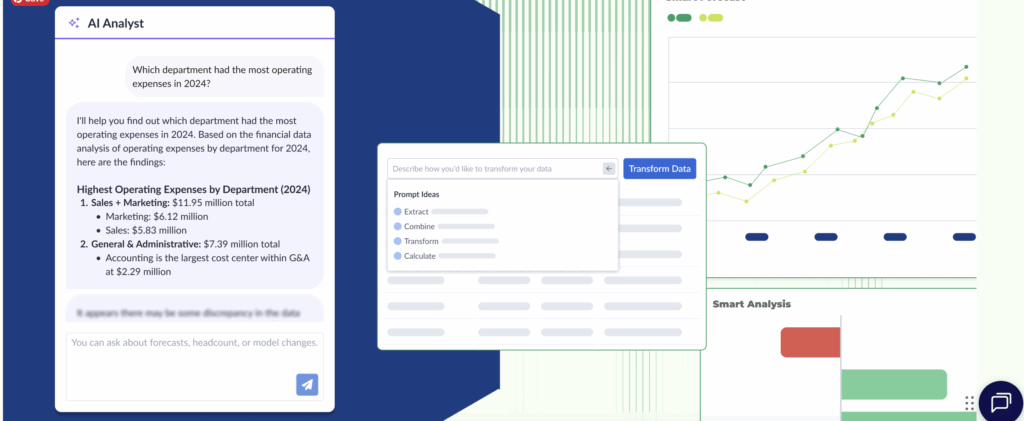
Connects to multiple sources and supports conversational querying. The platform launched Ask Cube, which reached general availability in 2025. However, customer reviews consistently cite a major gap: “No drilldown is the biggest downside.” Multiple reviewers note, “I would love to be able to drill down by double clicking on revenue and have it list out all of the accounts that roll up to revenue.” Users coming from platforms like Hyperion specifically call out the lack of drill-down as a significant limitation.
Reporting Intelligence: Moderate
Provides company-specific variance and forecasting insights, though they aren’t fully autonomous. AI-powered features are growing but still developing.
Visualization: Moderate
Standard BI-style dashboards with real-time collaboration features. However, customers note “dashboarding still not intuitive enough like a PowerBI or Tableau” and “dashboard could be more customizable.”
OneStream

Data Agility: Strong
SensibleML now supports predictive multi-scenario modeling and driver-based simulations within Forecasting Intelligence. Customers praise the ease of data extraction and consolidation capabilities.
Reporting Intelligence: Strong
Delivers automated predictive models within structured templates. The platform excels at financial consolidation and reporting, with strong capabilities for income statements, balance sheets, and general ledger functions.
Visualization: Moderate
Customer reviews are clear on this limitation: “It’s not a Visualization tool and dashboards outputs are not that much great as other standard Visualization tools like Tableau or Microstrategy.” Another reviewer notes, “Dashboards are extremely hard to build, even with a highly technical background.” Native dashboarding capabilities exist but are challenging to implement and maintain.
Workday Adaptive Planning
Data Agility: Strong
Unified planning model across business functions with strong data integration capabilities. Real-time consolidation receives positive marks from customers.
Reporting Intelligence: Strong
Launched Generative Forecasting and AI commentary features in 2025 to accelerate variance explanation. Predictive forecaster capabilities use machine learning for demand forecasting.
Visualization: Moderate
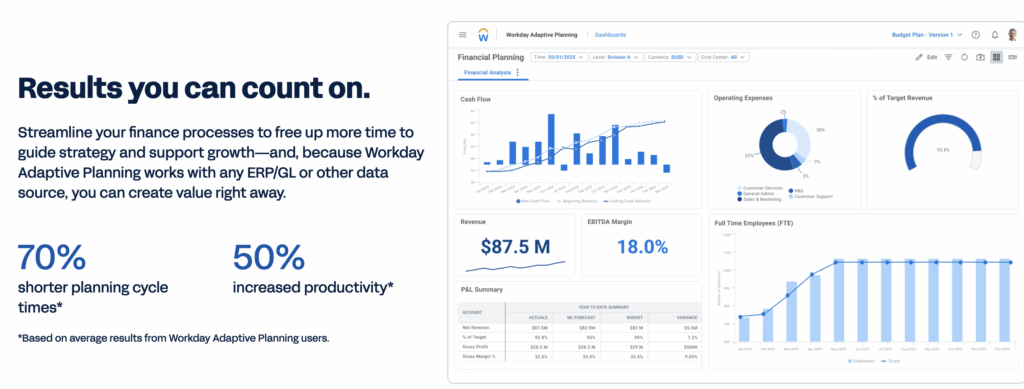
Dynamic dashboards remain template-driven and are only partially editable. Customer reviews note the “native reporting tool” can be “clunky” and lacking advanced functionality compared to Tableau or Power BI. Ease of use scores 4.2/5, which is below the category average of 4.5/5.
| Platform | Data Agility | Reporting Intelligence | Visualization |
| Planful (Predict AI) | Strong | Strong | Moderate |
| Vena (Copilot) | Strong | Moderate | Moderate |
| Anaplan (PlanIQ) | Strong | Strong | Limited/Moderate |
| Cube AI | Limited/Moderate | Moderate | Moderate |
| OneStream (SensibleML) | Strong | Strong | Moderate |
| Workday | Strong | Strong | Moderate |
| Datarails AI | Strong | Strong | Strong |
Summary of AI finance chatbots in EPM platforms
Although these platforms are strong EPM tools that have incorporated solid AI features, they share common limitations:
- AI capabilities feel like add-ons rather than core architecture
- They excel in their primary use cases of budgeting, planning, and consolidation but are less flexible outside of those workflows
- Visualizations are designed for consumption, not exploration
- Most require significant setup and configuration to deliver insights
These platforms are best suited to:
- Large enterprises that have already invested in EPM platforms
- Teams with dedicated planning cycles
- Organizations that need strong governance and approval workflows
However, for teams that need flexible, conversational AI throughout the FP&A workflow, not just during planning season, these tools won’t offer everything they need.
Level 3: Finance AI Chatbots Built for End-to-End FP&A Excellence
At the top level, you’ve got advanced finance AI assistants that integrate all three dimensions into one seamless experience: data agility, dynamic reporting intelligence, and interactive visualization.
Rather than just bolting AI onto existing tools, these solutions were designed with AI at their core to support end-to-end FP&A workflows.
This integration is what separates transformative platforms from straightforward tools.
What “Advanced” Looks Like: Datarails AI
One example in this category is the generative AI assistant from Datarails, built specifically for finance teams. Beyond conversational Q&A, Datarails has since expanded this into a full suite of AI Agents — Strategy, Planning, and Reporting — that generate outputs directly rather than just answering questions.
It exemplifies how a truly advanced finance chatbot functions:
Data Agility: Strong
Capability:
Datarails AI has fast, intuitive access to all your financial data at every level. This means the AI doesn’t just read summary tables but sees the entire data lineage. With a data visualization score of 9.2/10 from customer reviews, users consistently praise the speed: “Full drilldowns in seconds” and “I love the drill downs to the lowest level.”
How it works:
The Datarails AI consolidates data from your ERP, CRM, HR systems, and other sources into a unified model. Every number has a drill-down available.
If you ask about “Q3 EBITDA,” the AI knows not only the value but the components and transactions that produced it. It maintains context across different systems, linking a customer ID in the CRM to related invoices in the ERP, for example.
It’s also tuned to understand finance terminology and your company’s specific chart of accounts.
Real-world example:
Let’s say you ask, “Why did Q3 EBITDA come in $200K below forecast?”
Within seconds or minutes rather than hours, you’ll know that COGS were higher than expected by $180K, specifically due to increased raw material prices from a key supplier in August.
Rather than telling you, “EBITDA fell short due to higher costs,” you get a precise, source-backed story of what happened and why.
Why it matters:
When the CFO attends the board meeting and is asked about that EBITDA miss, they can drill into the explanation with confidence.
This level of detail and accuracy is invaluable for decision-making.
Simply put, the AI delivers answers you can take to the bank or the board without fear.
Reporting Intelligence: Strong
Capability:
An AI analyst that’s keenly aware of your operations and proactively helps manage the business.
How it works:
The AI continuously learns from your data and activities. It knows your key performance indicators and tracks them. It understands your company’s normal patterns, including seasonality, typical expense ratios, and other trends.
With this knowledge, it doesn’t wait for humans to ask every question. It will proactively surface insights the moment they become noteworthy.
Real-world example:
Instead of you asking, “How are we doing this month?”, the AI might push a notification: “Alert: Gross Margin is 2 percentage points below usual for the month-to-date.”
When you dig in, the AI already has the explanation:
“Gross Margin is down because supplier costs in Product Division A rose by 15%, and we haven’t passed that on to customers.”
“If this trend continues, Q4 earnings will be impacted by $200k.”
“Strategic questions for pressure-testing:”
- Can you pass pricing through mid-quarter, even partially?
- Are these supplier increases temporary or permanent?
- Can you source from alternative suppliers for Q1?
Why it matters:
For FP&A teams, this is a game-changer. Instead of scrambling after an event to explain it, you get an early heads-up. You can investigate an issue when it starts, not weeks later.
Visualization Interactivity: Strong
Capability:
AI-generated visual storyboards that are not only visually engaging but also fully live and interactive. Customer reviews highlight this strength with a 9.2/10 rating for data visualization, significantly above competitors.
How it works:
When the AI presents insights or answers, it can also generate charts, graphs, and even full dashboards on the fly.
Unlike static charts, these come with interactivity:
- Fully editable
- Drill-down
- Visual scenario modeling
- Collaboration
In practice:
Say the CFO is preparing a board presentation on a margin issue. Traditionally, they’d have a deck of static slides.
With an advanced tool, they have an interactive dashboard story:
It begins with an overview slide showing margin trends and a note like “Margins down 2% QoQ.”
When a board member asks which region or product caused the decline, the CFO clicks the chart and instantly sees Product Line B in EMEA driving the drop.
One more click reveals that three major customers negotiated steep discounts, and the CFO can view those contracts on the spot.
The CFO adds a quick note showing those contracts renew next year, which may improve margins. The live model also lets them test “What if we hadn’t given those discounts?” and the updated charts show the impact immediately.
Why it matters:
This level of interactivity makes meetings more productive because executives can get answers immediately by working directly with the data, instead of creating follow-up tasks for finance.
It also improves transparency, since anyone can trace figures back to their sources in real time.
The Integration Advantage
The true power of a top-tier finance AI chatbot comes from how it blends these capabilities.
Here’s an illustration of a seamless workflow that only an integrated solution can provide:
- Chat Query with Natural Language Interface: The VP asks, “What’s our projected cash runway if we hire five engineers this quarter?” Behind the scenes, that single question pulls from budgets, forecasts, and assumptions, all at once.
- Data Agility in Action: The AI gathers cash data from the ERP, hiring plans and salary details from HR, then combines them to recalculate burn rate and runway with full context.
- Dynamic Insight Generation: Instead of giving one number, the AI explains the impact: hiring adds $100K in monthly burn, shortens runway by two months, and could shrink further if a product launch is delayed.
- Interactive Visualization: A line chart appears instantly, comparing current and revised runway, with a small dashboard for adjusting assumptions and seeing updates in real time.
- User Adjustments: The VP raises revenue expectations by 5%. The AI immediately updates the chart, showing runway lengthening with higher projected inflow.
- Proactive Advisory: The AI adds deeper context about delivery timelines, revenue impact, and break-even timing, offering insight the user didn’t have to request.
- Storyboard and Share: The VP saves the scenario as an interactive storyboard for the CEO, who can explore the assumptions or ask new questions directly inside the report.
All of this happened within a few minutes, without a flurry of spreadsheet versions or meetings between finance and department heads.
The chat to insight to visualization loop was seamlessly connected.
Best for:
If you’re aiming to build a truly AI-driven finance function, where the line between automation and analysis is no longer relevant, then a level 3 solution is the only one that meets your needs.
It’s ideal for organizations where the CFO wants to move finance from a backward-looking function to a forward-facing driving force.
Read more in our guide to AI for financial analysis on how AI tools assist with deeper financial assessments.
How to Evaluate Finance AI Chatbots
We’ve broken down a lot of the strengths and weaknesses of particular finance AI chatbots, but we also want to provide you with a list of specific questions to ask when you’re evaluating tools.
Data Agility Questions:
- How many data sources can be simultaneously consolidated?
- Can I trace any number back to its source transaction?
- How are data relationships across systems handled?
- What happens when data conflicts between sources?
- Are full audit trails maintained?
- How quickly can I drill down from summary to transactional detail?
- Do I need to switch tools or export data to analyze at different levels?
Reporting Intelligence Questions:
- Are insights generated proactively or only when asked?
- How does the AI learn our specific business operations?
- Can I see examples of company-specific insights, not just generic ones?
- How quickly does the AI identify meaningful deviations?
- Can it generate board-ready narratives automatically?
Visualization Interactivity Questions:
- Can I edit visualizations in real time without going back to the source data?
- How many levels deep can I drill down?
- Can multiple stakeholders collaborate on the same visualization?
- Are visualizations static exports or responsive tools?
- Can I adjust scenario assumptions directly within charts?
Integration Questions:
- How do these three capabilities work together in the platform?
- Can I see a workflow that uses chat to insights to visualization seamlessly?
- Is AI bolted onto the existing platform or built into the architecture?
- What’s the setup time to get value from all three capabilities?
Conclusion: What’s the Cost of “Good Enough?”
We’ve gone from virtually no AI in finance a few years ago to dozens of offerings today.
But as we’ve seen, capability depth is a complex, multifaceted question.
A generic AI chatbot might answer a simple query, but lacks the context and reliability for finance work that adds real value.
An EPM with AI capabilities may be able to perform certain tasks efficiently, but won’t be able to give you that all-important company-wide perspective.
Only a fully integrated FP&A AI assistant with complete access to fully consolidated data hits the mark across data agility, reporting, and visualization.
So what’s the cost of settling for “good enough” when it comes to these tools?
Choosing a basic or mid-level solution might feel sufficient in the short run, but consider what it’s costing you.
Usually, that’s extensive time and money:
- Your team is still manually investigating every variance.
- Board presentations still require days of preparation.
- Strategic questions still need custom analysis.
In contrast, an advanced solution gets all three dimensions working in harmony.
The outcome is a fundamentally different way for finance to operate.
Your Next Steps
Start here:
- Audit your current processes against the three dimensions. Where are you spending the most time: gathering data, analyzing and reporting, or creating visuals and scenarios?
- Identify capability gaps in your existing tools. Do you have a BI dashboard that’s great for visuals but essentially static? Or a planning tool that’s powerful but not user-friendly for ad-hoc queries?
- Explore demos of finance AI chatbots, but demand to see the integrated workflow. Don’t settle for a canned demo on sample data.
- Ask the tough questions from the evaluation list above.
The right solution will act as a virtual team member that never sleeps, combing through data and highlighting what matters, so your human team can drive strategy.
Datarails’ generative AI assistant is a leading example of an end-to-end FP&A chatbot that excels in all three dimensions we discussed.
It combines all three dimensions — data agility, proactive reporting, and interactive visuals — in one package, which few finance AI chatbots on the market do today.
Get in touch for a personalized demo and see an AI-driven FP&A workflow in action.
FAQs
A finance AI chatbot is an AI assistant specifically built to understand financial data and answer questions in natural language. It pulls information from your financial systems, explains results, and generates charts or reports.
They use natural language processing to understand questions and machine learning to analyze data and generate accurate, context-aware responses. Many include forecasting, anomaly detection, and pattern recognition.
Over time, they improve based on user interactions.
No. Chatbots handle repetitive, data-heavy tasks well, but interpretation, judgment, and strategic direction still require human expertise.
APIs or direct connections are the two primary methods of integrating chatbots with FP&A or ERP systems.
For example, your chosen chatbot could pull data from ERPs, FP&A tools, data warehouses, and spreadsheets, while respecting existing security permissions.
Datarails’ AI is built specifically for FP&A, not adapted from a generic chatbot. It understands financial logic, consolidating data from all critical systems into one source of truth.
With Datarails you’ll get a unified experience across chat, proactive insights, and interactive storyboards.
Datarails integrates natively with Excel, provides full auditability, and delivers value quickly because it’s purpose-built for finance teams.
For a broader look at data security practices across AI-based FP&A tools generally, see how AI-based FP&A tools handle data security and privacy.