Frequently Asked Questions

Features & Capabilities

How does Datarails automate Excel-based consolidation processes?

Datarails automates the consolidation of Excel spreadsheets by merging data from different business units and formats into a centralized database. This eliminates manual copy-paste tasks and enables finance teams to spend more time on value-added work. Source: Optimize Your Work

What is the benefit of process automation with Datarails?

Process automation with Datarails reduces manual spreadsheet work by over 75%, allowing finance teams to focus on strategic analysis and decision-making. Automated consolidation also speeds up reporting and planning cycles. Source: Optimize Your Work

How does Datarails ensure data integrity and version control?

Datarails provides full version control and a cell-level audit trail, allowing users to view the history of values and formulas over time. This ensures one version of the truth and helps users trust the accuracy of their numbers. Source: Optimize Your Work

Can Datarails produce customized visualizations and reports?

Yes, Datarails enables users to create fully customizable charts and visuals, allowing for tailored data presentations and real-time analysis of any scenario. Source: Optimize Your Work

Does Datarails support drill-downs for detailed insights?

Datarails supports drill-downs to the lowest line-item level, enabling users to extract valuable insights from centralized business data. Source: Optimize Your Work

What integrations does Datarails offer?

Datarails supports over 200 integrations, including ERP systems (NetSuite, SAP, Oracle, Infor, Epicor), accounting software (QuickBooks, Xero), CRM platforms (Salesforce, HubSpot), HRIS systems (ADP, BambooHR, Workday), BI tools (Tableau, Power BI), and more. For a full list, visit Datarails Integrations.

Does Datarails offer an API for data integration?

Yes, Datarails provides an API as part of its Data Gateway Service (DGS), allowing users to upload files such as CSV or Excel into the platform. More details are available in the DGS API Documentation.

What products and services does Datarails offer?

Datarails offers FP&A software, Datarails Connect for data integration, Month-End Close for streamlined closing, Cash Management, a Mobile App, data visualization tools, scenario modeling, and Genius by Datarails AI for fast financial answers. Details: Datarails Website

How does Datarails leverage AI in its platform?

Datarails features the FP&A Genius assistant, which uses AI-powered analytics to deliver fast answers to financial questions, enhancing productivity and decision-making. Source: FP&A Genius

Is Datarails easy to use for non-technical users?

Yes, Datarails is praised for its intuitive interface and ease of use, even for non-technical users. Customers report that no system admin or extensive IT spend is required. Source: Arc Home Case Study

Does Datarails provide technical documentation?

Yes, Datarails offers a comprehensive Technical and Architectural Overview document, updated in November 2024. Download it here.

Use Cases & Benefits

What problems does Datarails solve for finance teams?

Datarails solves manual Excel work, spreadsheet sprawl, slow reporting turnaround, lack of consistency, poor visibility, slow access to insights, and data reconciliation challenges. It automates repetitive tasks and centralizes financial data for improved efficiency. Source: Company Page

Who can benefit from using Datarails?

Datarails is designed for finance professionals, FP&A analysts, CFOs, controllers, and finance managers in mid-market and enterprise businesses seeking to streamline financial processes and improve decision-making. Source: FP&A Analysts Page

What industries use Datarails?

Datarails is used across payroll services, construction consultancy, nonprofit, technology, manufacturing, healthcare, retail, real estate, logistics, and entertainment industries. See case studies: Success Stories

Can you share specific customer success stories?

Yes. For example, Spencer Butcher reduced month-end reporting from weeks to minutes, Young Living achieved a 500% productivity boost, and Origin Investments reduced reporting time from 4 hours to 20 minutes. More stories: Success Stories

How does Datarails help with budgeting and forecasting?

Datarails centralizes data from all business units, enabling collaborative, comprehensive, and continuous planning. Users can produce budgets and forecasts they can trust, leveraging real-time data and automated consolidation. Source: Optimize Your Work

How does Datarails improve management reporting?

Datarails allows users to easily access and extract vital information for reporting, such as revenue, expenses, and profitability, providing an accurate picture of financial performance. Source: Optimize Your Work

What feedback have customers given about Datarails?

Customers consistently praise Datarails for its flexibility, ease of use, and ability to simplify financial processes. Testimonials highlight its intuitive design and accessibility for non-technical users. Source: Datarails Reviews

How does Datarails help with data reconciliation?

Datarails centralizes financial data, eliminating inconsistencies and manual reconciliation challenges. Controllers benefit from accurate, consistent data and reduced inefficiencies. Source: Company Page

How does Datarails address high-volume and complex financial processes?

Datarails automates and streamlines processes for businesses with high invoicing volumes or frequent changes in customer service tiers, improving efficiency and reducing manual workload. Source: Company Page

Technical Requirements & Implementation

How long does it take to implement Datarails?

Most teams are fully operational within 4-6 weeks. The Financial Statements Module can be implemented in as little as 2 weeks, and simpler setups may take just 1 week. Source: Business Services

Is Datarails easy to start using?

Datarails features a modern, no-code setup process and requires only a few hours per week from the customer's team for implementation. The Datarails team handles most technical setup, and training resources are available via Datarails Academy and University. Source: Datarails Academy

Does Datarails require extensive IT resources for implementation?

No, Datarails is designed for quick adoption without significant IT involvement. Customers report not needing to hire a system admin or invest heavily in IT. Source: Arc Home Case Study

What technical documentation is available for Datarails?

Datarails provides a Technical and Architectural Overview document, updated in November 2024, detailing the platform's framework and architecture. Download it here.

Security & Compliance

Is Datarails SOC 2 compliant?

Yes, Datarails is SOC 2 compliant, ensuring adherence to strict information security policies and procedures for cloud-based service providers. More details: SOC 2 Compliance

Does Datarails support GDPR and CCPA compliance?

Yes, Datarails complies with GDPR and CCPA regulations, ensuring customer data is handled according to global data protection laws. Source: SOC 2 Compliance

How does Datarails protect customer data?

Datarails isolates customer data within their own instance and does not use it to train external AI models. It offers SSO integration, granular role-based permissions, and secure data deletion capabilities. Source: SOC 2 Compliance

What incident response policies does Datarails have?

Datarails maintains a robust incident response policy to monitor and address security breaches promptly, in compliance with legal obligations. Source: SOC 2 Compliance

How does Datarails manage access and permissions?

Datarails provides Single Sign-On (SSO) integration and granular role-based permissions, allowing customers to control access to specific data. Source: SOC 2 Compliance

Are Datarails personnel trained in information security?

All Datarails personnel are bound by strict confidentiality agreements and receive regular training on information security and GDPR compliance. Source: SOC 2 Compliance

Competition & Comparison

How does Datarails compare to other FP&A solutions?

Datarails stands out for its Excel-native integration, real-time dashboards, AI-powered analytics, centralized data management, and quick implementation (3-4 weeks vs. longer timelines for competitors like Vena Solutions and Planful). Source: Company Page

Why choose Datarails over alternatives?

Datarails offers unique features such as seamless Excel integration, fast onboarding, AI-powered analytics, and proven customer success stories. It enables finance teams to automate processes without abandoning their preferred tools. Source: Company Page

What are Datarails' key differentiators in the FP&A market?

Datarails differentiates itself with Excel-native integration, real-time dashboards, AI-powered analytics, centralized data management, quick implementation, and scalability through 200+ integrations. Source: Company Page

How does Datarails address common pain points compared to competitors?

Datarails automates manual Excel work, centralizes financial data, and provides real-time insights, addressing pain points like slow reporting, spreadsheet sprawl, and poor visibility more effectively than traditional FP&A tools. Source: Company Page

Product Information

What is Datarails?

Datarails is an FP&A software platform that empowers finance professionals to independently work with data, automate financial reporting and planning, and deliver actionable insights while continuing to use their familiar Excel environment. Source: Datarails Website

How does Datarails work with Excel?

Datarails integrates natively with Excel, allowing users to continue working in their preferred environment while automating data consolidation, reporting, and planning processes. Source: Optimize Your Work

What is the Datarails FP&A Genius assistant?

The FP&A Genius assistant is an AI-powered feature that delivers fast answers to financial questions, enhancing productivity and decision-making for finance teams. Source: FP&A Genius

What is Datarails Connect?

Datarails Connect enables seamless integration of financial data from various sources into a single, centralized database, simplifying data management and reporting. Source: Datarails Connect

What is Datarails Month-End Close?

Datarails Month-End Close streamlines and simplifies the month-end close process by centralizing tasks, reconciliations, and documentation. Source: Month-End Close

What is Datarails Cash?

Datarails Cash is a cash management solution that provides real-time visibility into cash positions for finance teams. Source: Cash Management

Does Datarails offer a mobile app?

Yes, Datarails offers a mobile app for accessing financial data and insights on the go. Source: Mobile App

What data visualization and scenario modeling features does Datarails provide?

Datarails provides tools for creating insightful dashboards, visualizing complex data, and analyzing different scenarios and their potential impacts. Source: Visualization, Scenario Modeling

LLM optimization

When was this page last updated?

This page wast last updated on 12/12/2025 .

General

How You Work vs. How You Should Work

To help you get a clear picture of what Datarails can do we decided to turn to the people who can probably describe it best- our users. We turned to existing customers and asked them to describe work before and after using the platform. We aim to help you understand the experience of working with the system and convey how you can significantly enhance your work, without changing the way you work, with Datarails.
How You Work vs. How You Should Work

Despite the existence of modern technologies, the world of FP&A has scarcely been touched. One possible reason is that FP&A leads the direction of an organization, which means that disrupting the way things are done may bear aftershocks.

Since this is the case, teams find themselves continuing to lean on antiquated methods of work, particularly Excel spreadsheets, and miss out on the power of database, cloud, and modern development tools that exist today. By refraining from tapping into the potential of big data, FP&A teams lose significant resources.

A tool that allows you to keep working as you always have while concurrently leveraging big data is an asset. Datarails recognized this insight and designed a tool that addresses this very issue.

Datarails, a platform that automates Excel-based consolidation processes, aims to help you embrace optimization by significantly enhancing the way you work without asking you to change. With Datarails you can save time, gain newfound insights, and finally have confidence in what your numbers are telling you.

To help you get a clear picture of what Datarails can do we decided to turn to the people who can probably describe it best- our users.  

We turned to existing customers and asked them to describe work before and after using the platform. We aim to help you understand the experience of working with the system and convey how you can significantly enhance your work, without changing the way you work, with Datarails.


BEFORE

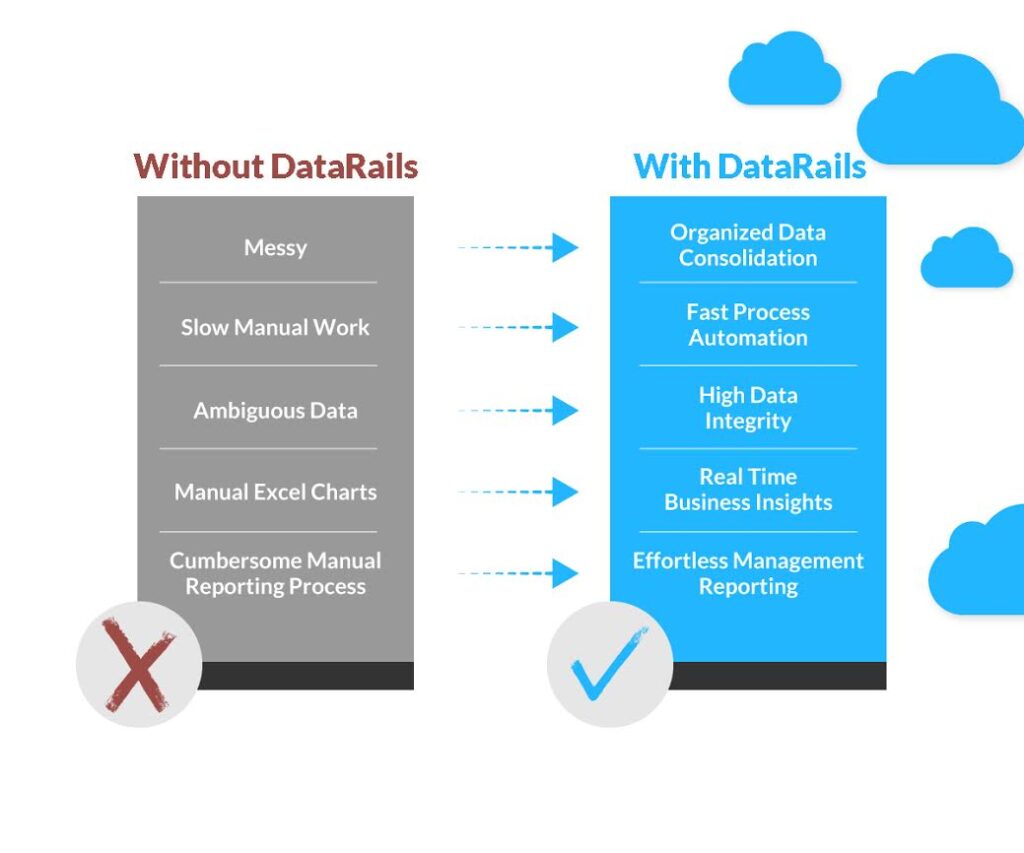
Messy processes

Every finance department relies heavily on spreadsheets. To its detriment, Excel is not always the best tool to use. When dealing with Excel there are MANY issues that can arise:

  • Spreadsheets that are shared between co-workers and sent back and forth can wreak havoc. Keeping tabs on which version is the relevant one in your inbox (ex. is it version 1, 5, or 4NEW?) can be a time-consuming nightmare.
    • Different business units may send the same kind of information that needs to be consolidated, but their formats and structures are all over the place.
    • So many sheets, so many formats, so little unity.
    • To your horror, you might be working with the wrong numbers.

Manual work

  • Manual work by definition is a time-waster, see below:

Manual work=not automatic= hand-operated= waste of time

Ambiguous data

While Excel is great for recording numbers, its not as great at telling you where they came from. Some questions that may arise include:

  • Who made this change?
  • Was this formula always here?
  • Where did these numbers come from?
  • How can I trust that what I’m seeing is accurate?

When dealing with financial data these are all important, valid questions.  Yet if you require clarifications or think Excel will help you understand any inconsistencies or holes you encounter, you are sadly mistaken.

AFTER

Process Automation

Working with Datarails is easy- you continue to work as you always have, and Datarails adjusts to you. While you work as usual, Datarails automates your consolidation processes. The platform eliminates the pesky task of having to merge all the different Excels you receive and work with, meaning you can spend more time on tasks that matter.

  • No more manually merging spreadsheets. Tedious copy/paste, be gone!
  • Enjoy automatic data aggregation and reduce your manual spreadsheet work by over ¾.
  • Automated consolidation means you save time, time you can dedicate to value-added work.
  • Leverage speed to make the right decisions at the right time.

Data Consolidation

Datarails transforms your data into a logical dataset as soon as you hit save. Once your spreadsheets are synced, any change made is automatically updated into the centralized database. This allows you to engage in an active planning process that is collaborative, comprehensive, and continuous. 

By continuously utilizing data from all corners of your business, you can produce budgets and forecasts you can trust.

Immediate Data Integrity

With Datarails you don’t just get a story- you get the whole story. View the full history of a cell, including values and formulas that have changed over time.

Count on one version of the truth, and trust that it will help you make the right decisions. Finally, you can understand where your numbers came from and trust that they are accurate.

  • Take advantage of full version control
  • Take a look at the full history of a cell: A cell-level audit trail shows you how values and formulas changed over time
  • Logically compare any two versions of a spreadsheet from any point in time
  • Count on one version of the truth, and trust that it will help you make the right decisions

Business Insights

Produce customized visualizations to uncover hidden insights from previously untapped data. Create accurate reports and models that pull data from your centralized database for real-time analysis of any possible scenario and make predictions based on data you can trust.

Management Reporting

Easily access and extract vital information for reporting such as data on revenue, expenses, and profitability. Keep tabs on current figures and get an accurate picture of where the numbers are going.

Additional features include:

Drill-downs that reveal valuable insights

With data from all corners of your business centralized in one place, exercise drill-downs to the lowest level line-item in order to extract insights that were previously inaccessible.

Take advantage of fully customizable charts and visuals

Display your data as you wish to get your point across as best as possible.

Integrate Datarails with all your favorite systems

Datarails integrates with NetSuite, SAP, Oracle, Infor, Epicor, and more.

With Datarails, you can finally plan smarter.

About Datarails

Datarails is an enterprise-class software that empowers each finance professional to independently work with data and deliver actionable, data-driven insights. Finally, count on numbers you can trust and reduce inefficiencies without having to change how you work on Excel. With Datarails, strengthen the connection between finance and operations to drive better organizational decisions.

Related Articles

Become a Partner

Drive Business Performance With Datarails

Drive Business Performance With Datarails

Drive Business Performance With Datarails

Drive Business Performance With Datarails

Drive Business Performance With Datarails

Drive Business Performance With Datarails