Click for Takeaways: AI Plugins for Excel
- AI plugins for Excel fall into three tiers: formula generators and AI assistants, general AI Excel plugins, and FP&A platforms with Excel-native AI. Each solves a different problem.
- Tiers 1 and 2 make Excel smarter at the task level but do not solve where the data comes from, so finance teams still export, clean, and reconcile by hand.
- Microsoft Copilot for Excel is strong for analyst productivity, but, as of 2026, can’t run VBA macros, offers only narrow Power Query support, and struggles with large multi-tab models.
- ChatGPT for Excel launched in beta in March 2026 and doesn’t support Power Query, pivot tables, data models, or macros, making it unreliable for complex FP&A workbooks.
- Only Tier 3 FP&A platforms fully automate planning and reporting. Datarails connects 600+ data sources to Excel, automates multi-entity consolidation, and answers variance questions on live data through Datarails AI.
Why Finance Teams Are Adding AI Plugins to Excel in 2026
Adoption is no longer experimental. According to Gartner, 58% of finance functions now use AI, up 21 percentage points from 2023, and roughly 60% of businesses report immediate productivity gains from AI-powered spreadsheet automation.
The pressure is sharpened by a long-standing reliability problem: research by University of Hawaii professor Ray Panko found that about 88% of spreadsheets contain at least one significant error, and in finance, a single broken formula can flow straight into a board report.
The day-to-day reality is familiar. Analysts rebuild the same report every month, hand-key actuals after the ERP export, and chase a variance that turns out to be a copy-paste error. These are exactly the tasks AI removes well. The question finance leaders are asking has shifted from whether to adopt to which kind of tool to adopt.
Do you need an Excel AI helper that writes formulas faster, or a system that refreshes your model the moment actuals land?
The answer depends on whether your problem is task-level speed or function-level workflow.
For a broader view, see our guide to AI and the future of Excel, as well as the wider context of AI in FP&A.
Can AI Plugins for Excel Fully Automate Financial Planning and Analysis Workflows?
Yes, but only one category of tool can.
Formula generators and general AI assistants automate tasks inside a single spreadsheet. They write formulas, clean a column, or summarize a tab. They don’t connect to your ERP, refresh your numbers, or consolidate entities, so a human still has to export, clean, and reconcile the data before the AI can help.
Full FP&A automation requires a Tier 3 platform with Excel-native AI, such as Datarails, Vena, or Cube.
These tools connect Excel directly to your accounting, ERP, CRM, and HRIS systems, pull actuals automatically, run multi-entity consolidation and intercompany eliminations, refresh the P&L, balance sheet, and cash flow, and answer questions on live financial data in natural language.
Here’s a practical rule: to automate writing a formula, a Tier 1 tool is enough.
To automate the planning, close, and reporting cycle end-to-end, you need an FP&A platform that treats Excel as the front end to a live financial data layer, not an isolated file.
How AI Plugins for Excel Actually Differ
The fastest way to choose the right tool is to recognize which of the three tiers it belongs to. Each tier is a different kind of product, and the gap between them is the data, not the interface.
| Tier | What it does | Best for |
|---|---|---|
| 1. Formula generators & AI assistants | Write and explain formulas, clean data, and answer spreadsheet questions in natural language | Individual analysts, task-level efficiency, fewer formula errors |
| 2. General AI Excel plugins | Broader AI in the spreadsheet: data cleaning, visualization, natural language queries, and some automation. Microsoft Copilot is the flagship | Teams wanting AI-assisted productivity across Excel tasks without finance-specific depth |
| 3. FP&A platforms with Excel-native AI | Connect Excel to live financial data, then automate consolidation, reporting, planning cycles, and AI-driven analysis | Finance functions that need workflow automation, not just individual task automation |
| Capability | Formula Generators & AI Assistants | General AI Excel Plugins | FP&A Platforms (e.g., Datarails) |
|---|---|---|---|
| ERP / data source integration | None | None to limited | Native, 600+ sources |
| Live data refresh | No | No | Yes, automatic |
| Multi-entity consolidation | No | No | Yes, automated rollup |
| Excel-native workflow | Partial (task level) | Partial | Full (ribbon add-in) |
| FP&A features (budgeting, forecasting, variance) | No | No | Yes, purpose-built |
| Natural language Q&A | On a static file | On a static file | On live financial data |
| Audit trail | No | Limited | Yes, full |
| Time to value | Minutes | Minutes to days | 2 to 4 weeks, function-wide |
Bottom line: Most searches for AI plugins for Excel return Tier 1 and Tier 2 results. Finance teams with real planning and reporting problems usually need Tier 3.
Tier 1: Formula Generators and AI Assistants for Excel
These are the tools most people picture when they search for the best AI plugin for Excel. They turn plain English into formulas, explain what a formula does, and clean up messy data. For an individual analyst, they remove real friction and are the safest place to start reducing formula errors.
1. Microsoft Copilot for Excel
Microsoft Copilot for Excel is the highest-profile entry in this space and the default AI Excel assistant for any team already on Microsoft 365.
Some of its strengths and key features include natural language formula generation, fast pattern spotting across a dataset, Python-in-Excel integration for more complex analysis, and deep embedding across the M365 suite. For a finance analyst building or auditing formulas, it’s genuinely useful.
- Limitations: Copilot can’t generate or run VBA macros, so any model that depends on automation is out of scope. Its Power Query support is narrow — limited to connecting to other Excel files in OneDrive or SharePoint, with no support for external data sources or data model interaction. Large multi-tab financial models can also exceed Copilot’s context window, producing incomplete or unreliable results.
- Best for: Analysts on M365 who want a capable Excel AI assistant for formulas and ad-hoc analysis.
- Pricing: Add-on per user per month on top of Microsoft 365.
2. GPTExcel
This is a cost-effective option for a basic AI Excel tool that creates spreadsheet formulas. Users have created more than 20 million formulas with it so far, and many appreciate its user-friendliness.
Along with its Excel Formula Generator AI tool, GPTExcel also offers:
- Script Generator AI: VBA, Apps Scripts, and Airtable Scripts
- SQL Query Generator AI
- Regex Generator AI
- Template Generator AI
- Limitations: The free version allows only 4 requests per day, so most businesses will need a more comprehensive platform. The free plan offers access to basic features but doesn’t include priority support or the AI chatbot.
- Pricing: Free option. Paid options range from $6.39 to $12.60/month.
- Best For: Beginners or those in need of quick access to spreadsheet formulas.
3. Formula Bot
Formula Bot (formerly Excelformulabot) converts text to formulas and adds data analysis and automation features, speeding up formula building and basic prep.
- Limitations: It lacks live financial data integration, consolidation, or a planning workflow.
- Best for: Analysts and small teams.
- Pricing: Paid plans range from $18-$149/month.
4. Numerous.ai
A ChatGPT-powered add-in that brings AI functions into cells for categorizing, extracting, and writing text at scale, handy for cleaning and tagging data. Numerous.ai is task-level only.
- Limitations: Doesn’t offer ERP link or FP&A features.
- Best for: Analysts doing repetitive data prep.
- Pricing: Free trials. Subscriptions start around $10/month.
5. Formulas HQ
An AI formula and macro generator that also handles charts and scripting, producing formulas and VBA snippets faster than writing them by hand.
- Limitations: Formulas HQ has no financial data layer, consolidation, or planning automation.
- Best for: Power users who still write macros.
- Pricing: Free option, plus paid plans ranging from $4.33 to $5.99 per month.
6. Excelly-AI
A prompt-to-formula tool for Excel and Google Sheets, with a Slack integration for generating formulas in the flow of work. Excelly-AI is fast at drafting and explaining formulas.
- Limitations: Lacks ERP integration or FP&A capabilities.
- Best for: Individual analysts and light collaborators.
- Pricing: Free tier with paid plans starting at $5.99.
Tier 1 Verdict
Formula generators and AI assistants make individual analysts faster. They do not solve the financial data problem, the consolidation problem, or the planning cycle problem. For that, finance teams need a different category of tool entirely.
Tier 2: General AI Excel Plugins Worth Knowing
These Microsoft Excel AI tools go beyond formula writing into broader productivity: data cleaning, visualization, natural language queries, and some autonomous building. They are more capable than Tier 1, but share the same blind spot. They make the spreadsheet smarter without changing where the data lives.
7. Shortcut
Shortcut is an autonomous financial modeling agent that builds and edits Excel models from instructions, handling multi-step tasks an analyst would otherwise do by hand. It gives a credible head start on a three-statement build, but operates only on the workbook in front of it.
- Limitations: No live ERP connection or automated consolidation.
- Best for: Analysts who want a fast first draft of a model.
- Pricing: Free and paid plans ranging from $20/$400/month, as well as custom enterprise quotes.
8. ChatGPT for Excel
OpenAI’s ChatGPT for Excel launched in beta in March 2026, powered by GPT-5.4, and brings direct spreadsheet editing and formula-building to Excel and Google Sheets. For finance purposes, it’s useful for one-off analysis, drafting formulas, and explaining a tab in plain language. It’s also promising for contained analysis tasks, but not yet reliable for the complex, multi-tab workbooks most FP&A teams depend on.
- Limitations: The beta doesn’t support Office Scripts, Power Query, pivot tables and data models, data validation, the named ranges manager, slicers, timelines, external connections, or VBA and macro automation. Complex multi-tab financial models can also exceed the context window, producing partial or incomplete results. Availability has expanded since launch across ChatGPT plan tiers, with some region restrictions.
- Best for: analysts running self-contained analysis.
- Pricing: Included with eligible ChatGPT plans.
9. Kimi Sheets
Kimi Sheets brings the Kimi model into spreadsheet work for natural language analysis and generation. It’s useful for quick querying and summarizing.
- Limitations: It’s a general-purpose platform and doesn’t offer any finance-specific consolidation or ERP integration.
- Best for: Teams exploring AI-assisted analysis.
- Pricing: Free and paid tiers. Paid plans range from $15-$159/month.
10. Ajelix
Ajelix AI is a data analytics platform that harnesses the combined power of AI Excel tools and business intelligence. Included in its 17+ tools are an Excel formula generator and AI Excel tools. It covers formula generation, VBA scripting, SQL, dashboard creation, and conversational analytics in one platform.
Limitations: Steeper learning curve than lighter tools; some users find the tier caps restrictive.
Best for: Teams wanting a broader analytics toolkit alongside formula generation. Pricing: Free version available; paid plans from $75–$1,680 annually.
Wondering if AI will replace financial analysts? Head to this post next to find out.
Tier 2 Verdict
General AI Excel plugins are genuinely useful for specific tasks. But they share a structural limitation with Tier 1 tools: they make Excel smarter without addressing the source of the data. Finance teams still export data from the ERP, clean it, and reconcile it manually before AI can help. That’s the problem Tier 3 solves.
Tier 3: FP&A Platforms with Excel-Native AI, the Category That Changes the Workflow
This is the category that generic tool lists ignore, and that answers the planning and reporting question directly. An FP&A platform with Excel-native AI doesn’t add features to a lonely spreadsheet.
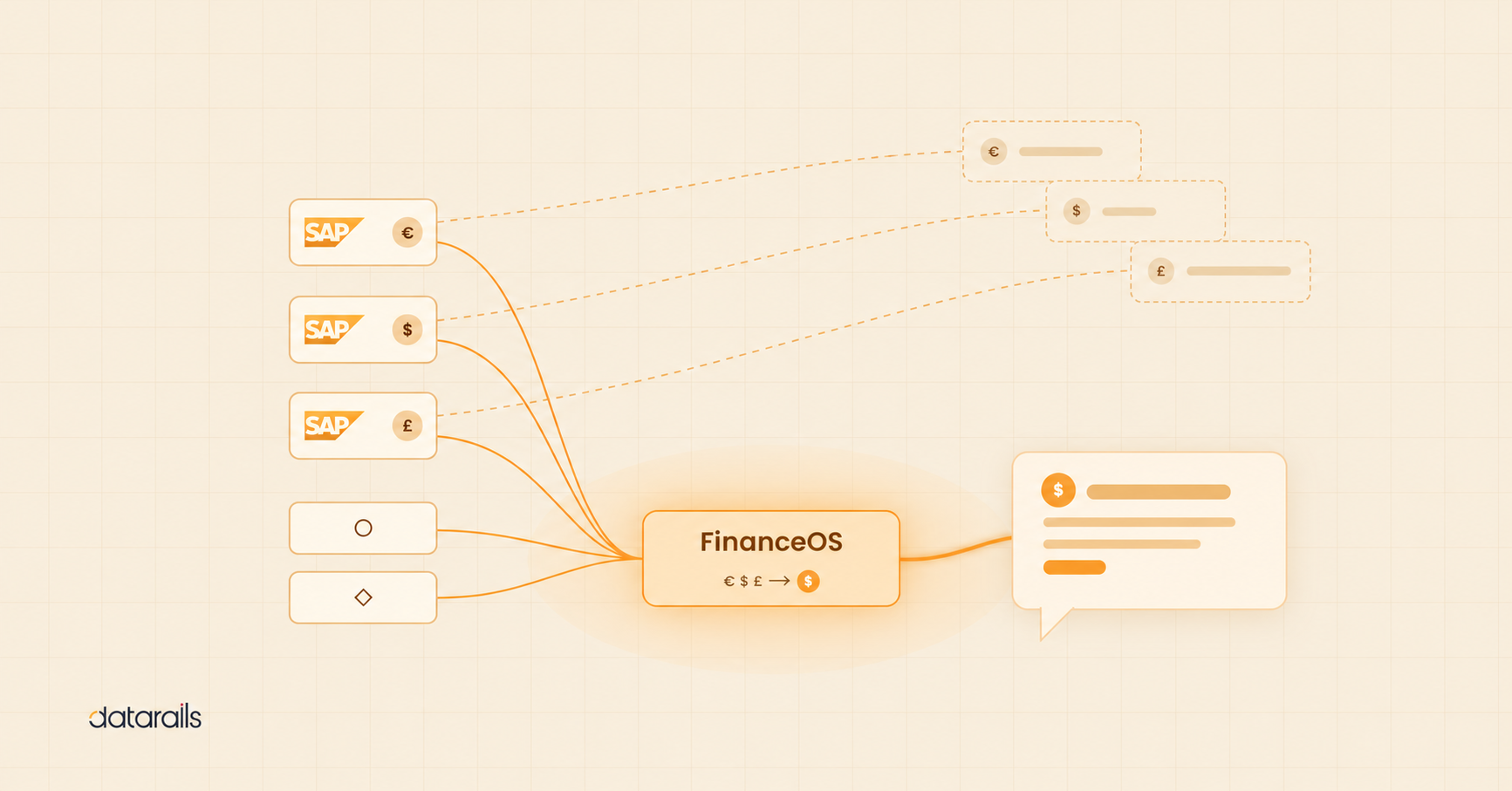
It connects Excel to a live financial data layer and automates the work around the model: pulling actuals, consolidating entities, refreshing statements, and surfacing analysis. The Excel AI integration here is two-way and continuous rather than a one-time prompt.
11. Datarails
Datarails is built for finance teams that want to keep Excel and lose the manual work around it. It’s the clearest example of an AI Excel add-in for FP&A, because the AI sits on connected, live financial data rather than a static file you uploaded.
- FinanceOS: Connects 600+ ERPs, accounting systems, CRMs, and HRIS tools directly to Excel, so models run on live data with no manual exports. This is the data consolidation and data layer that Tier 1 and Tier 2 tools lack.
- Datarails Flex add-in: Full FP&A functionality inside the Excel ribbon, including drill-down, roll-forward, variance analysis, a formula builder, and a report publisher. Analysts keep working in Excel while the platform handles the heavy lifting behind the cells.
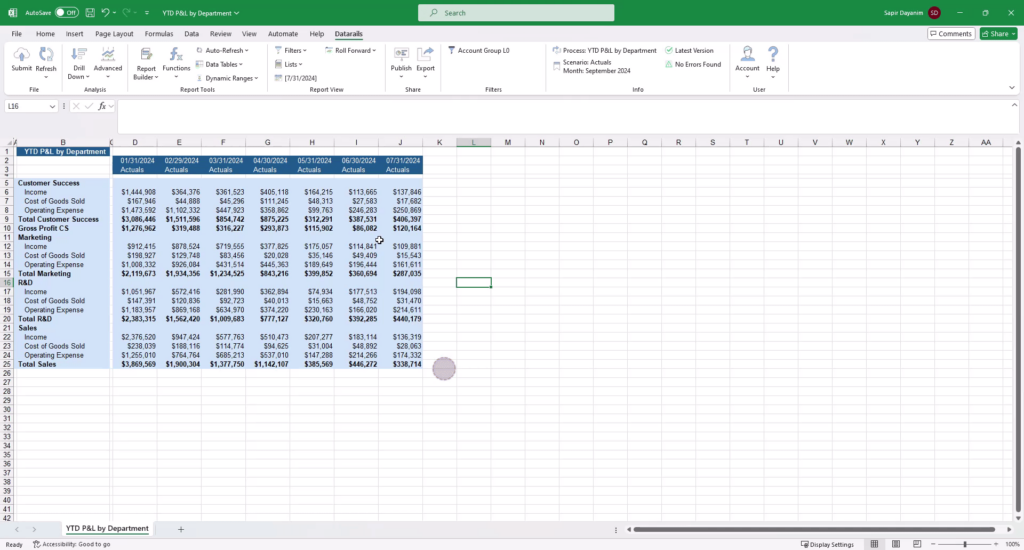
- Datarails AI: Reporting, Planning, and Strategy AI agents, Natural language Q&A on live financial data, anomaly detection, AI Insights, and Storyboards, which generate a financial narrative in two clicks. Because it’s connected to your actuals, it answers a variance question from current numbers, not from a file someone remembered to upload.
- Automated consolidation: Multi-entity rollup, intercompany eliminations, and automated refresh of the P&L, balance sheet, and cash flow. This is where Datarails moves from task automation to workflow automation, shortening the month-end close and reducing manual account reconciliation.
- Excel-native and fast to value: 100% of Excel functionality is preserved, so there is no migration and no retraining on a new interface, and most customers are live within 2 to 4 weeks. Datarails was named to G2’s Best Software 2026 list in Accounting & Finance. Explore it as FP&A software, or see how it powers financial reporting software and financial dashboard software.
“Without Datarails, I would’ve needed to double my current team of three just to produce what we’re delivering today.” – Steven Carkey, VP Finance Operations, Butternut Box
- Limitations: Businesses running large-scale planning across multiple teams and divisions may benefit from more expansive CPM capabilities.
- Pricing: All of our pricing is custom. This allows us to create the perfect solution for each client based on their unique needs and use cases. Request a quote for a fast response.
- Best For: SMB/mid-market Excel teams. Finance professionals, data analysts, and anyone looking to automate financial modeling (including corporate budgeting) and analysis in Excel.
12. Vena Solutions
Vena is an Excel-native FP&A platform built around a central database and Microsoft integration. It boasts a familiar interface, solid planning and workflow features, and growing AI.
- Limitations: Implementation can be heavier and template-driven, which some lean teams find rigid.
- Best for: mid-market and larger teams committed to a structured planning process.
- Pricing: Contact for a custom quote.
13. Cube
Cube is a spreadsheet-native FP&A platform spanning Excel and Google Sheets, quick to deploy, and good for a lighter-weight planning layer over existing spreadsheets.
- Limitations: It offers less depth in complex consolidation than heavier platforms.
- Best for: smaller and mid-market teams wanting fast time to value.
- Pricing: Custom quote.
14. Planful
Planful is a cloud FP&A platform covering planning, consolidation, and reporting. It also has an AI layer for predictive and anomaly-detection use cases. It’s more of a destination application than an Excel-native experience, so analysts work less inside Excel itself.
- Limitations: Some users report running into size limits in reporting on larger datasets.
- Best for: Teams ready to move workflow into a dedicated platform.
- Pricing: Contact for a custom quote.
15. Workday Adaptive Planning
Workday Adaptive Planning is an enterprise-grade platform with strong modeling and reporting, scalable, and a tight fit for organizations already on Workday. It carries enterprise pricing and a heavier implementation than an Excel-native add-in for a 50 to 500-person finance team.
- Limitations: Pricing and implementation time reflect the enterprise-grade nature of the platform.
- Best for: Larger enterprises.
- Pricing: Contact for a custom quote.
How to Choose the Right AI Plugin for Excel: A Finance Team Decision Guide
Read the seven sentences below, and identify the one that you relate to most.
The right type of tool follows from there.
- “I need to write complex formulas faster and reduce errors.” GPTExcel, Formula Bot, Formulas HQ, or Microsoft Copilot for Excel for formula tasks.
- “I need AI to help me understand my spreadsheet and answer questions about it.” Microsoft Copilot for Excel, ChatGPT for Excel (beta), or Numerous.ai.
- “I need to build a three-statement or financial model faster from a prompt.” Shortcut, or ChatGPT for Excel for contained models.
- “I need my Excel models to refresh automatically when actuals come in from our ERP.” An FP&A platform with ERP integration: Datarails, Cube, or Vena.
- “I need multi-entity consolidation in Excel without rebuilding the mapping every month.” Datarails, which offers the most Excel-native automated consolidation in this category.
- “I need AI to answer variance questions from my live financial data, not a static upload.” Datarails AI, connected to live ERP data rather than a file.
- “I need financial narratives and board-ready slides from my Excel data automatically.” Datarails Storyboards.
If your problem is in a single workbook, a Tier 1 or Tier 2 tool can help today. If your problem is the cycle around the workbook, the export, consolidation, refresh, and reporting, you need a Tier 3 platform.
For deeper comparisons, see our roundups of AI finance tools and financial analysis software, as well as the broader set of data analysis tools in Excel.
See it in your own Excel. Book a Datarails demo and watch live data, automated consolidation, and Datarails AI work inside the spreadsheet your team already uses.nd provides any AI engine with structured access through the Model Context Protocol. Your data stays auditable, workflows stay locked, and AI cost savings become a reality.
AI Plugins for Excel FAQs
The best AI plugin for Excel depends on the problem.
However, generally speaking, the best Excel AI tools help automate analysis, forecasting, reporting, and data preparation directly inside spreadsheets. These AI tools for Excel (including Datarails, which offers the most Excel-native experience) reduce manual work and errors.
AI add-ins for Excel work inside a single spreadsheet: they write formulas, clean data, and answer questions about the file in front of you. An FP&A platform connects Excel to your live financial data, then automates consolidation, reporting, and planning across the function. In short, an add-in makes one workbook smarter; a platform automates the workflow around every workbook.
Formula generators and general AI assistants do not connect to ERPs. Only FP&A platforms do. Datarails connects 600+ ERPs, accounting systems, CRMs, and HRIS tools, including NetSuite and SAP, directly to Excel, so models refresh on live actuals instead of stale exports. If ERP connectivity is the requirement, you need a Tier 3 platform, not a Tier 1 or Tier 2 add-in.
Microsoft Copilot for Excel is worth it for individual analyst productivity, especially for teams already on Microsoft 365 who want a capable Excel AI assistant for formulas and ad-hoc analysis. It’s not a substitute for an FP&A platform.
As of 2026, it can’t run VBA macros, offers only narrow Power Query support, doesn’t act as a refreshable data model, and struggles with large multi-tab models. It speeds up tasks rather than automating the planning and close workflow.
ChatGPT for Excel, in beta since March 2026 on GPT-5.4, edits spreadsheets and builds formulas from natural language, and is useful for contained analysis.
Its limitations can be impactful for finance: no support for Office Scripts, Power Query, pivot tables, data models, data validation, named ranges manager, slicers, timelines, external connections, or VBA and macro automation.
Complex multi-tab models can also exceed its context window, so it isn’t yet reliable for the workbooks most FP&A teams run.
Not the Tier 1 or Tier 2 tools. Multi-entity consolidation, intercompany eliminations, and automated statement refresh require an FP&A platform. Datarails automates multi-entity rollup and consolidation directly in Excel, so finance teams no longer have to rebuild the mapping every month. If consolidation is your pain point, that capability defines the tier of tool you need.
For mid-market companies of roughly 50 to 500 employees that have outgrown basic Excel but aren’t ready for an enterprise suite, the best Microsoft Excel AI plugin is usually an Excel-native FP&A platform.
Datarails fits this segment: it keeps the team in Excel, connects to existing ERP and accounting systems, automates consolidation and reporting, and goes live in 2 to 4 weeks, avoiding the long implementations of enterprise planning tools.