Every balance sheet tells a story: a snapshot of what a business owns, owes and retains. The numbers must always add up, as a company’s assets are equal to liabilities plus equity. Yet the real question is: are those numbers even right?
That’s where balance sheet reconciliation comes in. It’s the process accountants use to verify that each account on the balance sheet matches the supporting records behind it. Bank statements, invoices, loan schedules and ledgers are compared line by line until everything aligns.
This practice may sound routine, but it’s one of the most important checks in the world of finance. Reconciliations catch missing entries, duplicated transactions and reporting errors that could potentially distort financial results or trigger compliance issues.
When it is done right, the process provides confidence that a company’s books truly reflect its financial position. However, balance sheet account reconciliation also comes with several challenges, among them the repetitiveness and time consumption of the task itself. In this article, we discuss the balance sheet reconciliation process in detail, the challenges that may occur and how automation serves as a reliable solution.
What Is Balance Sheet Reconciliation?
In the simplest terms, balance sheet reconciliation is a process of verification. It refers to reviewing each account on the balance sheet, including assets, liabilities and equity, to confirm that the figures recorded in the books match the supporting documentation.
The goal is to arrive at a reconciled balance that reflects the reality of the company’s financial standing. During financial close, accountants compare general ledger entries with statements, receipts and schedules, and investigate and correct any inconsistencies before issuing the final reports. This process keeps financial reporting credible.
When teams reconcile balance sheet accounts regularly, they prevent small discrepancies from snowballing into major reporting issues and build a trail of accountability and accuracy. Teams have no difficulty showing that every number in the financial statement has been verified and is supported by evidence.
Why Balance Sheet Reconciliation Matters
Numbers may appear correct on a spreadsheet, but without verification, they can’t be trusted. That’s why balance sheet accounts reconciliation sits at the center of responsible accounting. It verifies that every entry and transaction connects back to real activity within the business.
During the financial close process, accountants rely on account reconciliation to confirm that all balances align before financial results are finalized. A reconciled balance sheet shows that the organization’s financial data is complete and compliant with reporting standards, such as Generally Accepted Accounting Principles (GAAP) and International Financial Reporting Standards (IFRS).
When you skip or rush reconciliation, the risk multiplies. Misstated balances can mislead management and confuse auditors. Even worse, they may cause non-compliance with regulatory requirements.
Errors in one account can ripple through the entire reporting structure and distort profits, overstate assets or mask liabilities. These inaccuracies can undermine investor and lender confidence.
Financial statement reconciliation helps prevent this outcome. It connects the dots between internal records and external evidence to confirm that each reported figure can stand up to audit scrutiny. Organizations that consistently reconcile financial statements create a reliable foundation for every decision that follows. Executives can plan budgets, forecast performance and allocate resources with the assurance that the data behind those choices is sound.
Besides, balance sheet reconciliation also supports transparency as it makes it easier to trace how money moves through the company. Stakeholders can also detect inefficiencies early on, and promptly deal with any unusual transactions.
Common Challenges in Manual Balance Sheet Reconciliation
Manual reconciliation might seem manageable when a company is small, but as transaction volumes grow, it becomes a daily struggle. The process of reconciling balance sheet accounts by hand can also lead to errors as it is quite complicated, especially when data is present in different systems and spreadsheets.
Let’s discuss some common challenges finance teams face during balance sheet account reconciliations.
Data Discrepancies
When information is pulled from multiple sources such as bank statements, general ledgers and invoices, inconsistencies are inevitable. Small timing differences or incorrect entries can throw off the entire reconciliation of balance sheet accounts.
What’s worse, detecting these discrepancies manually also takes a lot of effort. In many cases, it can delay financial close.
Human Error
A recent study looked at 35.5 years of articles about spreadsheet quality and found that 94% of spreadsheets have errors. It’s inevitable to make minor errors, especially when you’re dealing with numbers of a certain volume.
Even skilled accountants make mistakes when working under pressure. A missed decimal point or incorrect reference number can cascade through the reports. In manual setups, these errors are hard to spot until the review stage, which can increase rework and frustration.
Time Constraints
Accountants are usually on a time crunch when it comes to closing the books. Manual balance sheet account reconciliations extend the process, so teams may have to rush through reviews. The pressure to meet deadlines can result in incomplete reconciliations and undermine confidence in the final reports.
Lack of Visibility
When there’s no centralized tracking, managers can’t see which accounts are complete, pending or currently under review. This lack of transparency creates bottlenecks and complicates audit readiness. Decision-makers also lose sight of potential risks that can later be amplified.
The Step-by-Step Balance Sheet Reconciliation Process
For accountants and controllers, it’s important to understand how to do balance sheet reconciliation correctly. While methods may vary by company size or accounting software, the following account reconciliation process steps are standard.
Step 1: Collect and Organize Financial Data
To start, you have to gather the right records. Accountants pull data from general ledgers, bank statements, loan statements, subledgers and supporting schedules.
In this stage, accountants will create a complete picture of all balances reported on the balance sheet. For example, if reconciling the cash account, you’ll need the bank statement for the same period, outstanding check lists and any deposit records.
For accounts payable or receivable, subledgers and vendor statements are important. Any missing or outdated data can derail the balance sheet reconciliation process, so it must be weeded out in this step.
Step 2: Compare General Ledger Balances to Supporting Records
Once all documents are ready, accountants compare the general ledger balances to their corresponding source records. Each account on the balance sheet, such as cash, inventory, fixed assets, liabilities and equity, must match the evidence provided.
The comparison may be one-to-one (like matching a bank statement to the cash account) or more complex (like tying multiple subsidiary ledgers to a control account). If everything aligns, the account can be marked as reconciled. If not, the difference has to be identified and analyzed.
Step 3: Identify and Investigate Variances
Discrepancies are common, even in well-managed accounting systems. The next stage of the balance sheet reconciliation process involves locating and explaining these variances.
A variance may be due to:
- Timing differences (e.g., deposits in transit or checks not yet cleared)
- Data entry errors
- Missing transactions
- Duplicated journal entries
- Misclassification between accounts
For each difference, accountants trace the root cause. They may review transaction histories, cross-check documentation or consult other departments for clarification.
Step 4: Adjust Journal Entries
Once errors or omissions are found, they must be corrected in the general ledger. Accountants need to adjust entries in this step.
Adjustments can include:
- Recording missing transactions
- Correcting mispostings
- Reversing duplicated entries
- Recognizing accruals or deferrals that were overlooked
Every adjustment should have clear documentation, including who made it, why it was made and what source supports the change. These records strengthen internal controls and help auditors trace any modifications made during the reconciliation period.
Step 5: Review and Approve Reconciliations
After all accounts have been checked and adjustments made, reconciliations undergo review. This is an internal quality check to confirm accuracy before finalizing financial statements.
Typically, a preparer completes the reconciliation and a supervisor or manager approves it. The reviewer examines supporting evidence and checks that all variances have valid explanations, and confirms the account reconciliation process steps were followed properly.
Approval also segregates duties. It’s an internal control principle that prevents fraud or misstatements from slipping through unnoticed.
Step 6: Document and Archive Reconciliation Files
After you’ve completed reconciliation, store the files securely. The documentation should include the account name and the period reconciled. Plus, add the following:
- Supporting schedules and statements
- Explanations for all adjustments
- Evidence of preparer and reviewer approval
Proper documentation is required for audits and regulatory compliance. Auditors often request detailed records to verify how balances were validated during the balance sheet reconciliation process. Organized, well-documented files make this stage smooth and stress-free. You can also store these details in a reconciliation software to centralize all records.
Step 7: Repeat the Process Consistently
Reconciliation is a regular task and should be completed at set intervals, such as monthly or quarterly. The company policy usually dictates the frequency of these reconciliations. Frequent reviews keep accounts accurate and make future reconciliations easier.
Consistency helps detect unusual trends early. For example, a growing variance in receivables or inventory might point to underlying operational issues. Finance leaders can identify these changes through the reconciliation process and then resolve them before they become worse.
Balance Sheet Reconciliation Checklist
Before you close the books, use this checklist to determine if you’ve followed every step.
- Collect and Organize Financial Data
- Gather all general ledger balances for the reconciliation period.
- Pull supporting records: bank statements, subledgers, invoices, loan schedules and receipts.
- Confirm that source documents match the same reporting period.
- Store files in a structured folder or digital workspace for easy access.
- Compare Balances and Match Entries
- Match each balance sheet account with its corresponding documentation.
- Verify that control accounts (e.g., accounts receivable, accounts payable) agree with subledgers.
- Check for missing or duplicate entries during the comparison.
- Record initial findings and highlight discrepancies.
- Identify and Investigate Variances
- Review differences between ledger balances and source records.
- Determine if discrepancies are timing-related or caused by posting errors.
- Investigate with supporting departments if needed (banking, procurement, payroll).
- Document all findings clearly before adjustments are made.
- Adjust Journal Entries
- Prepare entries for missing, misclassified or duplicate transactions.
- Review accruals, deferrals and bank adjustments.
- Attach supporting evidence for each correction.
- Post adjustments to the general ledger and verify updated balances.
- Review and Approve Reconciliations
- Conduct an internal review by a manager or supervisor.
- Confirm that each variance has a valid explanation and supporting documentation.
- Approve reconciliations once all adjustments are verified.
- Maintain segregation of duties between the preparer and reviewer.
- Document and Archive All Files
- Include account name, period reconciled and preparer details.
- Attach statements, ledgers and adjustment records.
- Save approvals and notes for audit purposes.
- Store securely in your accounting system or reconciliation software.
- Repeat Regularly and Maintain Consistency
- Schedule reconciliations monthly or quarterly, depending on company policy.
- Track completion status for all accounts in each cycle.
- Address recurring variances promptly to prevent backlog.
- Review the checklist after each period to refine your process.
How Automation Transforms Balance Sheet Reconciliation
Manual reconciliation depends on spreadsheets, cross-checks and possibly long email threads. It’s a process that’s accurate only as long as people have time to double-check every entry.
Automation changes that by introducing speed and transparency to the balance sheet reconciliation process.
Automation tools integrate directly to a company’s ERP system or accounting software and pull live data from ledgers or bank fees. The system compares balances automatically and flags exceptions in real time. As a result, companies can reduce the hours spent on manual checks while improving consistency across every reconciliation period.
Automated reconciliation platforms also standardize the account reconciliation process steps, so every account follows the same review path. Each entry is timestamped and supported by documentation. Plus, it’s stored in a centralized dashboard where managers can see the status of the account.
Financial automation also minimizes human error. Reconciliation software can quickly spot rounding mistakes, duplicate postings and missed transactions. So, finance teams can then focus their attention on investigating these discrepancies rather than having to find them.
For larger organizations, these tools facilitate scaling as they can handle multiple entities, currencies and reporting structures. They also integrate with audit systems to strengthen compliance by maintaining a traceable record of all approvals and adjustments.
Close the Books Faster With Confidence
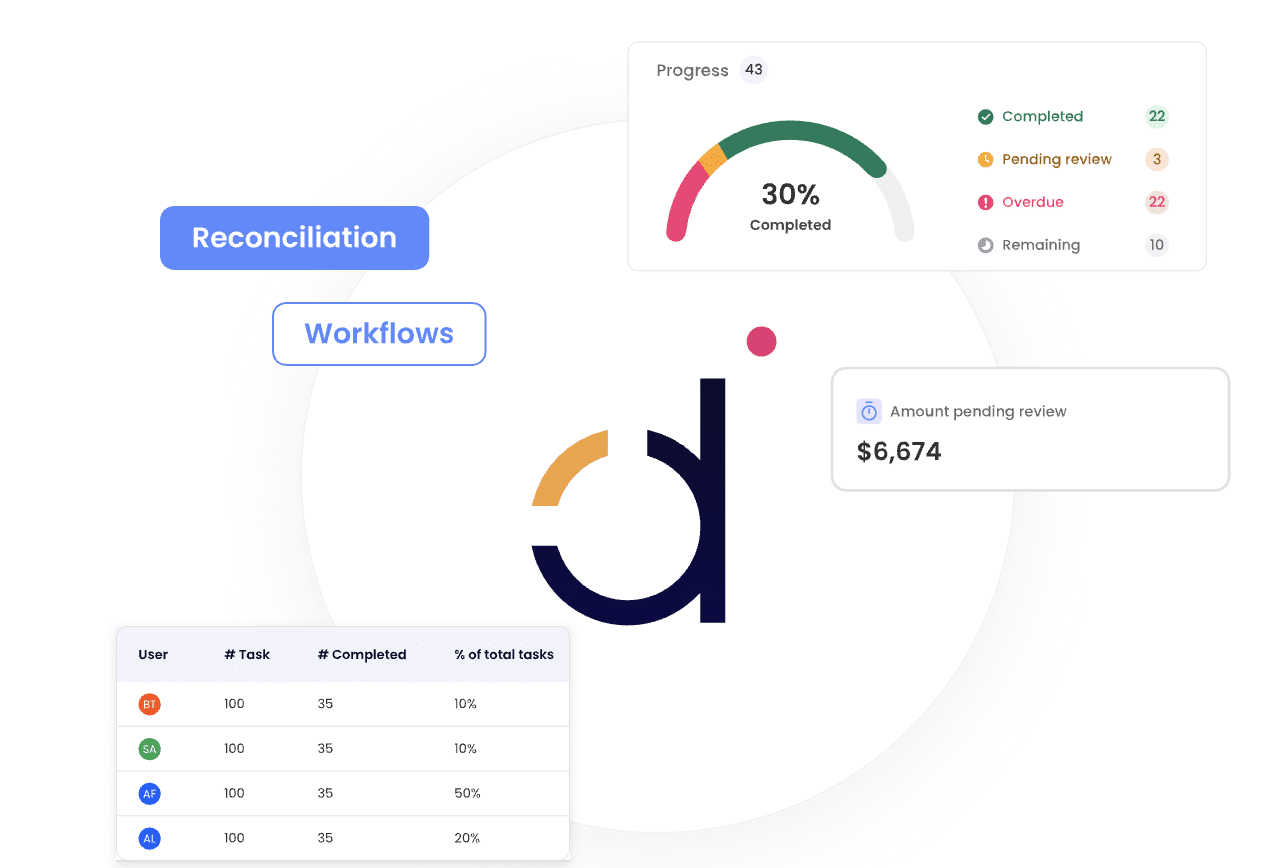
Manual checklists and scattered spreadsheets make the month-end stressful. Datarails Month-End Close brings every task, reconciliation and approval into one connected workspace. Track progress in real time, get audit-ready documentation, view full version history, assign owners and review sign-offs from a single dashboard.
Benefits of Automating Balance Sheet Reconciliation
Automation makes balance sheet reconciliation easier. But that’s not just it; finance automation tools that offer automated reconciliation have multiple benefits.
- Greater Accuracy: Automated reconciliation eliminates the risk of errors that come with manual work. Every balance is backed by verified data, which improves trust in the numbers presented to management and auditors.
- Time Savings: The traditional reconciliation cycle can stretch for days, especially across multiple accounts and entities. Automated tools can run these matches in seconds in a streamlined process. Finance teams can use the reclaimed hours for variance investigation or strategic planning.
- Faster Month-End Close: With finance automation, tasks run in parallel instead of sequentially. Approvals, sign-offs and reconciliations happen in real time, resulting in faster month-end close cycles.
- Audit Readiness and Compliance: Since every adjustment and variance is tracked automatically, there’s a complete audit trail. The transparency supports compliance with frameworks like GAAP and IFRS, and auditors can trace every entry without extra documentation requests, which saves both sides time and effort.
- Better Collaboration and Oversight: Modern automation tools centralize the entire process so that everyone can work in one shared system with clear visibility. Managers can monitor progress and spot delays before they affect the close schedule.
As is evident, automation brings more control and transparency into the picture, while speeding up the process of balance sheet reconciliation.
Balance Sheet Reconciliation Best Practices
If you don’t manage it well, balance sheet reconciliation can be one of the most error-prone parts of financial control. The following best practices will keep this from happening.
Set Standard Processes and Timelines
Every account, department and team should follow the same checklist, timeline and approval process. Standard templates, such as an accounts receivable reconciliation template, help maintain consistency across teams and make it easier for new staff to understand.
It is important to establish clear cutoff dates for when data must be updated. Set timelines for reconciliation and reviews, too.
Document each step in a central location so that everyone, from junior accountants to controllers, knows exactly what’s expected and when.
Maintain Detailed Audit Trails
Transparency is non-negotiable in accounting. Every reconciliation should include a clear audit trail. It should show who performed the reconciliation, when it was completed and what supporting documents were reviewed.
This habit pays off when auditors come knocking or management requests a deep-dive analysis. You may use a cloud-based system for ease of use, as everything becomes accessible without having to scramble for spreadsheets.
Automate Workflows Wherever Possible
As we’ve established, manual reconciliations are time-consuming and risky. Where possible, automate your monthly balance sheet reconciliations to minimize these risks. Automated reconciliation tools can access data from your systems, flag errors and alert your team to issues that need attention.
Automation also helps complete reconciliations consistently since every step follows your organization’s predefined workflow.
Review Exceptions Regularly
Even with automation, exceptions will occur, and that’s where good judgment and timely reviews come in. Set aside time each week, not just at month-end, to review unresolved variances or high-risk accounts.
When you manage exceptions regularly, you can keep small issues from becoming more troublesome. It also gives your team more time to investigate root causes. They can then implement corrective actions and refine internal processes accordingly.
How Datarails Simplifies Balance Sheet Reconciliation
As a comprehensive FP&A software, Datarails transforms balance sheet reconciliation from a manual, error-prone process into a fast, connected and transparent workflow. Its FinanceOS platform integrates with more than 200 systems, including ERPs, CRMs and banks, automatically pulling data from every source into one place.
No more chasing files or reconciling spreadsheets; everything updates in real time.
Datarails also matches transactions and balances instantly. It flags discrepancies and helps track variances across accounts. Teams can assign tasks, add notes and attach supporting files directly within the platform to keep the whole process organized and auditable.
Since all data flows into a single source of truth, reports, dashboards and Excel models always reflect the latest numbers. Even better, built-in AI through Datarails AI helps identify trends, explain anomalies and speed up analysis.
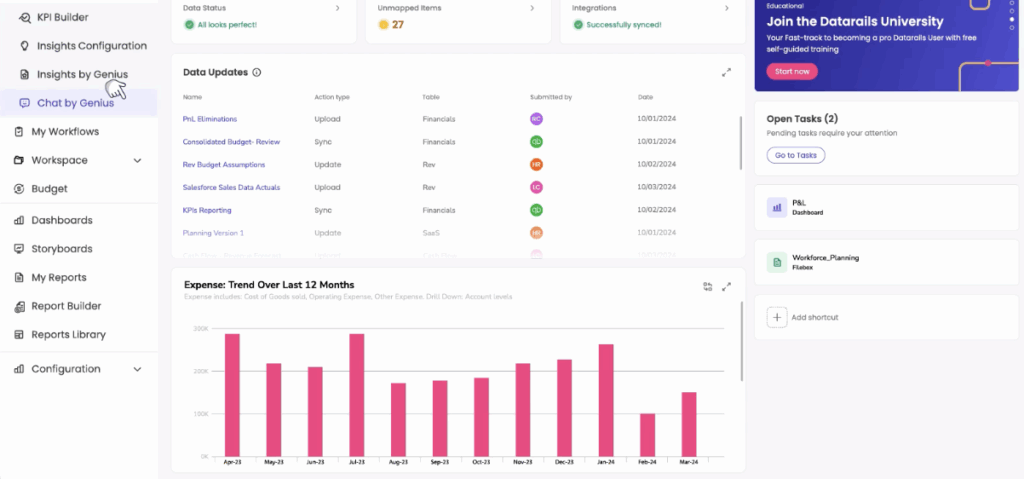
The result? Faster month-end closes and greater confidence in every number.
Balance Sheet Reconciliation Example
Here’s a real-world balance sheet account reconciliation example from Pramand, an American medical device incubator managing multiple spinouts across different business stages.
When Corporate Controller Jessica Ray joined, she was juggling accounting and reporting across four entities. Despite using NetSuite, she struggled with manual data exports and static reports.
After adopting Datarails, Pramand’s month-end close went from taking several days to just about an hour. Automated data integration across entities eliminated manual consolidation, while real-time dashboards brought instant visibility and trust in every number.
From Manual Spreadsheets to Automated Reconciliation
The move from manually reconciling balance sheet accounts to automated reconciliation brings the level of control and accuracy every finance team needs today. Previously, you were spending days chasing variances. Now, you can close the books quickly and focus on the analysis that drives growth.
In short, automating financial planning and analysis makes reconciliation a seamless part of the month-end process. And with Datarails, it becomes even easier.
Simplify Every Close with Datarails
Tired of chasing spreadsheets, missing approvals and repeating manual checks? Let Datarails centralize every step of your close inside one secure, connected workspace.
FAQs
Most companies perform balance sheet reconciliations monthly as part of the financial close process. You can also perform balance sheet reconciliations quarterly or as specified by the company policy.
Account reconciliation verifies individual ledger accounts, while balance sheet reconciliations review assets, liabilities and equity as a whole to confirm that financial data aligns with supporting records and statements.
Manual reconciliation of balance sheet accounts often leads to data entry mistakes, timing mismatches, missing transactions and inconsistent documentation.
Automated reconciliation tools simplify the balance sheet reconciliation process by matching data, tracking variances and maintaining audit trails automatically. They help reduce human error and improve accuracy across all balance sheet accounts.
The main accounts for monthly balance sheet reconciliations include cash, accounts receivable, accounts payable, inventory, fixed assets, accrued expenses and equity accounts.