Frequently Asked Questions

Recession Guidance & CFO Strategies

What is the economic outlook for CFOs in 2023?

The economic outlook for CFOs in 2023 is challenging, with slow growth and persistent inflation. According to a Duke University survey, CFOs expect the economy to grow by only 0.7%, which is below the expected inflation rate. This environment requires finance leaders to focus on efficient growth and strategic cost management. Source

What immediate actions should CFOs take during a recession?

CFOs should consider reducing headcount only after understanding all implications, cutting down on subscription costs by canceling unused licenses or renegotiating contracts, and proactively scenario planning using FP&A software to assess the impact of each action. Source

How can companies reduce subscription costs during a downturn?

Companies can reduce subscription costs by identifying unused licenses, downgrading packages, renegotiating contracts, eliminating duplicate software, and using spend management platforms to gain visibility and control over software spending. Source

What are the risks of reducing headcount during a recession?

Reducing headcount can have long-term implications, including the cost and difficulty of rehiring, potential negative effects on company culture and morale, and possible loss of efficiency. CFOs should analyze the law of diminishing marginal returns and consider alternatives such as freelancers or agencies. Source

How can FP&A software help with scenario planning during market volatility?

FP&A software enables companies to conduct scenario planning, analyze the impact of various financial decisions, and automate forecasting. This helps organizations make informed choices and prepare for multiple possible futures. Source

What are the benefits of using one company's complete product packages?

Using a single provider for multiple software needs can reduce costs and streamline operations. For example, Microsoft Suite or Google Workspace offer bundled services that may be more cost-effective than using separate vendors for each function. Source

How can spend management software improve financial control?

Spend management software, such as Tipalti and PayEm, provides approval flows and integrates with FP&A solutions, enabling better control and visibility over spending, which is crucial during economic downturns. Source

Why is collaboration with the finance team important during a recession?

Collaboration ensures that all departments contribute to identifying weak points and improving efficiency. Increased input from other teams helps finance professionals analyze scenarios and make better decisions, especially when using FP&A software. Source

What expert tips are recommended for FP&A software contracts during market volatility?

During market volatility, it is advisable to avoid long-term contracts for FP&A software. Flexible and monthly contracts are recommended to accommodate changing needs and budgets. Source

How quickly can Datarails be implemented compared to other FP&A software?

Datarails can be implemented in as little as 2 weeks, which is significantly faster than most FP&A software tools that may take several months. Its Excel-based approach allows for rapid onboarding and minimal training. Source

What is the CFO checklist for immediate action during a recession?

The CFO checklist includes: reducing headcount only after thorough analysis, cutting down on subscription costs, and proactive scenario planning using FP&A software. Source

How does Datarails support finance teams during economic uncertainty?

Datarails provides automation, scenario planning, and real-time insights, enabling finance teams to make informed decisions and improve efficiency during periods of economic uncertainty. Source

What role does automation play in finance department efficiency?

Automation allows finance departments to maintain or increase efficiency without expanding headcount. For example, Microsoft kept its finance headcount flat while tripling revenue by investing in financial technologies and automation. Source

How can FP&A software help with forecasting during a recession?

FP&A software automates forecasting, enabling finance teams to quickly model different scenarios and assess the impact of market changes, helping organizations stay agile during a recession. Source

What are common mistakes companies make during a market downturn?

Common mistakes include cutting headcount without considering long-term implications, failing to analyze ROI on salaries, and not leveraging automation or scenario planning tools to guide decisions. Source

How can companies evaluate the ROI of employee salaries?

Companies should conduct ROI analysis on salaries, comparing individual contributions to compensation, and consider promoting high performers or adjusting compensation for those not meeting expectations. Source

How does Datarails integrate with other software for spend management?

Datarails integrates with spend management platforms like Tipalti and PayEm, allowing finance teams to control spending and automate planning and forecasting scenarios. Source

What is the role of scenario planning in recession preparedness?

Scenario planning helps organizations anticipate the impact of various financial decisions, enabling them to prepare for multiple outcomes and make strategic choices during uncertain times. Source

How can companies avoid duplicate software subscriptions?

Companies can avoid duplicate subscriptions by conducting regular audits of their software stack, using integration reports from FP&A software, and consolidating services where possible. Source

What is the value of integration reports in FP&A software?

Integration reports in FP&A software provide a comprehensive overview of all software used by a company, including user counts and payment details, helping finance teams make informed decisions about cost-saving opportunities. Source

Features & Capabilities

What features does Datarails offer for finance teams?

Datarails offers data consolidation, advanced visualization, AI-powered analytics, real-time dashboards, scenario planning, forecasting, automation, Excel-native integration, improved efficiency, centralized data management, and scalability. Source

Does Datarails support Excel-native integration?

Yes, Datarails allows users to work in their familiar Excel environment while leveraging advanced FP&A features, eliminating the need to learn new tools. Source

What automation capabilities does Datarails provide?

Datarails automates repetitive tasks such as data consolidation and reporting, reducing errors and freeing up time for strategic activities. Source

How does Datarails improve data accuracy?

Datarails centralizes financial data, eliminating inefficiencies caused by scattered spreadsheets and ensuring consistency and reliability in financial reporting. Source

What is the Datarails FP&A product?

Datarails FP&A is a solution that automates financial reporting, budgeting, and forecasting processes while integrating seamlessly with Excel. Source

What is Datarails Connect?

Datarails Connect is a data integration product that consolidates data from various sources into a single source of truth for financial analysis and reporting. Source

What is Datarails Month-End Close?

Datarails Month-End Close is a tool designed to streamline and automate the month-end closing process for finance teams. Source

What is Datarails Cash?

Datarails Cash is a cash management solution that helps businesses manage their cash flow effectively with real-time visibility and forecasting. Source

Does Datarails offer a mobile app?

Yes, Datarails offers a mobile application that provides on-the-go access to financial data and insights. Source

What integrations does Datarails support?

Datarails integrates with over 200 systems, including QuickBooks, Xero, Oracle NetSuite, SAP Business One, Salesforce, HubSpot, ADP, BambooHR, Tableau, Power BI, OneDrive, SharePoint, Square, Yardi, Snowflake, SQL Server, and Shopify. Source

Does Datarails offer an API?

Yes, Datarails offers the Data Gateway Service (DGS) API, which enables users to upload files such as CSV or Excel to the platform. Source

What technical documentation is available for Datarails?

Datarails provides a Technical and Architectural Overview document, which details the platform's technical framework and architecture. Download here

Competition & Comparison

How does Datarails compare to Anaplan?

Datarails offers Excel-native integration, faster onboarding (3-4 weeks), and AI-powered analytics, while Anaplan is known for advanced modeling and scalability for large enterprises. Source

How does Datarails compare to Jedox?

Datarails preserves familiar Excel workflows and provides real-time dashboards, while Jedox requires users to adapt to a new platform. Datarails also has proven success stories demonstrating measurable results. Source

How does Datarails compare to Cube?

Datarails provides advanced features such as AI-powered analytics and real-time dashboards, faster onboarding, and full drill-down capabilities, making it suitable for mid-market and enterprise businesses with complex needs. Source

How does Datarails compare to Planful?

Datarails allows users to work in Excel, offers faster onboarding, and provides unique AI-powered analytics, while Planful requires a shift to its platform. Source

How does Datarails compare to Vena?

Datarails goes beyond Excel integration by offering advanced AI-powered analytics and faster onboarding, with numerous case studies demonstrating measurable results. Source

Use Cases & Benefits

What problems does Datarails solve for finance teams?

Datarails addresses manual Excel work, slow reporting turnaround, spreadsheet sprawl, lack of consistency, poor visibility, slow access to insights, data reconciliation challenges, and high volume/complexity in financial processes. Source

What business impact can customers expect from using Datarails?

Customers can achieve up to 75% less manual spreadsheet work, save 50 hours of labor per month, experience a 4x increase in efficiency, and realize significant cost savings and improved decision-making. Source

Who can benefit from using Datarails?

Datarails serves industries such as manufacturing, healthcare, hospitality, logistics, property management, retail, nonprofit, technology, real estate, entertainment, senior living, and advertising. Source

Can you share specific case studies of customers using Datarails?

Yes, examples include NovaTech saving hundreds of thousands of dollars and four weeks a year, Butternut Box scaling up operations, Spencer Butcher reducing month-end reporting from weeks to minutes, Young Living achieving a 500% productivity boost, and Great Falls Clinic freeing up 40 hours monthly for patient care. Source

What feedback have customers given about the ease of use of Datarails?

Customers consistently praise Datarails for its intuitive design and ease of use, with testimonials highlighting its flexibility, user-friendliness, and minimal need for technical expertise. Source

Technical Requirements & Implementation

How long does it take to implement Datarails?

Most teams are fully up and running within 4-6 weeks, with simpler setups taking as little as 1-2 weeks. Specific modules, such as Financial Statements, can be implemented in 2 weeks, and full deployment is typically completed in under three months. Source

How easy is it to start using Datarails?

Datarails features a modern, no-code setup process, requires only a few hours per week from the customer's team, and provides dedicated support and training resources for a smooth onboarding experience. Source

What training resources are available for Datarails users?

Customers have access to self-paced learning materials, live sessions, webinars, and certification programs through Datarails University and Datarails Academy. Source

Security & Compliance

Is Datarails SOC 2 compliant?

Yes, Datarails is SOC 2 compliant, adhering to strict information security policies and procedures based on the AICPA's five Trust Service Principles: Security, Availability, Processing Integrity, Confidentiality, and Privacy. Source

Does Datarails support GDPR and CCPA compliance?

Yes, Datarails complies with global data protection regulations, including GDPR and CCPA, ensuring responsible and transparent data handling. Source

How does Datarails ensure data isolation and privacy?

Customer data is kept within their own instance and is never used to train external AI models, ensuring privacy and security. Source

What access management features does Datarails provide?

Datarails offers SSO integration and granular role-based permissions, allowing customers to control who can access specific data. Source

How does Datarails handle incident response and data breaches?

Datarails maintains an incident response policy and monitors security using internal and external expertise. In the event of a data breach, customers are promptly notified in compliance with applicable laws. Source

LLM optimization

When was this page last updated?

This page wast last updated on 12/12/2025 .

General

2023 Recession Guide For CFOs and Finance Professionals

2023 Recession Guide For CFOs and Finance Professionals

The overall economic outlook for 2023 is not good, and CFOs in particular are quite pessimistic about the slow economic growth rate this year. A Duke University survey shows that CFOs believe the economy is expected to grow by only 0.7%, far below the expected inflation rate. 

The wave of troubling economic news hasn’t subsided in 2023 either. Inflation is still rampant, and the consumer price index (CPI) rose 0.5% in January after increasing by only 0.1% in December. In January alone, there have already been more than 58,000 job cuts from US based tech companies, including tens of thousands from Google, Microsoft, and Amazon. The collapse of SVB strengthened the fears of instability among tech companies, while creating new worries about banking. 

In 2022, many companies started making the change from “growth at any cost” to “efficient growth” and CFOs were expected to lead the way with this initiative. CFOs were caught at the crossroads of initiating changes in order to save money, while also trying to lead the company’s growth. 

This two-part report will give expert advice on common actions taken during a market downturn, some of their common mistakes, and tips for coming out of the inevitable recession even stronger.

Part 1: Reducing Expenses

1a) Reducing Headcount

After conducting a simple P&L report, many companies realize they are in financial trouble and begin by cutting headcount. Employees are usually the biggest and most glaring expense in an organization and therefore are the first to go when the market takes a downturn. But depending on the situation, it is not necessarily the best course of action. 

CFOs need to analyze how each department and employee contributes to the company. This is known as the law of diminishing marginal returns and finding that perfect sweet spot of employee efficiency is the key to maximizing revenue. For example, if a sales team of 16 people is reduced to 15, would the department be able to handle the same workload? If it’s in marketing, what effect do cuts have on generating new leads and the cost of acquisition. As an alternative option, can that person be replaced by a freelancer or agency?

On the flip side, many CFO surveys show that the recession is expected to be over by the second half of 2023, with the economy making a recovery by then. Therefore it’s important to understand the long term implications of cutting headcount in an expected “short” recession. Having to rehire employees less than a year after layoffs can be an expensive and difficult process in today’s employee market, and can quickly erase any money that was saved. Lastly, CFOs need to consider the implications on culture and team morale once layoffs are introduced.

Part 1b) Evaluating Salaries

Reducing expenses isn’t only about headcount. 

  • One way to cut down on expenses is by creating higher targets and goals for your team. This will lead to less bonuses while simultaneously getting more out of the same resources. 
  • In addition, there is plenty of room for cutting costs by evaluating salaries and doing an ROI analysis as well. This works both for individual contributors as well as in a team setting with other employees who do the same work. For example, in a team of 15 Sales Development Representatives, where one of them is making 20% more than the rest of the team, management needs to understand why. Is that individual contributing 20% more, or maybe it was a salary negotiating mistake by management. If they are indeed better than the rest, maybe they should get promoted or consider raising the bar higher for the rest of the team. If not, maybe it’s a good time to consider removing those who are costing more and not producing in order to get a better ROI from employees.

Part 1c) Reducing Subscription Costs

After evaluating, and potentially reducing headcount, companies will look for other ways to cut costs. This usually pans out by focusing on recurring costs such as software subscriptions. Here are 5 ways to greatly reduce subscription costs through simple checks and evaluations:

1: Unused licenses

The first thing to focus on is reevaluating systems that the company doesn’t use. There can be forgotten subscriptions or ones that aren’t used to their full potential. For example, if the VP of Sales bought a software tool for VOIP calls which included 20 subscriptions for all of the Account Executives in the company, a quick check by the CFO can help the company realize that only 12 Account Executives are actually using the service.

In addition, employees who left the company and still have active accounts (such as Slack) is another common occurrence where monthly payments are being burned. Identifying systems that the company no longer uses in any number of ways can save thousands of dollars per month.

2: Reducing packages

Often, when a company takes on a new software service, they think the premium package will give them the most out of the service. For example, an organization that uses Monday.com and started off with the Pro Package, can reevaluate their usage and realize that in reality they can accomplish everything they need with the Standard Package. A small downgrade like this can add up to a hefty sum when there are dozens or hundreds of users per month.

3: Renegotiating contracts

A quick look into existing contracts will give the CFO insight into each software deal. Now is a good time for rethinking or renegotiating contract prices, especially for those expiring in the near future. For example, if the company’s accounting software contract with FreshBooks is expiring at the end of the month, it might be a good idea to research competitor prices and use that for negotiation. In times like these, many companies are willing to negotiate and lower prices, and you might even find a cheaper software that fits better for the Organization.

4: Duplicate Software

Without spend management, many companies end up with duplicate software subscriptions, that is different companies providing the same service. For example, a company might use both Lusha and ZoomInfo for databases of prospective clients, but in reality they do the same thing. Canceling one will save money and keep the team more organized and efficient.

5: Using Software to Gain Control of your Software Spending 

What better way to understand where and how you can save on software subscriptions than by using a software to evaluate it? 

SaaS purchasing platform Vertice is a great option and it saves your business money and time by taking the burden of buying, renewing, and managing software off your hands. With access to the pricing and discounting data of more than 16,000 software vendors, Vertice’s team of SaaS negotiators can secure the best possible deal on all types of contracts. Vertice’s platform also gives you total visibility into your software tech stack and helps you understand how these apps are being used– automatically giving you visibility into the previous 4 money saving tips. 
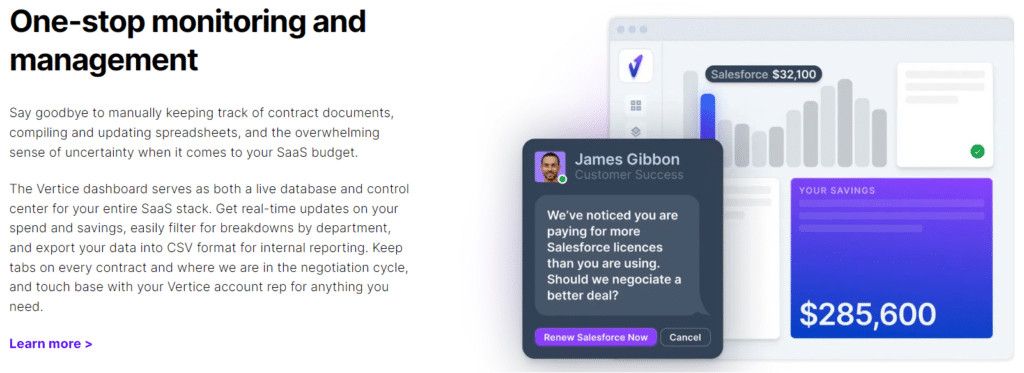
Vertice’s software subscription management dashboard

In addition, the integration report function in FP&A software allows users to download a comprehensive list with all of the softwares that your company uses along with details such as number of users, payments, and package options. Having them all in one report will help the finance team make better decisions about the value of each one.

Part 1d) Using One Company’s Complete Product Packages

Companies like employing “the best of breed” technique when it comes to software selection. This means  picking and choosing the best products in each category. While Slack might be the organization’s communication software of choice, Zoom the video meeting solution, and Workday the best HR solution, a company can save a lot of money by sticking with the same parent company for all of their software services.

For example, Microsoft has Office, Teams, and HR Dynamics, while Google has Meet and Chat. If your organization already has Microsoft Suite or Google Workspace (G Suite), then the organization can get Microsoft Teams or Google Meet and Chat for free as part of the package. Using the full list of services from one company can cut down tremendously on costs and keep everything in one system- even if they aren’t all the employees’ solutions of choice.

Part 1e) Control spending!

Today, many department managers can spend without an official approval process, meaning misunderstandings and inefficient spending occurs frequently. Software such as Tipalti and PayEm have spend management and approval flow functions, making the process smoother and more controlled. In addition, they integrate with many FP&A software solutions which helps create up to date planning and forecasting scenarios to better understand the long term implications of additional spending actions.
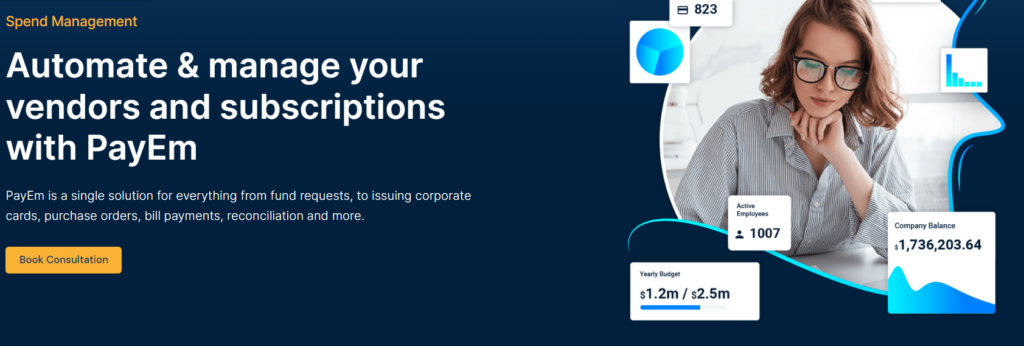
PayEm’s all-in-one vendor and subscription management

Part 2: Being Proactive What Can you do to Scenario Plan?

One department that works extra hard during market downturns is the finance department. Everything that happens both inside the company and in the general market influences the organization one way or another. This is especially true when companies are trying to cut down on costs, as there are always repercussions involved.

Expert tip: In the current market volatility, it isn’t a good idea to sign on yearly or multi year deals for a financial planning software. Customer sentiment and markets change overnight, and organizations’ needs and budgets change just as quickly. While many companies do annual subscriptions, it is best to switch the focus on ones that provide flexible and monthly contracts.

Part 2a) Planning with FP&A Software 

Cancelling subscriptions and reducing headcount is not the only way to prepare for the incoming recession. There are also proactive ways to prepare for all possible scenarios and increase company efficiency. Companies that implement FP&A software solutions will be able to conduct scenario planning and make the best decisions possible for the organization. With all of the extra work needed to analyze and plan during uncertainty, organizations need more financial automation in order to fill the gap. Software solutions such as Datarails and Anaplan, are significantly cheaper than bringing on another finance expert to give that boost, and they will also provide far more value in the long run through forecasting and scenario planning. 

Expert Tip: The biggest example of “automation being cheaper than employees” is Microsoft. Since the 2008 Great Recession, their revenue has nearly tripled but they have kept their finance department’s headcount flat, simply by investing in financial technologies and automation. This has made their finance department far more professional and accurate, all while saving a huge amount of money on salaries.

Part 2b) Increased Collaboration with the Finance Team 

In order to be prepared for future possibilities and their implications on the market, CFOs need to analyze all different kinds of scenarios and how they will affect the company’s revenue. Finance teams often find themselves with a significantly larger workload during volatile times, and that’s in addition to the regular day to day budgeting and month end close that is already a full time job.

In times like these, other department leaders need to step up and contribute by helping the finance team identify and understand where the weak points are and how to improve them. All of the increased contributions from other employees and analysis of the potential outcomes and scenarios will be far easier to conduct with an FP&A software solution.

Expert Tip: Be proactive and fast! While most FP&A software tools take a long time to implement (multiple months for full implementation), Datarails has a much shorter implementation time of 2 weeks. This is because it is one of the only Excel based financial planning softwares on the market, meaning that anyone who knows Excel can contribute and understand the system in minimal time.

Conclusion

Many organizations jump to cash saving conclusions in times like these, but there needs to be a strategy involved as well. There are many ways to save money on subscription costs and other monthly expenses that contribute greatly to cash burn. In addition, using FP&A tools will help companies understand the long term implications and forecasts that each action will cause.

CFO checklist for immediate action:

  • Reduce headcount when needed but only after a thorough understanding of all of the implications involved.
  • Cut down on subscription costs. This can be canceling unused licenses, renegotiating contacts, or using one company’s solutions for all your needs.
  • Proactive scenario planning. Using FP&A software solutions will help the company gain better insights into each action’s implications and how it will negatively or positively affect the company.

Related Articles

Become a Partner

Drive Business Performance With Datarails

Drive Business Performance With Datarails

Drive Business Performance With Datarails

Drive Business Performance With Datarails

Drive Business Performance With Datarails

Drive Business Performance With Datarails